
Ubiquiti, a major vendor of cloud-enabled Internet of Things (IoT) devices such as routers, network video recorders, security cameras and access control systems, is urging customers to change their passwords and enable multi-factor authentication. The company says an incident at a third-party cloud provider may have exposed customer account information and credentials used to remotely manage Ubiquiti gear.
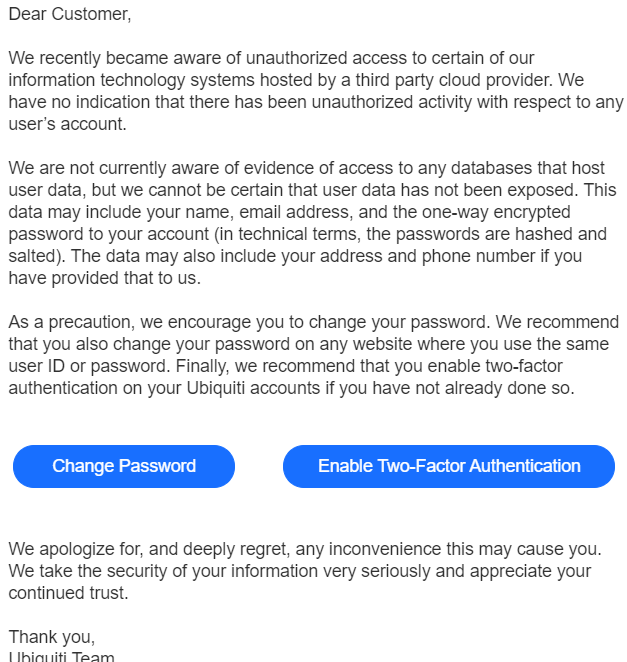
In an email sent to customers today, Ubiquiti Inc. [NYSE: UI] said it recently became aware of “unauthorized access to certain of our information technology systems hosted by a third party cloud provider,” although it declined to name that provider.
The statement continues:
“We are not currently aware of evidence of access to any databases that host user data, but we cannot be certain that user data has not been exposed. This data may include your name, email address, and the one-way encrypted password to your account (in technical terms, the passwords are hashed and salted). The data may also include your address and phone number if you have provided that to us.”
Ubiquiti has not yet responded to requests for more information, but the notice was confirmed as official in a post on the company’s user support forum.
The warning from Ubiquiti carries particular significance because the company has made it fairly difficult for customers using the latest Ubiquiti firmware to interact with their devices without first authenticating through the company’s cloud-based systems.
This has become a sticking point for many Ubiquiti customers, as evidenced by numerous threads on the topic in the company’s user support forums over the past few months.
“While I and others do appreciate the convenience and option of using hosted accounts, this incident clearly highlights the problem with relying on your infrastructure for authenticating access to our devices,” wrote one Ubiquiti customer today whose sentiment was immediately echoed by other users. “A lot us cannot take your process for granted and need to keep our devices offline during setup and make direct connections by IP/Hostname using our Mobile Apps.”
To manage your security settings on a Ubiquiti device, visit https://account.ui.com and log in. Click on ‘Security’ from the left-hand menu.
1. Change your password
2. Set a session timeout value
3. Enable 2FA
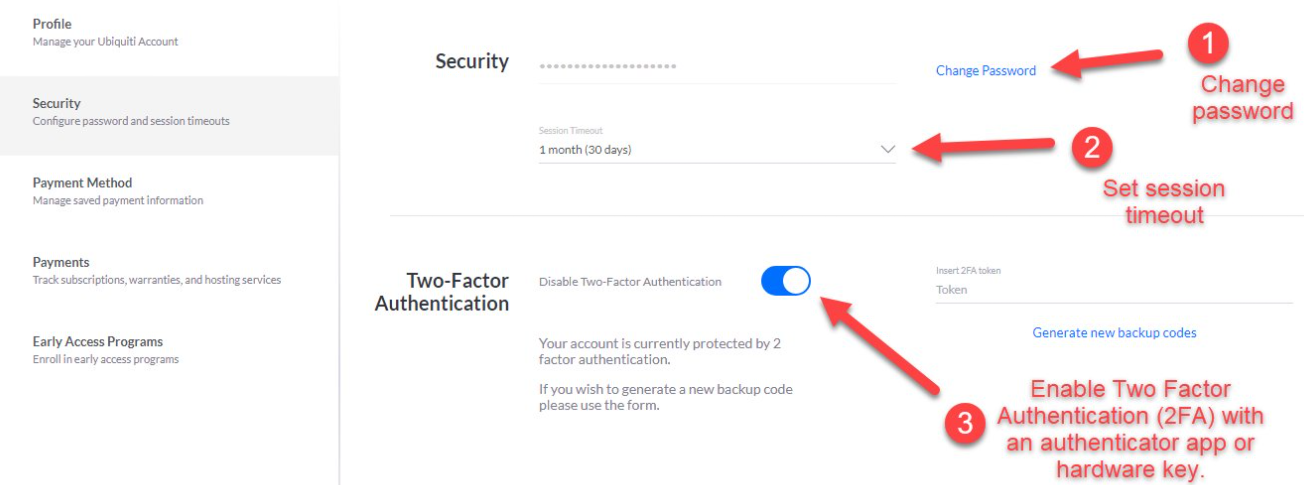
Image: twitter.com/crosstalksol/
According to Ubiquiti’s investment literature, the company has shipped more than 85 million devices that play a key role in networking infrastructure in over 200 countries and territories worldwide.
This is a developing story that may be updated throughout the day.
from Krebs on Security https://ift.tt/2LoNs6X
via IFTTT

 Pacosite's Blog