
Norton 360, one of the most popular antivirus products on the market today, has installed a cryptocurrency mining program on its customers’ computers. Norton’s parent firm says the cloud-based service that activates the program and allows customers to profit from the scheme — in which the company keeps 15 percent of any currencies mined — is “opt-in,” meaning users have to agree to enable it. But many Norton users complain the mining program is difficult to remove, and reactions from longtime customers have ranged from unease and disbelief to, “Dude, where’s my crypto?”
Norton 360 is owned by Tempe, Ariz.-based NortonLifeLock Inc. In 2017, the identity theft protection company LifeLock was acquired by Symantec Corp., which was renamed to NortonLifeLock in 2019 (LifeLock is now included in the Norton 360 service).
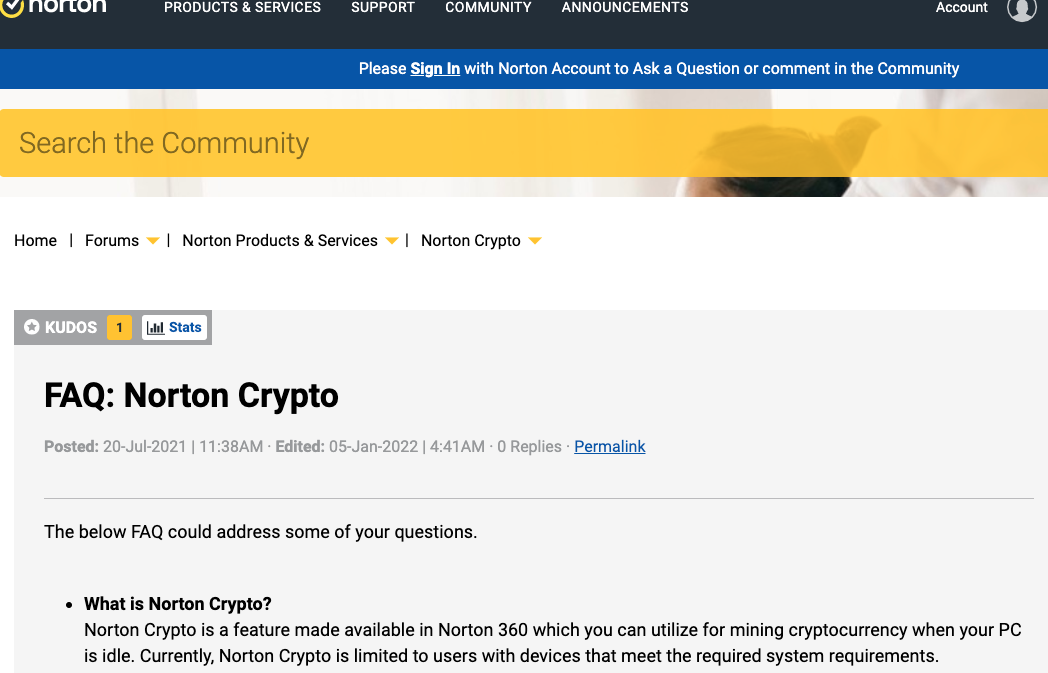
According to the FAQ posted on its site, “Norton Crypto” will mine Ethereum (ETH) cryptocurrency while the customer’s computer is idle. The FAQ also says Norton Crypto will only run on systems that meet certain hardware and software requirements (such as an NVIDIA graphics card with at least 6 GB of memory).
“Norton creates a secure digital Ethereum wallet for each user,” the FAQ reads. “The key to the wallet is encrypted and stored securely in the cloud. Only you have access to the wallet.”
NortonLifeLock began offering the mining service in July 2021, but the program gained broader attention on Jan. 4 when Boing Boing co-editor Cory Doctorow tweeted that NortonCrypto would run by default for Norton 360 users.
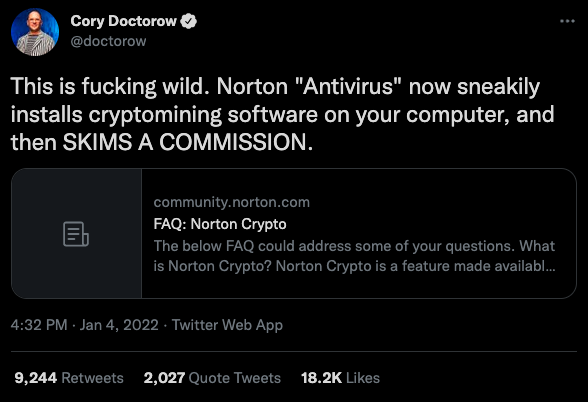
NortonLifeLock says Norton Crypto is an opt-in feature only and is not enabled without user permission.
“If users have turned on Norton Crypto but no longer wish to use the feature, it can be disabled by temporarily shutting off ‘tamper protection’ (which allows users to modify the Norton installation) and deleting NCrypt.exe from your computer,” NortonLifeLock said in a written statement. However, many users have reported difficulty removing the mining program.
From reading user posts on the Norton Crypto community forum, it seems some longtime Norton customers were horrified at the prospect of their antivirus product installing coin-mining software, regardless of whether the mining service was turned off by default.
“How on Earth could anyone at Norton think that adding crypto mining within a security product would be a good thing?,” reads a Dec. 28 thread titled “Absolutely furious.”
“Norton should be DETECTING and killing off crypto mining hijacking, not installing their own,” the post reads. “The product people need firing. What’s the next ‘bright idea’? Norton Botnet? ‘ And I was just about to re-install Norton 360 too, but this has literally has caused me to no longer trust Norton and their direction.”
It’s an open question whether Norton Crypto users can expect to see much profit from participating in this scheme, at least in the short run. Mining cryptocurrencies basically involves using your computer’s spare resources to help validate financial transactions of other crypto users. Crypto mining causes one’s computer to draw more power, which can increase one’s overall electricity costs.
“Norton is pretty much amplifying energy consumption worldwide, costing their customers more in electricity use than the customer makes on the mining, yet allowing Norton to make a ton of profit,” tweeted security researcher Chris Vickery. “It’s disgusting, gross, and brand-suicide.”
Then there’s the matter of getting paid. Norton Crypto lets users withdraw their earnings to an account at cryptocurrency platform CoinBase, but as Norton Crypto’s FAQ rightly points out, there are coin mining fees as well as transaction costs to transfer Ethereum.
“The coin mining fee is currently 15% of the crypto allocated to the miner,” the FAQ explains. “Transfers of cryptocurrencies may result in transaction fees (also known as “gas” fees) paid to the users of the cryptocurrency blockchain network who process the transaction. In addition, if you choose to exchange crypto for another currency, you may be required to pay fees to an exchange facilitating the transaction. Transaction fees fluctuate due to cryptocurrency market conditions and other factors. These fees are not set by Norton.”
Which might explain why so many Norton Crypto users have taken to the community’s online forum to complain they were having trouble withdrawing their earnings. Those gas fees are the same regardless of the amount of crypto being moved, so the system simply blocks withdrawals if the amount requested can’t cover the transfer fees.
I guess what bothers me most about Norton Crypto is that it will be introducing millions of perhaps less savvy Internet users to the world of cryptocurrency, which comes with its own set of unique security and privacy challenges that require users to “level up” their personal security practices in fairly significant ways.
Several of my elder family members and closest friends are longtime Norton users who renew their subscription year after year (despite my reminding them that it’s way cheaper just to purchase it again each year as a new user). None of them are particularly interested in or experts at securing their computers and digital lives, and the thought of them opening CoinBase accounts and navigating that space is terrifying.
Big Yellow is not the only brand that’s cashing in on investor fervor over cryptocurrencies and hoping to appeal to a broader (or maybe just older) audience: The venerable electronics retailer RadioShack, which relaunched in 2020 as an online-focused brand, now says it plans to chart a future as a cryptocurrency exchange.
“RadioShack’s argument is basically that as a very old brand, it’s primed to sell old CEOs on cryptocurrency,” writes Adi Robertson for The Verge.
“Too many [cryptocurrency companies] focused on speculation and not enough on making the ‘old-school’ customer feel comfortable,” the company’s website states, claiming that the average “decision-making” corporate CEO is 68 years old. “The older generation simply doesn’t trust the new-fangled ideas of the Bitcoin youth.”
from Krebs on Security https://ift.tt/34tgdJ2
via IFTTT




 Pacosite's Blog