
from Dark Reading: https://ift.tt/2Ls9MeB
via IFTTT
Daily Archives: August 21, 2019
Forced Password Reset? Check Your Assumptions
Almost weekly now I hear from an indignant reader who suspects a data breach at a Web site they frequent that has just asked the reader to reset their password. Further investigation almost invariably reveals that the password reset demand was not the result of a breach but rather the site’s efforts to identify customers who are reusing passwords from other sites that have already been hacked.
But ironically, many companies taking these proactive steps soon discover that their explanation as to why they’re doing it can get misinterpreted as more evidence of lax security. This post attempts to unravel what’s going on here.
Over the weekend, a follower on Twitter included me in a tweet sent to California-based job search site Glassdoor, which had just sent him the following notice:
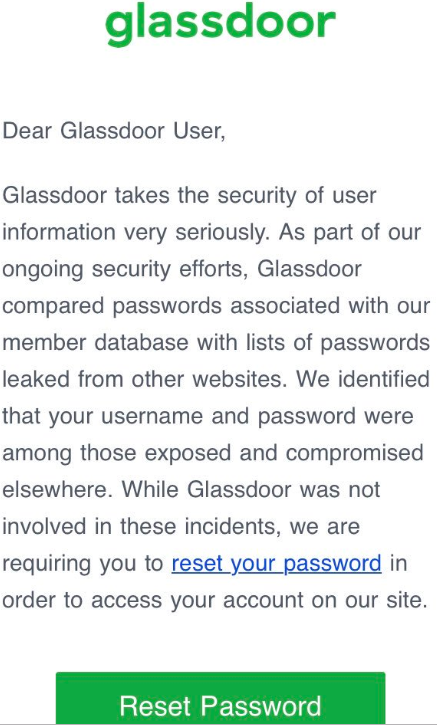
The Twitter follower expressed concern about this message, because it suggested to him that in order for Glassdoor to have done what it described, the company would have had to be storing its users’ passwords in plain text. I replied that this was in fact not an indication of storing passwords in plain text, and that many companies are now testing their users’ credentials against lists of hacked credentials that have been leaked and made available online.
The reality is Facebook, Netflix and a number of many big-name companies are regularly combing through huge data leak troves for credentials that match those of their customers, and then forcing a password reset for those users. Some are even checking for password re-use on all new account signups.
The idea here is to stymie a massively pervasive problem facing all companies that do business online today: Namely, “credential-stuffing attacks,” in which attackers take millions or even billions of email addresses and corresponding cracked passwords from compromised databases and see how many of them work at other online properties.
So how does the defense against this daily deluge of credential stuffing work? A company employing this strategy will first extract from these leaked credential lists any email addresses that correspond to their current user base.
From there, the corresponding cracked (plain text) passwords are fed into the same process that the company relies upon when users log in: That is, the company feeds those plain text passwords through its own password “hashing” or scrambling routine.
Password hashing is designed to be a one-way function which scrambles a plain text password so that it produces a long string of numbers and letters. Not all hashing methods are created equal, and some of the most commonly used methods — MD5 and SHA-1, for example — can be far less secure than others, depending on how they’re implemented (more on that in a moment). Whatever the hashing method used, it’s the hashed output that gets stored, not the password itself.
Back to the process: If a user’s plain text password from a hacked database matches the output of what a company would expect to see after running it through their own internal hashing process, then that user is then prompted to change their password to something truly unique.
Now, password hashing methods can be made more secure by amending the password with what’s known as a “salt” — or random data added to the input of a hash function to guarantee a unique output. And many readers of the Twitter thread on Glassdoor’s approach reasoned that the company couldn’t have been doing what it described without also forgoing this additional layer of security.
My tweeted explanatory reply as to why Glassdoor was doing this was (in hindsight) incomplete and in any case not as clear as it should have been. Fortunately, Glassdoor’s chief information officer Anthony Moisant chimed in to the Twitter thread to explain that the salt is in fact added as part of the password testing procedure.
“In our [user] database, we’ve got three columns — username, salt value and scrypt hash,” Moisant explained in an interview with KrebsOnSecurity. “We apply the salt that’s stored in the database and the hash [function] to the plain text password, and that resulting value is then checked against the hash in the database we store. For whatever reason, some people have gotten it into their heads that there’s no possible way to do these checks if you salt, but that’s not true.”
CHECK YOUR ASSUMPTIONS
You — the user — can’t be expected to know or control what password hashing methods a given site uses, if indeed they use them at all. But you can control the quality of the passwords you pick.
I can’t stress this enough: Do not re-use passwords. And don’t recycle them either. Recycling involves rather lame attempts to make a reused password unique by simply adding a digit or changing the capitalization of certain characters. Crooks who specialize in password attacks are wise to this approach as well.
If you have trouble remembering complex passwords (and this describes most people), consider relying instead on password length, which is a far more important determiner of whether a given password can be cracked by available tools in any timeframe that might be reasonably useful to an attacker.
In that vein, it’s safer and wiser to focus on picking passphrases instead of passwords. Passphrases are collections of multiple (ideally unrelated) words mushed together. Passphrases are not only generally more secure, they also have the added benefit of being easier to remember.
According to a recent blog entry by Microsoft group program manager Alex Weinert, none of the above advice about password complexity amounts to a hill of beans from the attacker’s standpoint.
Weinert’s post makes a compelling argument that as long as we’re stuck with passwords, taking full advantage of the most robust form of multi-factor authentication (MFA) offered by a site you frequent is the best way to deter attackers. Twofactorauth.org has a handy list of your options here, broken down by industry.
“Your password doesn’t matter, but MFA does,” Weinert wrote. “Based on our studies, your account is more than 99.9% less likely to be compromised if you use MFA.”
Glassdoor’s Moisant said the company doesn’t currently offer MFA for its users, but that is planning to roll that out later this year to both consumer and business users.
Password managers also can be useful for those who feel encumbered by having to come up with passphrases or complex passwords. If you’re uncomfortable with entrusting a third-party service or application to handle this process for you, there’s absolutely nothing wrong with writing down your passwords, provided a) you do not store them in a file on your computer or taped to your laptop or screen or whatever, and b) that your password notebook is stored somewhere relatively secure, i.e. not in your purse or car, but something like a locked drawer or safe.
Although many readers will no doubt take me to task on that last bit of advice, as in all things security related it’s important not to let the perfect become the enemy of the good. Many people (think moms/dads/grandparents) can’t be bothered to use password managers — even when you go through the trouble of setting them up on their behalf. Instead, without an easier, non-technical method they will simply revert back to reusing or recycling passwords.
from Krebs on Security https://ift.tt/2zfNk05
via IFTTT
Samsung Galaxy Note10+ Review: It’s Too Much Phone, But We Love It
Overkill has never been so beautiful.
from Gear Latest https://ift.tt/2NngwKE
via IFTTT
¡Por fin! Xiaomi confirma en un vídeo que el Redmi Note 8 sí que tendrá NFC
Redmi presentará la nueva edición de su familia Note, el Redmi Note 8, a finales de este mismo mes, y la expectación no hace más que crecer. Hace unos días pudimos ver sus primeras imágenes reales y confirmamos algunos de los detalles de su diseño. Ahora hemos sabido que, por fin, el nuevo dispositivo chino incorporará una esperada característica. Gracias a un vídeo publicado en Weibo ha quedado claro que
Entra en Andro4all para leer el artículo completo
Puedes unirte a nosotros en Twitter, Facebook o en Google+
¡Suscríbete a nuestro canal de YouTube!
Publicado recientemente en Andro4all
- ¡Por fin! Xiaomi confirma en un vídeo que el Redmi Note 8 sí que tendrá NFC
- Este es el Nokia 7.2: ZEISS confirma el diseño del nuevo smartphone con triple cámara
- Estos 5 móviles tienen todo lo que necesitas y solo cuestan 200 euros
- EMUI 9.1 llegará de forma estable a estos 8 dispositivos de Huawei de 2017
- Xiaomi publica sus resultados del segundo trimestre de 2019: estas son las astronómicas cifras que manejan
- Google anuncia que integrará nuevas funciones gramaticales y ortográficas a Gmail para corregir textos
- Así será el OPPO Reno 2, un móvil que tendrá zoom de hasta 20x
- La mitad de los mexicanos tienen un Samsung o un Motorola, solo 1 de cada 10 apuesta por el iPhone
from Andro4all https://ift.tt/2KUuxgc
via IFTTT
Vivaldi 2.7 mejorará tu productividad mientras gana fiabilidad y estabilidad
 El navegador Chrome de Google se ha convertido en el rival a batir desde su lanzamiento en 2008. Son pocos los que se atreven a luchar contra él, entre los que tenemos Firefox en todo tipo de ordenadores, Safari en macOS y Edge en Windows, pero la mayoría hacen aquello de “si no puedes con tu enemigo, únete a él” y lanzan sus propuestas basadas en Chromium. Así lo hace Vivaldi Technologies, cuyo Vivaldi 2.7 ha sido lanzado hoy mismo.
Esta versión, que ha estado en desarrollo durante los últimos dos meses, llega con muchas mejoras que harán que seamos más productivos. Por otra parte, no han querido dejar pasar la ocasión y Vivaldi 2.7 está ahora basado en Chromium 76.0.3809.110, la versión más actualizada de la versión de código abierto de Chrome en la que también se basa el navegador 100% de Google.
(adsbygoogle = window.adsbygoogle || []).push({});
Novedades incluidas en Vivaldi 2.7
- Nueva opción accesible con el clic derecho que nos permite silenciar una página web.
- Posibilidad de acceder a nuestros perfiles de usuario más rápido al crear accesos directos en el escritorio para un perfil de usuario en concreto (Windows).
- Nueva opción en los ajustes para activar o desactivar el Flash Player de manera más sencilla.
- La barra de estado ahora informa a los usuarios sobre el estado actual de una página web en la parte inferior de la ventana.
- Mejorada la estabilidad para asegurar que no haya cierres inesperados en macOS.
Vivaldi 2.7 ya está disponible para Windows, macOS y Linux desde este enlace. Para Linux está disponible para Debian/Ubuntu y Fedora/Suse en forma de paquete DEB y RPM respectivamente. Una vez instalado y como hace Chrome, se añade el repositorio de Vivaldi, por lo que actualizarlo es tan sencillo como abrir el actualizador de software de nuestra distribución y aplicar las actualizaciones. ¿Te convencen las novedades de Vivaldi 2.7 unidas a las funciones que ya tenía o seguirás con Chrome, Firefox o tu otro navegador favorito?
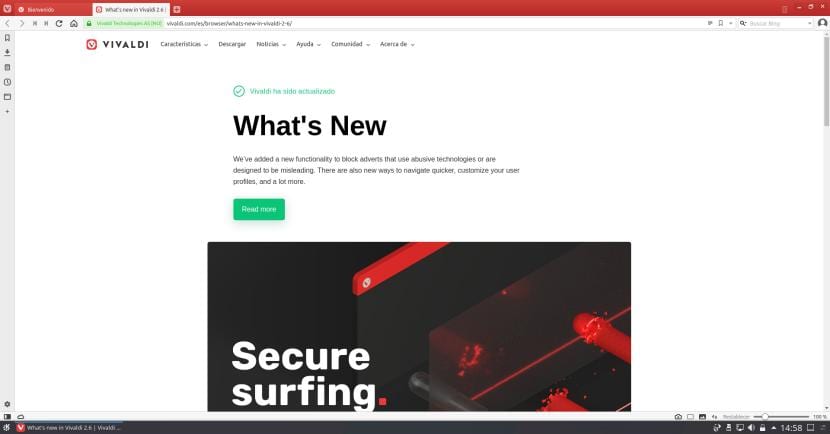
Artículo relacionado:
Vivaldi 2.6 llega para bloquear publicidad intrusiva y mejorar el rendimiento
from Linux Adictos https://ift.tt/2zdWSIQ
via IFTTT
Ransomware disrupts 22 Texas government departments
On August 16, Texas local government became the latest victim of the expanding global racket that is ransomware.
from Naked Security https://ift.tt/2KWABF0
via IFTTT
Was a Man Wrongly Identified After Police Digitally Altered His Mugshot?

Was a Man Wrongly Identified After Police Digitally Altered His Mugshot?
ACLU says the case “raises big questions” after Oregon authorities removed facial tattoos before showing image to witnesses.
August 21, 2019 at 06:21AM
via Digg https://ift.tt/31SnKdF
Hi, Alexa. How Do I Stop You From Listening In On Me? by BRIAN X. CHEN

By BRIAN X. CHEN
Humans help train artificial intelligence, so someone may be listening to what you tell Siri, Google Assistant or Alexa. Here’s what to do if you have a problem with that.
Published: August 20, 2019 at 07:00PM
from NYT Technology https://ift.tt/2ZgB12i
via IFTTT
Google’s Nest webcam needs patching after flaws found
The list of vulnerabilities recently discovered by researchers relate to one model, the Nest Cam IQ Indoor camera.
from Naked Security https://ift.tt/2HeNMjl
via IFTTT
Este es el Nokia 7.2: ZEISS confirma el diseño del nuevo smartphone con triple cámara
Nokia ya ha confirmado que estará presente en el IFA de Berlín celebrado a primeros de septiembre, probablemente para presentar una nueva generación de smartphones Android con la que dar continuidad a su ya extenso catálogo de terminales. Desde hace tiempo se rumorea que uno de los smartphones de la nueva colección será el Nokia 7.2, una nueva edición de la serie 7, cuya última entrega pudimos analizar a fondo
Entra en Andro4all para leer el artículo completo
Puedes unirte a nosotros en Twitter, Facebook o en Google+
¡Suscríbete a nuestro canal de YouTube!
Publicado recientemente en Andro4all
- Este es el Nokia 7.2: ZEISS confirma el diseño del nuevo smartphone con triple cámara
- Estos 5 móviles tienen todo lo que necesitas y solo cuestan 200 euros
- EMUI 9.1 llegará de forma estable a estos 8 dispositivos de Huawei de 2017
- Xiaomi publica sus resultados del segundo trimestre de 2019: estas son las astronómicas cifras que manejan
- Google anuncia que integrará nuevas funciones gramaticales y ortográficas a Gmail para corregir textos
- Así será el OPPO Reno 2, un móvil que tendrá zoom de hasta 20x
- La mitad de los mexicanos tienen un Samsung o un Motorola, solo 1 de cada 10 apuesta por el iPhone
- Google combatirá las aplicaciones con sorpresa, tardará tres días en aprobar nuevas apps para la Play Store
from Andro4all https://ift.tt/2NorrDR
via IFTTT
 Pacosite's Blog