
A message posted on Monday to the homepage of the U.S. Cybersecurity & Infrastructure Security Agency (CISA) is the latest exhibit in the Trump administration’s continued disregard for basic cybersecurity protections. The message instructed recently-fired CISA employees to get in touch so they can be rehired and then immediately placed on leave, asking employees to send their Social Security number or date of birth in a password-protected email attachment — presumably with the password needed to view the file included in the body of the email.
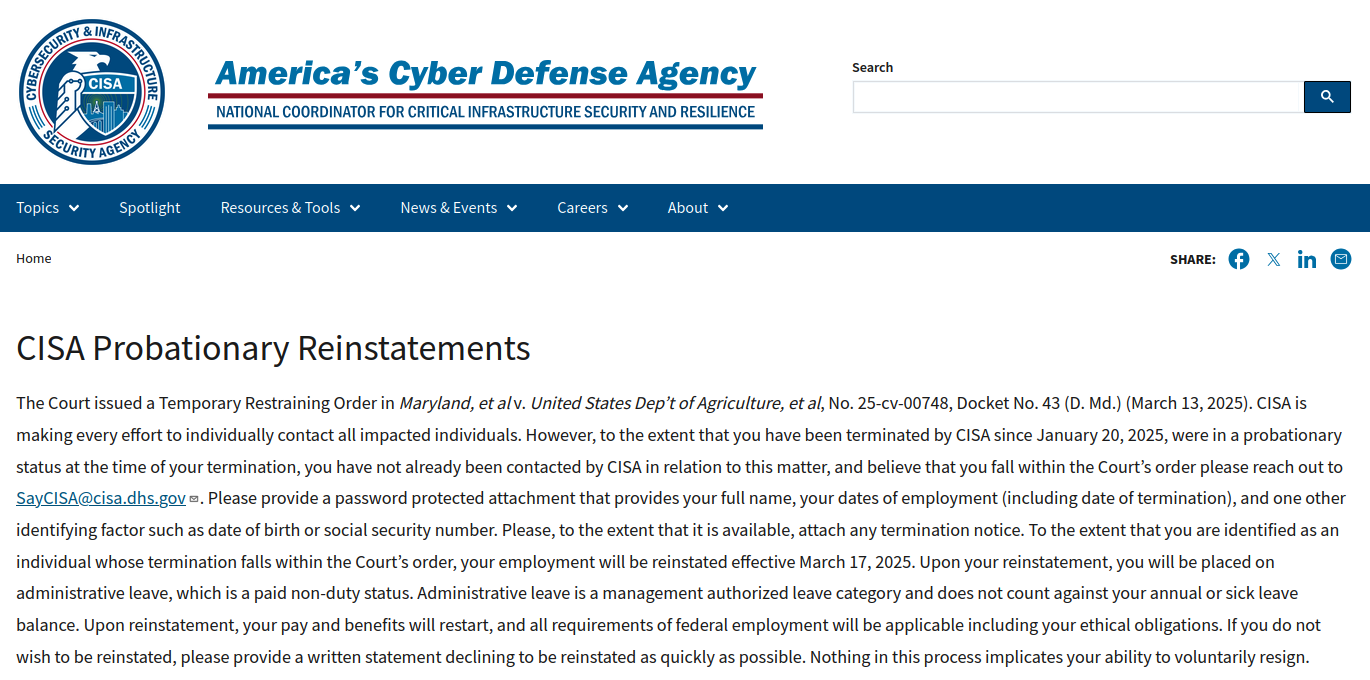
The homepage of cisa.gov as it appeared on Monday and Tuesday afternoon.
On March 13, a Maryland district court judge ordered the Trump administration to reinstate more than 130 probationary CISA employees who were fired last month. On Monday, the administration announced that those dismissed employees would be reinstated but placed on paid administrative leave.
A notice covering the CISA homepage said the administration is making every effort to contact those who were unlawfully fired in mid-February.
“Please provide a password protected attachment that provides your full name, your dates of employment (including date of termination), and one other identifying factor such as date of birth or social security number,” the message reads. “Please, to the extent that it is available, attach any termination notice.”
The message didn’t specify how affected CISA employees should share the password for any attached files, so the implicit expectation is that employees should just include the plaintext password in their message.
Email is about as secure as a postcard sent through the mail, because anyone who manages to intercept the missive anywhere along its path of delivery can likely read it. In security terms, that’s the equivalent of encrypting sensitive data while also attaching the secret key needed to view the information.
What’s more, a great many antivirus and security scanners have trouble inspecting password-protected files, meaning the administration’s instructions are likely to increase the risk that malware submitted by cybercriminals could be accepted and opened by U.S. government employees.
The message in the screenshot above was removed from the CISA homepage Tuesday evening and replaced with a much shorter notice directing former CISA employees to contact a specific email address. But a slightly different version of the same message originally posted to CISA’s website still exists at the website for the U.S. Citizenship and Immigration Services, which likewise instructs those fired employees who wish to be rehired and put on leave to send a password-protected email attachment with sensitive personal data.
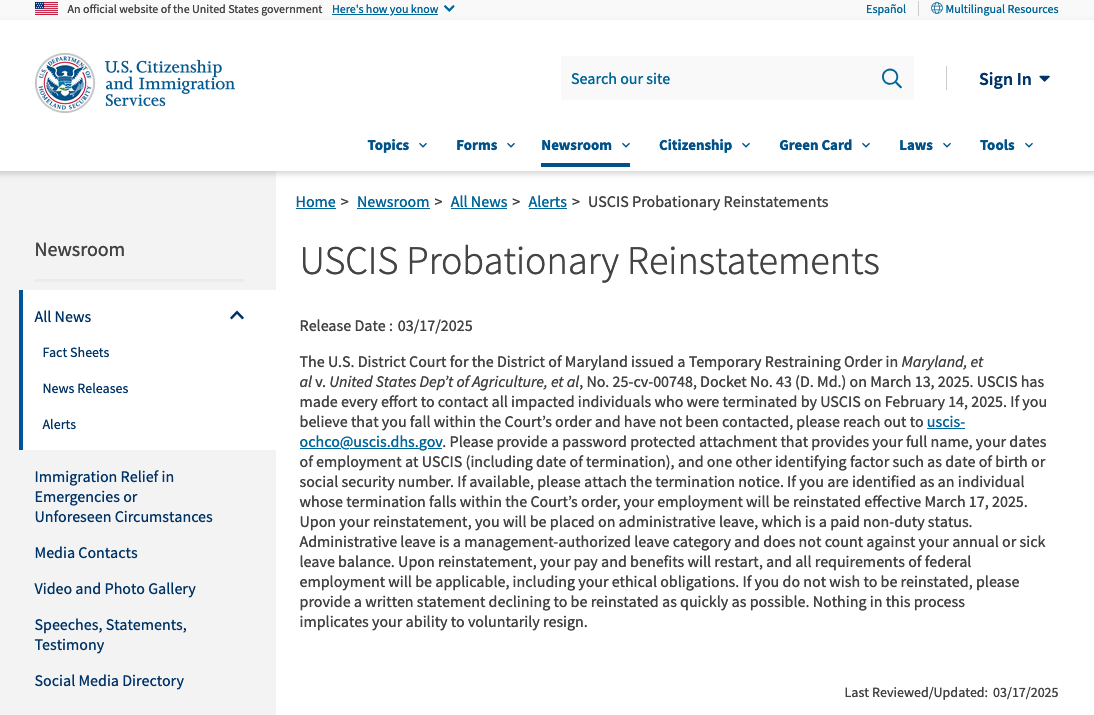
A message from the White House to fired federal employees at the U.S. Citizenship and Immigration Services instructs recipients to email personal information in a password-protected attachment.
This is hardly the first example of the administration discarding Security 101 practices in the name of expediency. Last month, the Central Intelligence Agency (CIA) sent an unencrypted email to the White House with the first names and first letter of the last names of recently hired CIA officers who might be easy to fire.
As cybersecurity journalist Shane Harris noted in The Atlantic, even those fragments of information could be useful to foreign spies.
“Over the weekend, a former senior CIA official showed me the steps by which a foreign adversary who knew only his first name and last initial could have managed to identify him from the single line of the congressional record where his full name was published more than 20 years ago, when he became a member of the Foreign Service,” Harris wrote. “The former official was undercover at the time as a State Department employee. If a foreign government had known even part of his name from a list of confirmed CIA officers, his cover would have been blown.”
The White House has also fired at least 100 intelligence staffers from the National Security Agency (NSA), reportedly for using an internal NSA chat tool to discuss their personal lives and politics. Testifying before the House Select Committee on the Communist Party earlier this month, the NSA’s former top cybersecurity official said the Trump administration’s attempts to mass fire probationary federal employees will be “devastating” to U.S. cybersecurity operations.”
Rob Joyce, who spent 34 years at the NSA, told Congress how important those employees are in sustaining an aggressive stance against China in cyberspace.
“At my former agency, remarkable technical talent was recruited into developmental programs that provided intensive unique training and hands-on experience to cultivate vital skills,” Joyce told the panel. “Eliminating probationary employees will destroy a pipeline of top talent responsible for hunting and eradicating [Chinese] threats.”
Both the email to fired CISA workers and DOGE’s ongoing efforts to bypass vetted government networks for a faster Wi-Fi signal are emblematic of this administration’s overall approach to even basic security measures: To go around them, or just pretend they don’t exist for a good reason.
On Monday, The New York Times reported that U.S. Secret Service agents at the White House were briefly on alert last month when a trusted captain of Elon Musk’s “Department of Government Efficiency” (DOGE) visited the roof of the Eisenhower building inside the White House compound — to see about setting up a dish to receive satellite Internet access directly from Musk’s Starlink service.
The White House press secretary told The Times that Starlink had “donated” the service and that the gift had been vetted by the lawyer overseeing ethics issues in the White House Counsel’s Office. The White House claims the service is necessary because its wireless network is too slow.
Jake Williams, vice president for research and development at the cybersecurity consulting firm Hunter Strategy, told The Times “it’s super rare” to install Starlink or another internet provider as a replacement for existing government infrastructure that has been vetted and secured.
“I can’t think of a time that I have heard of that,” Williams said. “It introduces another attack point,” Williams said. “But why introduce that risk?”
Meanwhile, NBC News reported on March 7 that Starlink is expanding its footprint across the federal government.
“Multiple federal agencies are exploring the idea of adopting SpaceX’s Starlink for internet access — and at least one agency, the General Services Administration (GSA), has done so at the request of Musk’s staff, according to someone who worked at the GSA last month and is familiar with its network operations — despite a vow by Musk and Trump to slash the overall federal budget,” NBC wrote.
The longtime Musk employee who encountered the Secret Service on the roof in the White House complex was Christopher Stanley, the 33-year-old senior director for security engineering at X and principal security engineer at SpaceX.
On Monday, Bloomberg broke the news that Stanley had been tapped for a seat on the board of directors at the mortgage giant Fannie Mae. Stanley was added to the board alongside newly confirmed Federal Housing Finance Agency director Bill Pulte, the grandson of the late housing businessman and founder of PulteGroup — William J. Pulte.
In a nod to his new board role atop an agency that helps drive the nation’s $12 trillion mortgage market, Stanley retweeted a Bloomberg story about the hire with a smiley emoji and the comment “Tech Support.”
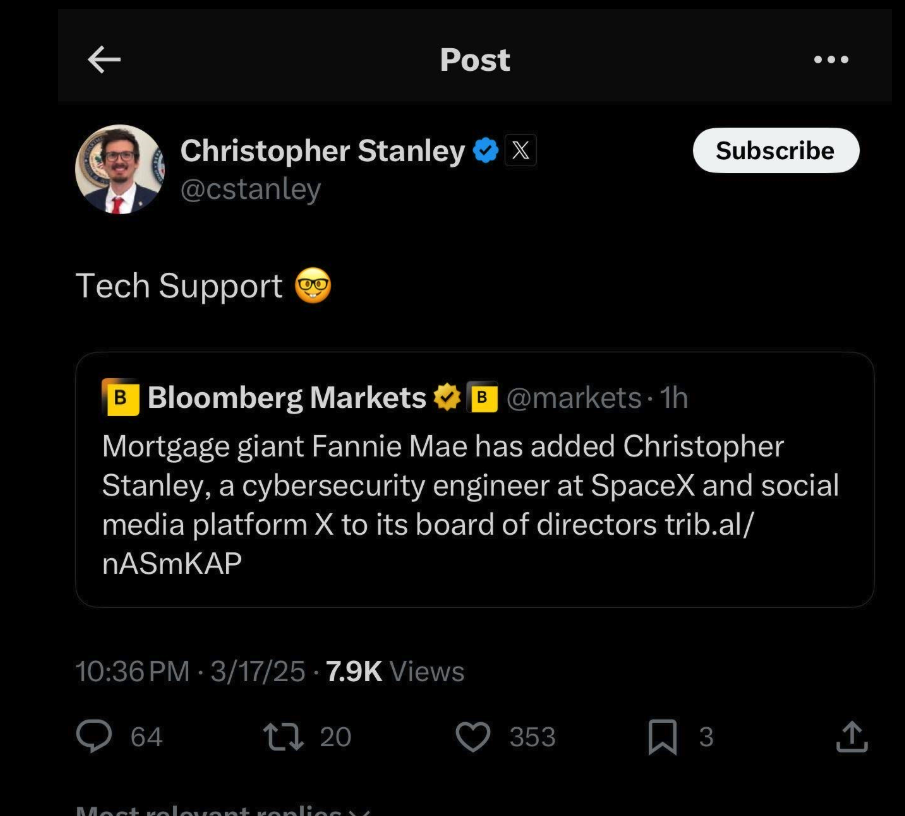
But earlier today, Bloomberg reported that Stanley had abruptly resigned from the Fannie board, and that details about the reason for his quick departure weren’t immediately clear. As first reported here last month, Stanley had a brush with celebrity on Twitter in 2015 when he leaked the user database for the DDoS-for-hire service LizardStresser, and soon faced threats of physical violence against his family.
My 2015 story on that leak did not name Stanley, but he exposed himself as the source by posting a video about it on his Youtube channel. A review of domain names registered by Stanley shows he went by the nickname “enKrypt,” and was the former owner of a pirated software and hacking forum called error33[.]net, as well as theC0re, a video game cheating community.
Stanley is one of more than 50 DOGE workers, mostly young men and women who have worked with one or more of Musk’s companies. The Trump administration remains dogged by questions about how many — if any — of the DOGE workers were put through the gauntlet of a thorough security background investigation before being given access to such sensitive government databases.
That’s largely because in one of his first executive actions after being sworn in for a second term on Jan. 20, President Trump declared that the security clearance process was simply too onerous and time-consuming, and that anyone so designated by the White House counsel would have full top secret/sensitive compartmented information (TS/SCI) clearances for up to six months. Translation: We accepted the risk, so TAH-DAH! No risk!
Presumably, this is the same counsel who saw no ethical concerns with Musk “donating” Starlink to the White House, or with President Trump summoning the media to film him hawking Cybertrucks and Teslas (a.k.a. “Teslers”) on the White House lawn last week.
Mr. Musk’s unelected role as head of an ad hoc executive entity that is gleefully firing federal workers and feeding federal agencies into “the wood chipper” has seen his Tesla stock price plunge in recent weeks, while firebombings and other vandalism attacks on property carrying the Tesla logo are cropping up across the U.S. and overseas and driving down Tesla sales.
President Trump and his attorney general Pam Bondi have dubiously asserted that those responsible for attacks on Tesla dealerships are committing “domestic terrorism,” and that vandals will be prosecuted accordingly. But it’s not clear this administration would recognize a real domestic security threat if it was ensconced squarely behind the Resolute Desk.
Or at the pinnacle of the Federal Bureau of Investigation (FBI). The Washington Post reported last month that Trump’s new FBI director Kash Patel was paid $25,000 last year by a film company owned by a dual U.S. Russian citizen that has made programs promoting “deep state” conspiracy theories pushed by the Kremlin.
“The resulting six-part documentary appeared on Tucker Carlson’s online network, itself a reliable conduit for Kremlin propaganda,” The Post reported. “In the film, Patel made his now infamous pledge to shut down the FBI’s headquarters in Washington and ‘open it up as a museum to the deep state.’”
When the head of the FBI is promising to turn his own agency headquarters into a mocking public exhibit on the U.S. National Mall, it may seem silly to fuss over the White House’s clumsy and insulting instructions to former employees they unlawfully fired.
Indeed, one consistent feedback I’ve heard from a subset of readers here is something to this effect: “I used to like reading your stuff more when you weren’t writing about politics all the time.”
My response to that is: “Yeah, me too.” It’s not that I’m suddenly interested in writing about political matters; it’s that various actions by this administration keep intruding on my areas of coverage.
A less charitable interpretation of that reader comment is that anyone still giving such feedback is either dangerously uninformed, being disingenuous, or just doesn’t want to keep being reminded that they’re on the side of the villains, despite all the evidence showing it.
Article II of the U.S. Constitution unambiguously states that the president shall take care that the laws be faithfully executed. But almost from Day One of his second term, Mr. Trump has been acting in violation of his sworn duty as president by choosing not to enforce laws passed by Congress (TikTok ban, anyone?), by freezing funds already allocated by Congress, and most recently by flouting a federal court order while simultaneously calling for the impeachment of the judge who issued it. Sworn to uphold, protect and defend The Constitution, President Trump appears to be creating new constitutional challenges with almost each passing day.
When Mr. Trump was voted out of office in November 2020, he turned to baseless claims of widespread “election fraud” to explain his loss — with deadly and long-lasting consequences. This time around, the rallying cry of DOGE and White House is “government fraud,” which gives the administration a certain amount of cover for its actions among a base of voters that has long sought to shrink the size and cost of government.
In reality, “government fraud” has become a term of derision and public scorn applied to anything or anyone the current administration doesn’t like. If DOGE and the White House were truly interested in trimming government waste, fraud and abuse, they could scarcely do better than consult the inspectors general fighting it at various federal agencies.
After all, the inspectors general likely know exactly where a great deal of the federal government’s fiscal skeletons are buried. Instead, Mr. Trump fired at least 17 inspectors general, leaving the government without critical oversight of agency activities. That action is unlikely to stem government fraud; if anything, it will only encourage such activity.
As Techdirt founder Mike Masnick noted in a recent column “Why Techdirt is Now a Democracy Blog (Whether We Like it or Not),” when the very institutions that made American innovation possible are being systematically dismantled, it’s not a “political” story anymore: It’s a story about whether the environment that enabled all the other stories we cover will continue to exist.
“This is why tech journalism’s perspective is so crucial right now,” Masnick wrote. “We’ve spent decades documenting how technology and entrepreneurship can either strengthen or undermine democratic institutions. We understand the dangers of concentrated power in the digital age. And we’ve watched in real-time as tech leaders who once championed innovation and openness now actively work to consolidate control and dismantle the very systems that enabled their success.”
“But right now, the story that matters most is how the dismantling of American institutions threatens everything else we cover,” Masnick continued. “When the fundamental structures that enable innovation, protect civil liberties, and foster open dialogue are under attack, every other tech policy story becomes secondary.”
from Krebs on Security https://ift.tt/4d8Slpc
via IFTTT


 Pacosite's Blog