HandBrake 1.9.2: Novedades y Mejoras en el Transcodificador de Vídeo

HandBrake 1.9.2

HandBrake es una herramienta de código abierto y gratuita que permite la conversión de archivos multimedia con una amplia variedad de opciones de codificación. Compatible con Windows, macOS y Linux, se ha convertido en una solución popular para quienes buscan convertir vídeos en distintos formatos sin perder calidad. Disponible desde hace unas horas, HandBrake 1.9.2 llega con varias mejoras importantes, enfocadas tanto en nuevas funcionalidades como en la estabilidad del programa.

Esta versión ha llegado menos de dos semanas después de la versión anterior, lo que, como poco, deja clara una cosa: sus desarrolladores están activos y bien activos. A continuación, exploramos los cambios más relevantes de esta actualización.

Principales novedades de HandBrake 1.9.2

Uno de los aspectos más destacables de esta versión es la compatibilidad mejorada con el códec AV1. Ahora, se permite la mezcla de vídeos codificados con NVENC AV1 y VCN AV1 dentro del contenedor WebM, lo que amplía las opciones para quienes trabajan con este nuevo estándar de compresión de vídeo.

Además, se han corregido diversos errores que afectaban la experiencia del usuario. Entre ellos, destaca la solución a un fallo que provocaba el cierre inesperado del programa cuando una fuente de vídeo contenía capítulos sin nombres, asegurando así una mayor estabilidad en el procesamiento de archivos.

Correcciones específicas para Windows

En la versión para Windows, se ha resuelto un problema que causaba que los nombres de las pistas de audio no se restablecieran al cambiar la fuente de vídeo, evitando así confusiones en el ajuste de pistas.

Formatos de entrada y salida compatibles

HandBrake soporta una amplia variedad de formatos:

  • Entradas: Archivos multimedia comunes y fuentes de DVD o Blu-ray sin protección anticopia.
  • Contenedores de salida: MP4 (.M4V) y MKV.
  • Codificadores de vídeo: H.265 (x265 y QuickSync), H.264 (x264 y QuickSync), MPEG-4, MPEG-2, VP8 y Theora.
  • Codificadores de audio: AAC / HE-AAC, MP3, FLAC, AC3 y Vorbis.

Herramientas avanzadas y filtros de procesamiento

Para quienes buscan opciones de personalización avanzadas, HandBrake ofrece una serie de herramientas adicionales:

  • Selección de títulos o capítulos específicos.
  • Posibilidad de procesar múltiples archivos en cola.
  • Marcadores de capítulos para un acceso rápido.
  • Compatibilidad con subtítulos en diferentes formatos (VobSub, CEA-608, SSA, SRT).
  • Opciones de codificación con calidad constante o tasa de bits promedio.
  • Soporte para frecuencias de cuadros variables y constantes.
  • Filtros de vídeo avanzados: Desentrelazado, eliminación de combing, reducción de ruido, escala de grises, recorte y escalado de imagen.
  • Vista previa en tiempo real para controlar el resultado antes del procesamiento final.

Descarga y disponibilidad de HandBrake 1.9.2

HandBrake 1.9.2 está disponible en diversas versiones según el sistema operativo del usuario:

  • Windows: Versión de 64 bits e instalador portátil.
  • MacOS: Compatible con las últimas versiones del sistema.
  • Linux: Disponible en paquetes para diferentes distribuciones, o lo estará en las próximas horas.

Para obtener la última versión de HandBrake, puedes acceder a su sitio web oficial, donde también encontrarás capturas de pantalla y más información sobre sus características.

Con cada nueva actualización, HandBrake continúa consolidándose como una de las opciones más completas y accesibles para la conversión de vídeo, ofreciendo herramientas tanto para usuarios básicos como avanzados.

from Linux Adictos https://ift.tt/AUYSZ9F
via IFTTT

Heroic Games Launcher: qué es y cómo instalarlo para sacarle el máximo partido

Heroic Games Launcher

Recién publicado un artículo sobre Lutris, me he dado cuenta de que no teníamos nada sobre otra opción que gana popularidad a cada día que pasa. Heroic Games Launcher se ha convertido en una alternativa imprescindible para quienes desean acceder a sus juegos de Epic Games, GOG y Amazon sin depender de clientes oficiales. Su compatibilidad con Linux, Windows y macOS, junto con su diseño de código abierto, lo han consolidado como una opción versátil para gamers de todas las plataformas.

En este artículo, exploraremos en detalle qué ofrece Heroic, cómo instalarlo en diversos sistemas operativos y las configuraciones que permiten optimizar la experiencia de juego. Si eres usuario de Linux y quieres jugar a títulos de Windows sin complicaciones, esta guía te será de gran utilidad.

¿Qué es Heroic Games Launcher?

Heroic Games Launcher es un lanzador de juegos de código abierto que permite a los usuarios ejecutar títulos de Epic Games, GOG y Amazon en sus sistemas operativos sin necesidad de utilizar sus clientes oficiales. Para ello, se apoya en herramientas como WINE y Proton en Linux y macOS, facilitando la ejecución de juegos diseñados para Windows.

Entre sus características principales, se encuentran:

  • Acceso a bibliotecas de Epic Games, GOG y Amazon.
  • Instalación, actualización, desinstalación y reparación de juegos.
  • Compatibilidad con WINE y Proton para ejecutar juegos de Windows en Linux.
  • Soporta la instalación de juegos a partir de ejecutables.
  • Sincronización de partidas guardadas en la nube., siempre y cuando esté soportada.
  • Interfaz intuitiva y personalizable.

Cómo instalar Heroic Games Launcher en distintos sistemas

Heroic Games Launcher se puede instalar de diversas formas según el sistema operativo que estés utilizando. Veamos cómo hacerlo en cada uno.

Instalar en Linux

Existen múltiples métodos para instalar Heroic en Linux, siendo el más recomendado el uso de Flatpak:

  • Flatpak: Se encuentra en Flathub, lo que permite instalarlo fácilmente desde la terminal con el comando flatpak install flathub com.heroicgameslauncher.hgl.
  • AUR: Para usuarios de Arch Linux, está disponible en AUR bajo el paquete heroic-games-launcher-bin.
  • Debian/Ubuntu: Se puede instalar mediante el archivo .deb con el comando sudo dpkg -i heroic_*_amd64.deb.
  • Fedora: Está disponible en un repositorio COPR que se habilita con sudo dnf copr enable atim/heroic-games-launcher seguido de sudo dnf install heroic-games-launcher-bin.

Instalar en Windows

En Windows, la forma más sencilla es descargar el instalador desde la página oficial o usar WinGet con el comando winget install Heroic. Ahora bien, aunque permite tenerlo todo en una misma aplicación, quizá no interese tanto como en Linux.

Instalar en macOS

Para macOS, existen dos métodos principales:

  • Con Homebrew: Ejecutar brew install --cask --no-quarantine heroic.
  • Descargando el archivo .dmg desde la web oficial y moviéndolo a la carpeta de Aplicaciones.

Configuración y optimización de WINE en Heroic Games Launcher

Para lograr la mejor experiencia de juego en Heroic, es importante configurar correctamente WINE. Desde el propio lanzador, es posible realizar ajustes clave como:

  • Instalar versiones personalizadas de WINE y Proton.
  • Ejecutar herramientas como WineCFG y Winetricks.
  • Habilitar DXVK y VKD3D para mejorar el rendimiento gráfico.
  • Aplicar FSR para mejorar la calidad visual en juegos con menor resolución.

Características avanzadas del lanzador

Heroic no solo permite instalar y ejecutar juegos, sino que también ofrece una serie de funciones avanzadas que mejoran la experiencia del usuario.

Compatibilidad con ProtonDB y Steam Deck

Los usuarios de Linux pueden consultar la compatibilidad de cada juego en ProtonDB directamente desde Heroic. Además, el lanzador muestra información sobre la compatibilidad con Steam Deck, facilitando así la instalación de títulos en la consola de Valve.

Sincronización en la nube

Heroic permite la sincronización de partidas guardadas en la nube, lo que resulta especialmente útil para aquellos que juegan en múltiples dispositivos.

Personalización de la interfaz

El lanzador soporta temas personalizados, lo que brinda a los usuarios la posibilidad de modificar su apariencia para adaptarla a su gusto.

Heroic Games Launcher se ha consolidado como una solución ideal para quienes buscan una alternativa a los clientes oficiales de Epic Games, GOG y Amazon en Linux, Windows y macOS. Su capacidad para ejecutar juegos mediante WINE y Proton, junto con su interfaz sencilla y personalizable, lo convierten en una opción excelente para cualquier jugador. Con múltiples métodos de instalación y una comunidad activa que impulsa su desarrollo, Heroic sigue evolucionando y mejorando con cada nueva versión.

Más información en su página web oficial.

from Linux Adictos https://ift.tt/6jQa1Gk
via IFTTT

Lutris 0.5.19 mejora la integración con Proton y la experiencia de juego en Linux

Lutris 0.5.19

La nueva versión de Lutris, 0.5.19, llega con importantes avances en su integración con Proton, facilitando aún más la ejecución de juegos de Windows en entornos Linux. Esta actualización trae consigo mejoras que optimizan el rendimiento de los juegos, simplifican su instalación y ofrecen mayores opciones de personalización para los jugadores.

El soporte mejorado para Proton representa un avance significativo en la jugabilidad dentro de Linux, permitiendo acceder a una mayor cantidad de títulos que anteriormente presentaban dificultades para ejecutarse. Con estas mejoras, la plataforma busca consolidarse como una alternativa más atractiva para aquellos que quieren disfrutar de sus videojuegos en sistemas de código abierto.

¿Qué es Proton y por qué su integración es clave?

Proton es una herramienta desarrollada por Valve que facilita la ejecución de juegos diseñados para Windows en Linux. Sirve como una capa de compatibilidad que hace posible jugar títulos sin versión nativa para este sistema operativo. Gracias a Lutris 0.5.19, su integración es ahora más fluida, permitiendo una experiencia sin inconvenientes al instalar y gestionar juegos compatibles.

Principales mejoras y novedades de Lutris 0.5.19

Entre las características más destacadas de esta nueva versión se encuentran:

  • Instalación y gestión de juegos más eficiente: Ahora, configurar y ejecutar títulos resulta más sencillo y rápido.
  • Opciones avanzadas de personalización: Los jugadores pueden ajustar parámetros gráficos y de rendimiento según sus preferencias.
  • Mejor compatibilidad con Proton: Se han optimizado varios procesos internos para garantizar una mayor estabilidad en la ejecución de juegos.

Impacto en la comunidad gamer de Linux

Para los entusiastas del gaming en Linux, estas mejoras suponen un paso adelante en la viabilidad del sistema operativo como plataforma de juegos. La posibilidad de acceder a títulos de Windows sin complicaciones técnicas incentiva a más usuarios a dar el salto a Linux sin temor a perder su biblioteca de juegos favorita.

A medida que Lutris continúa evolucionando junto a herramientas como Proton, el ecosistema Linux se fortalece en el ámbito del entretenimiento digital. Con esta actualización, los jugadores pueden esperar un proceso de instalación más ágil y la capacidad de personalizar cada aspecto de su experiencia de juego para adaptarlo a sus necesidades.

Gracias a estos avances, Linux sigue consolidándose como una opción viable para quienes buscan una plataforma estable para gaming que se lo pregunten a PewDiePie –, sin depender de sistemas operativos propietarios. Si aún no has probado Lutris, esta es una gran oportunidad para sumergirte en una nueva forma de jugar sin limitaciones.

El código fuente está disponible en su página de GitHub.

from Linux Adictos https://ift.tt/gXelIQG
via IFTTT

Superfile: El Gestor de Archivos Avanzado para Terminal

Superfile en acción

Superfile es una herramienta que moderniza la gestión de archivos en la terminal, ofreciendo una experiencia más visual y optimizada. Su diseño atractivo, junto con sus múltiples funciones, lo convierte en una alternativa potente para los usuarios que buscan eficiencia en la gestión de archivos sin recurrir a interfaces gráficas tradicionales.

En este artículo, exploraremos en detalle todas las características de Superfile, cómo instalarlo en distintos sistemas operativos y qué ventajas ofrece frente a otros gestores de archivos en el terminal.

¿Qué es Superfile?

Como cmus con la música, Superfile es un gestor de archivos para terminal con un diseño moderno y múltiples funcionalidades. Está diseñado para facilitar la navegación y manipulación de archivos en sistemas operativos basados en Unix, como Linux y macOS. Su interfaz es intuitiva y permite realizar operaciones comunes, como copiar, mover y eliminar archivos, de manera rápida y eficiente.

Características principales de Superfile

Superfile destaca por su combinación de funcionalidad avanzada y facilidad de uso. Algunas de sus principales características incluyen:

  • Interfaz moderna y elegante: Diseñado para ser atractivo visualmente y mejorar la experiencia en la terminal.
  • Soporte de plugins: Permite la personalización y extensión de sus funciones mediante complementos.
  • Temas personalizables: Los usuarios pueden modificar la apariencia para adaptarla a su gusto.
  • Atajos de teclado intuitivos: Facilitan la navegación y agilizan el manejo de archivos.
  • Integración con gestores de paquetes: Disponible en múltiples formatos para una instalación sencilla.

Cómo instalar Superfile

Instalar Superfile es un proceso sencillo y puede realizarse de distintas maneras, según el sistema operativo que utilices. A continuación, te mostramos las opciones más comunes.

Instalación en Linux y macOS

Para instalar Superfile en Linux o macOS, puedes utilizar los siguientes comandos:

Con curl:

sh -c "$(curl -fsSL https://superfile.netlify.app/install.sh)"

Con wget:

sh -c "$(wget -qO- https://superfile.netlify.app/install.sh)"

Instalación con gestores de paquetes

En algunas distribuciones, Superfile se encuentra disponible a través de gestores de paquetes como:

  • Homebrew: brew install superfile
  • NixOS: nix-env -iA nixpkgs.superfile
  • X-CMD: Herramienta de gestión de paquetes basada en shell.

Comenzando con Superfile

Una vez instalado, iniciar Superfile es muy sencillo. Simplemente abre una terminal y ejecuta:

spf

Si el comando no es reconocido, verifica que el binario de Superfile esté en tu variable de entorno PATH.

Personalización y expansión

Uno de los puntos fuertes de este gestor de archivos para la terminal es su capacidad de personalización. Los usuarios pueden ajustar la apariencia con diferentes temas y ampliar su funcionalidad mediante plugins. También cuenta con una extensa guía de atajos de teclado para mejorar la productividad.

Superfile opciones de personalización

Cómo desinstalar el software

Si en algún momento deseas desinstalar Superfile, los pasos varían según el sistema operativo.

  • En macOS y Linux: Simplemente elimina el binario asociado al ejecutable.
  • En Windows: Se puede utilizar un script en PowerShell para eliminarlo de manera segura.

Si instalaste el programa utilizando un gestor de paquetes, puedes eliminarlo con el mismo gestor. Por ejemplo, si usaste Homebrew, el comando sería:

brew uninstall superfile

Esta es una solución innovadora para quienes buscan un gestor de archivos eficiente en la terminal. Con su interfaz moderna, atajos de teclado optimizados y soporte para plugins y temas, mejora significativamente la experiencia de gestión de archivos sin necesidad de interfaces gráficas tradicionales. Instalarlo es sencillo y ofrece una gran flexibilidad en su uso y personalización.

Más información en su GitHub.

.barra {display: flex;justify-content: flex-end;height: 25px; background-color: #333;border-radius: 5px 5px 0 0;}.rojo, .naranja, .verde{width: 12px;height: 12px; position: relative;border-radius: 50%;top: 7px; margin: 0 3px;}.rojo{background-color: rgb(248, 82, 82); margin-right: 7px;}.naranja{background-color: rgb(252, 186, 63);}.verde{background-color: rgb(17, 187, 17);}.terminal{background-color: black !important; border-radius: 5px !important; margin-bottom:20px}pre{font-family:monospace !important; padding: 0 10px 10px; line-height: 1.5em; overflow: auto; background-color: black !important; color: #0EE80E !important}code {background-color: rgba(255, 255, 0, 0.18); color: #d63384; padding: 1px 3px; font-family: monospace; border-radius: 2px;}

from Linux Adictos https://ift.tt/6dEq2lJ
via IFTTT

Trump 2.0 Brings Cuts to Cyber, Consumer Protections

One month into his second term, President Trump’s actions to shrink the government through mass layoffs, firings and withholding funds allocated by Congress have thrown federal cybersecurity and consumer protection programs into disarray. At the same time, agencies are battling an ongoing effort by the world’s richest man to wrest control over their networks and data.

Image: Shutterstock. Greg Meland.

The Trump administration has fired at least 130 employees at the federal government’s foremost cybersecurity body — the Cybersecurity and Infrastructure Security Agency (CISA). Those dismissals reportedly included CISA staff dedicated to securing U.S. elections, and fighting misinformation and foreign influence operations.

Earlier this week, technologists with Elon Musk’s Department of Government Efficiency (DOGE) arrived at CISA and gained access to the agency’s email and networked files. Those DOGE staffers include Edward “Big Balls” Coristine, a 19-year-old former denizen of the “Com,” an archipelago of Discord and Telegram chat channels that function as a kind of distributed cybercriminal social network.

The investigative journalist Jacob Silverman writes that Coristine is the grandson of Valery Martynov, a KGB double agent who spied for the United States. Silverman recounted how Martynov’s wife Natalya Martynova moved to the United States with her two children after her husband’s death.

“Her son became a Virginia police officer who sometimes posts comments on blogs about his historically famous father,” Silverman wrote. “Her daughter became a financial professional who married Charles Coristine, the proprietor of LesserEvil, a snack company. Among their children is a 19-year-old young man named Edward Coristine, who currently wields an unknown amount of power and authority over the inner-workings of our federal government.”

Another member of DOGE is Christopher Stanley, formerly senior director for security engineering at X and principal security engineer at Musk’s SpaceX. Stanley, 33, had a brush with celebrity on Twitter in 2015 when he leaked the user database for the DDoS-for-hire service LizardStresser, and soon faced threats of physical violence against his family.

My 2015 story on that leak did not name Stanley, but he exposed himself as the source by posting a video about it on his Youtube channel. A review of domain names registered by Stanley shows he went by the nickname “enKrypt,” and was the former owner of a pirated software and hacking forum called error33[.]net, as well as theC0re, a video game cheating community.

“A NATIONAL CYBERATTACK”

DOGE has been steadily gaining sensitive network access to federal agencies that hold a staggering amount of personal and financial information on Americans, including the Social Security Administration (SSA), the Department of Homeland Security, the Office of Personnel Management (OPM), and the Treasury Department.

Most recently, DOGE has sought broad access to systems at the Internal Revenue Service that contain the personal tax information on millions of Americans, including how much individuals earn and owe, property information, and even details related to child custody agreements. The New York Times reported Friday that the IRS had reached an agreement whereby a single DOGE employee — 25-year-old Gavin Kliger — will be allowed to see only anonymized taxpayer information.

The rapidity with which DOGE has rifled through one federal database after another in the name of unearthing “massive fraud” by government agencies has alarmed many security experts, who warned that DOGE’s actions bypassed essential safeguards and security measures.

“The most alarming aspect isn’t just the access being granted,” wrote Bruce Schneier and Davi Ottenheimer, referring to DOGE as a national cyberattack. “It’s the systematic dismantling of security measures that would detect and prevent misuse—including standard incident response protocols, auditing, and change-tracking mechanisms—by removing the career officials in charge of those security measures and replacing them with inexperienced operators.”

Jacob Williams is a former hacker with the U.S. National Security Agency who now works as managing director of the cybersecurity firm Hunter Labs. Williams kicked a virtual hornet’s nest last week when he posted on LinkedIn that the network incursions by DOGE were “a bigger threat to U.S. federal government information systems than China.”

Williams said while he doesn’t believe anyone at DOGE would intentionally harm the integrity and availability of these systems, it’s widely reported (and not denied) that DOGE introduced code changes into multiple federal IT systems. These code changes, he maintained, are not following the normal process for vetting and review given to federal government IT systems.

“For those thinking ‘I’m glad they aren’t following the normal federal government IT processes, those are too burdensome’ I get where you’re coming from,” Williams wrote. “But another name for ‘red tape’ are ‘controls.’ If you’re comfortable bypassing controls for the advancement of your agenda, I have questions – mostly about whether you do this in your day job too. Please tag your employer letting them know your position when you comment that controls aren’t important (doubly so if you work in cybersecurity). All satire aside, if you’re comfortable abandoning controls for expediency, I implore you to decide where the line is that you won’t cross in that regard.”

The DOGE website’s “wall of receipts” boasts that Musk and his team have saved the federal government more than $55 billion through staff reductions, lease cancellations and terminated contracts. But a team of reporters at The New York Times found the math that could back up those checks is marred with accounting errors, incorrect assumptions, outdated data and other mistakes.

For example, DOGE claimed it saved $8 billion in one contract, when the total amount was actually $8 million, The Times found.

“Some contracts the group claims credit for were double- or triple-counted,” reads a Times story with six bylines. “Another initially contained an error that inflated the totals by billions of dollars. While the DOGE team has surely cut some number of billions of dollars, its slapdash accounting adds to a pattern of recklessness by the group, which has recently gained access to sensitive government payment systems.”

So far, the DOGE website does not inspire confidence: We learned last week that the doge.gov administrators somehow left their database wide open, allowing someone to publish messages that ridiculed the site’s insecurity.

A screenshot of the DOGE website after it was defaced with the message: “These ‘experts’ left their database open – roro”

APPOINTMENTS

Trump’s efforts to grab federal agencies by their data has seen him replace career civil servants who refused to allow DOGE access to agency networks. CNN reports that Michelle King, acting commissioner of the Social Security Administration for more than 30 years, was shown the door after she denied DOGE access to sensitive information.

King was replaced by Leland Dudek, formerly a senior advisor in the SSA’s Office of Program Integrity. This week, Dudek posted a now-deleted message on LinkedIn acknowledging he had been placed on administrative leave for cooperating with DOGE.

“I confess,” Dudek wrote. “I bullied agency executives, shared executive contact information, and circumvented the chain of command to connect DOGE with the people who get stuff done. I confess. I asked where the fact was and is in our contracts so we can make the right tough choices.”

Dudek’s message on LinkedIn.

According to Wired, the National Institute of Standards and Technology (NIST) was also bracing this week for roughly 500 staffers to be fired, which could have serious impacts on NIST’s cybersecurity standards and software vulnerability tracking work.

“And cuts last week at the US Digital Service included the cybersecurity lead for the central Veterans Affairs portal, VA.gov, potentially leaving VA systems and data more vulnerable without someone in his role,” Wired’s Andy Greenberg and Lily Hay Newman wrote.

NextGov reports that Trump named the Department of Defense’s new chief information security officer: Katie Arrington, a former South Carolina state lawmaker who helped steer Pentagon cybersecurity contracting policy before being put on leave amid accusations that she disclosed classified data from a military intelligence agency.

NextGov notes that the National Security Agency suspended her clearance in 2021, although the exact reasons that led to the suspension and her subsequent leave were classified. Arrington argued that the suspension was a politically motivated effort to silence her.

Trump also appointed the former chief operating officer of the Republican National Committee as the new head of the Office of National Cyber Director. Sean Cairncross, who has no formal experience in technology or security, will be responsible for coordinating national cybersecurity policy, advising the president on cyber threats, and ensuring a unified federal response to emerging cyber-risks, Politico writes.

DarkReading reports that Cairncross would share responsibility for advising the president on cyber matters, along with the director of cyber at the White House National Security Council (NSC) — a group that advises the president on all matters security related, and not just cyber.

CONSUMER PROTECTION?

The president also ordered staffers at the Consumer Financial Protection Bureau (CFPB) to stop most work. Created by Congress in 2011 to be a clearinghouse of consumer complaints, the CFPB has sued some of the nation’s largest financial institutions for violating consumer protection laws.

The CFPB says its actions have put nearly $18 billion back in Americans’ pockets in the form of monetary compensation or canceled debts, and imposed $4 billion in civil money penalties against violators. The CFPB’s homepage has featured a “404: Page not found” error for weeks now.

Trump has appointed Russell Vought, the architect of the conservative policy playbook Project 2025, to be the CFPB’s acting director. Vought has publicly favored abolishing the agency, as has Elon Musk, whose efforts to remake X into a payments platform would otherwise be regulated by the CFPB.

The New York Times recently published a useful graphic showing all of the government staffing changes, including the firing of several top officials, affecting agencies with federal investigations into or regulatory battles with Musk’s companies. Democrats on the House Judiciary Committee also have released a comprehensive account (PDF) of Musk’s various conflicts of interest.
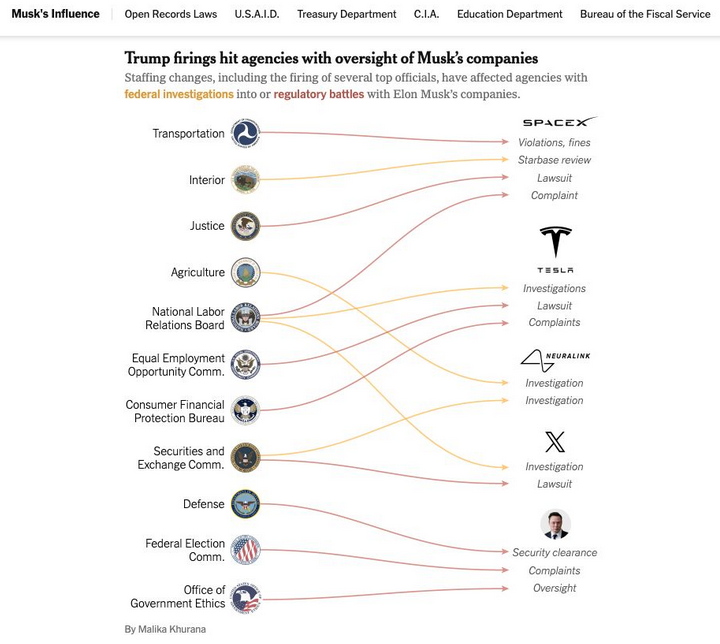
Image: nytimes.com

As the Times notes, Musk and his companies have repeatedly failed to comply with federal reporting protocols aimed at protecting state secrets, and these failures have prompted at least three federal reviews. Those include an inquiry launched last year by the Defense Department’s Office of Inspector General. Four days after taking office, Trump fired the DoD inspector general along with 17 other inspectors general.

The Trump administration also shifted the enforcement priorities of the U.S. Securities and Exchange Commission (SEC) away from prosecuting misconduct in the cryptocurrency sector, reassigning lawyers and renaming the unit to focus more on “cyber and emerging technologies.”

Reuters reports that the former SEC chair Gary Gensler made fighting misconduct in a sector he termed the “wild west” a priority for the agency, targeting not only cryptocurrency fraudsters but also the large firms that facilitate trading such as Coinbase.

On Friday, Coinbase said the SEC planned to withdraw its lawsuit against the crypto exchange. Also on Friday, the cryptocurrency exchange Bybit announced on X that a cybersecurity breach led to the theft of more than $1.4 billion worth of cryptocurrencies — making it the largest crypto heist ever.

ORGANIZED CRIME AND CORRUPTION

On Feb. 10, Trump ordered executive branch agencies to stop enforcing the U.S. Foreign Corrupt Practices Act, which froze foreign bribery investigations, and even allows for “remedial actions” of past enforcement actions deemed “inappropriate.”

Trump’s action also disbanded the Kleptocracy Asset Recovery Initiative and KleptoCapture Task Force — units which proved their value in corruption cases and in seizing the assets of sanctioned Russian oligarchs — and diverted resources away from investigating white-collar crime.

That’s according to the independent Organized Crime and Corruption Reporting Project (OCCRP), an investigative journalism outlet that until very recently was funded in part by the U.S. Agency for International Development (USAID).

The OCCRP lost nearly a third of its funding and was forced to lay off 43 reporters and staff after Trump moved to shutter USAID and freeze its spending. NBC News reports the Trump administration plans to gut the agency and leave fewer than 300 staffers on the job out of the current 8,000 direct hires and contractors.

The Global Investigative Journalism Network wrote this week that the sudden hold on USAID foreign assistance funding has frozen an estimated $268 million in agreed grants for independent media and the free flow of information in more than 30 countries — including several under repressive regimes.

Elon Musk has called USAID “a criminal organization” without evidence, and promoted fringe theories on his social media platform X that the agency operated without oversight and was rife with fraud. Just months before the election, USAID’s Office of Inspector General announced an investigation into USAID’s oversight of Starlink satellite terminals provided to the government of Ukraine.

KrebsOnSecurity this week heard from a trusted source that all outgoing email from USAID now carries a notation of “sensitive but unclassified,” a designation that experts say could make it more difficult for journalists and others to obtain USAID email records under the Freedom of Information Act (FOIA). On Feb. 20, Fedscoop reported also hearing the same thing from multiple sources, noting that the added message cannot be seen by senders until after the email is sent.

FIVE BULLETS

On Feb. 18, Trump issued an executive order declaring that only the U.S. attorney general and the president can provide authoritative interpretations of the law for the executive branch, and that this authority extends to independent agencies operating under the executive branch.

Trump is arguing that Article II, Clause 1 of the Constitution vests this power with the president. However, jurist.org writes that Article II does not expressly state the president or any other person in the executive branch has the power to interpret laws.

“The article states that the president is required to ‘take care that the laws be faithfully executed,’” Juris noted. “Jurisdiction to interpret laws and determine constitutionality belongs to the judicial branch under Article III. The framers of the Constitution designed the separation of duties to prevent any single branch of government from becoming too powerful.”

The executive order requires all agencies to submit to “performance standards and management objectives” to be established by the White House Office of Management and Budget, and to report periodically to the president.

Those performance metrics are already being requested: Employees at multiple federal agencies on Saturday reported receiving an email from the Office of Personnel Management ordering them to reply with a set of bullet points justifying their work for the past week.

“Please reply to this email with approx. 5 bullets of what you accomplished last week and cc your manager,” the notice read. “Please do not send any classified information, links, or attachments. Deadline is this Monday at 11:59 p.m. EST.”

An email sent by the OPM to more than two million federal employees late in the afternoon EST on Saturday, Feb. 22.

In a social media post Saturday, Musk said the directive came at the behest of President Trump, and that failure to respond would be taken as a resignation. Meanwhile, Bloomberg writes the Department of Justice has been urging employees to hold off replying out of concern doing so could trigger ethics violations. The National Treasury Employees Union also is advising its employees not to respond.

A legal battle over Trump’s latest executive order is bound to join more than 70 other lawsuits currently underway to halt the administration’s efforts to massively reduce the size of the federal workforce through layoffs, firings and attrition.

KING TRUMP?

On Feb. 15, the president posted on social media, “He who saves his Country does not violate any Law,” citing a quote often attributed to the French dictator Napoleon Bonaparte. Four days later, Trump referred to himself as “the king” on social media, while the White House nonchalantly posted an illustration of him wearing a crown.

Trump has been publicly musing about running for an unconstitutional third-term in office, a statement that some of his supporters dismiss as Trump just trying to rile his liberal critics. However, just days after Trump began his second term, Rep. Andy Ogles (R-Tenn.) introduced a bill to amend the Constitution so that Trump — and any other future president — can be elected to serve a third term.

This week at the Conservative Political Action Conference (CPAC), Rep. Ogles reportedly led a group of Trump supporters calling itself the “Third Term Project,” which is trying to gain support for the bill from GOP lawmakers. The event featured images of Trump depicted as Caesar.

A banner at the CPAC conference this week in support of The Third Term Project, a group of conservatives trying to gain support for a bill to amend the Constitution and allow Trump to run for a third term.

Russia continues to be among the world’s top exporters of cybercrime, narcotics, money laundering, human trafficking, disinformation, war and death, and yet the Trump administration has suddenly broken with the Western world in normalizing relations with Moscow.

This week President Trump stunned U.S. allies by repeating Kremlin talking points that Ukraine is somehow responsible for Russia’s invasion, and that Ukrainian President Volodymyr Zelensky is a “dictator.” The president repeated these lies even as his administration is demanding that Zelensky give the United States half of his country’s mineral wealth in exchange for a promise that Russia will cease its territorial aggression there.

President Trump’s servility toward an actual dictatorRussian President Vladimir Putin — does not bode well for efforts to improve the cybersecurity of U.S. federal IT networks, or the private sector systems on which the government is largely reliant. In addition, this administration’s baffling moves to alienate, antagonize and sideline our closest allies could make it more difficult for the United States to secure their ongoing cooperation in cybercrime investigations.

It’s also startling how closely DOGE’s approach so far hews to tactics typically employed by ransomware gangs: A group of 20-somethings with names like “Big Balls” shows up on a weekend and gains access to your servers, deletes data, locks out key staff, takes your website down, and prevents you from serving customers.

When the federal executive starts imitating ransomware playbooks against its own agencies while Congress largely gazes on in either bewilderment or amusement, we’re in four-alarm fire territory. At least in theory, one can negotiate with ransomware purveyors.

from Krebs on Security https://ift.tt/tc1PRD9
via IFTTT

Mi distro-hopping en la Raspberry Pi sí que no se acaba. Ahora pruebo con EndeavourOS

EndeavourOS ARM

Aquí en LXA hemos hablado largo y tendido sobre el distro-hopping. Resumiendo, se trata de probar distribuciones hasta dar con una que nos satisfaga por completo, algo que no siempre se da. En mi portátil principal y secundario ya estoy cómodo con Manjaro, pero que la versión ARM no haya lanzado ninguna estable desde hace más de un año me ha hecho mirar alternativas para mi Raspberry Pi. Otra con base Arch que se actualiza más rápido es EndeavourOS, y eso es lo que estoy probando estos días.

Yo tengo una Raspberry Pi 4 porque hace unos 5 años quise hacerme algo así como un set-top box, una «cajita» para disfrutar de todo lo multimedia. Pronto caí en la arquitectura y en que no podría usar en la popular placa simple lo mismo que daba por sentado en cualquier otro PC. La he usado bastante para ver de todo, pero cuando adquirí mi Steam Deck la cosa cambió. Lo que pasa es que la Deck es un aparato de quita y pon, y por ese motivo he, digamos, desempolvado mi RPi4.

EndeavourOS es casi Arch

«Manjaro no es Arch», se puede leer por todas partes. Lo dicen porque, aunque comparte base, tiene una filosofía diferente. Arch sube a sus repositorios lo que sea que salga y casi al instante. Manjaro tiene sus ramas Unstable, Testing y Stable, y a las últimas llegan las cosas cuando están probadas y se ha comprobado que funcionan bien entre sí. Por ese motivo, casi todo tarda en llegar de un par de semanas en el mejor de los casos a meses en el peor.

Esto no es un problema tan grande en PC, pero la versión ARM es diferente. En el momento de escribir este artículo, la última estable es del 14 de marzo de 2024, y como se empeñan en que todo suba de golpe y de la mano, es o resignarse o pasarse a la Testing, cuya versión más actualizada sí es de noviembre y ya incluye Plasma 6.2. Un dato curioso: la Testing está más actualizada que la Unstable, o por lo menos así figura en su foro.

Por otra parte, hay distribuciones que son más fieles a Arch, y entre ellas destaca EndeavourOS. Salvando algunas distancias, EOS es como Arch, si éste viniese con un entorno gráfico incluido por defecto, y también con todo lo necesario para que el sistema se pueda usar tras la instalación de cero sin muchos conocimientos. Aunque también deciden cuándo llegan los paquetes, se puede decir que llagan casi cuando llegan a Arch.

Más complicado, pero merece la pena

EndeavourOS es más complicado que Manjaro. O mejor dicho, Manjaro es más sencillo que EndeavourOS. Manjaro usa Pamac por defecto, una tienda de software que también se puede usar en línea de comandos y que es compatible con AUR, Flatpak y Snaps, así como bebe de los repositorios oficiales. Por su parte, EOS usa Pacman, el gestor de paquetes por línea de comandos, y Yay, un asistente de AUR. Tiene las herramientas instaladas por defecto, pero ambas sin GUI.

En cuanto a dificultad, es la diferencia más grande con la que se puede encontrar alguien como yo, pero los beneficios son mayores que las pérdidas. Además, Pamac está disponible en AUR, como también lo están otras tiendas con interfaz gráfica como Bauh. Yo he decidido quedarme con Pacman y Yay. Eso y la instalación, que es con interfaz, pero la antigua con fondo azul, nada de un escritorio y un Calamares que den cierta tranquilidad.

Hablando de instalación, consta de dos pasos: primero, se graba la imagen de este enlace en un dispositivo USB o microSD; luego, al iniciar por primera vez, configuramos algunos parámetros, como el WiFi, el escritorio y el usuario, y luego realiza/finaliza la instalación, que se toma su tiempo. Al siguiente reinicio ya entramos al sistema completo.

Qué gano con EndeavourOS en mi RPi4

Básicamente software actualizado y buen rendimiento. Raspberry Pi OS no está demasiado mal, pero el software le llega de Debian y tarda más. Por otra parte, a mí no me gusta cómo gestiona Debian las cosas, y todo unido me hizo pasarme a Manjaro. Es una distribución que me gusta, pero que tarden tanto en actualizar el sistema y la mayoría de paquetes me hace sentirme incómodo. En un punto medio tenemos EndeavourOS, con una base Arch que recibe pronto los paquetes y ofrece un buen rendimiento. Ojo, el buen rendimiento lo menciono por o que siento; no le he pasado ninguna herramienta para verlo en números.

Ahora tengo Kodi al día, así como cualquier navegador y emulador, que es casi todo lo que necesito en mi RPi4 si la quiero usar para ver de todo o echar alguna partida a juegos poco exigentes. Android es compatible, pero Kodi me da problemas. Ahora sólo queda por ver como se ve, valga la redundancia, todo y si me encuentro con alguna piedra en el zapato. Si es así, siempre me queda la Deck.

from Linux Adictos https://ift.tt/v5HiPwZ
via IFTTT

‘The bot asked me four times a day how I was feeling’: is tracking everything actually good for us?

Gathering data used to be a fringe pursuit of Silicon Valley nerds. Now we’re all at it, recording everything from menstrual cycles and mobility to toothbrushing and time spent in daylight. Is this just narcissism redesigned for the big tech age?

I first heard about my friend Adam’s curious new habit in a busy pub. He said he’d been doing it for over a year, but had never spoken to anyone about it before. He had a furtive look around, then took out his phone and showed me the product of his burning obsession: a spreadsheet.

This was not a record of his annual tax return or numbers he was crunching for work (Adam is a data scientist). Instead, it was a spreadsheet recording the minutiae of his life, with dozens of columns tracking every element of his daily routine. It all started, he told me, because of a recurring argument with his boyfriend. His partner didn’t think they spent enough time together, but Adam thought that they did. There was only one way to settle this, he decided: cold, hard data. So he began keeping a note of the days they saw each other and the days they didn’t.

Continue reading…

from Data and computer security | The Guardian https://ift.tt/q54hs9f
via IFTTT

PewDiePie sorprende al montar un PC Gaming con Linux Mint

PewDiePie y Linux

El famoso creador de contenido PewDiePie ha causado revuelo en la comunidad tecnológica tras compartir su más reciente decisión: armar su propio PC Gaming, pero con una particularidad que ha llamado la atención de muchos, ha optado por Linux Mint como sistema operativo. La noticia ha generado un gran debate en foros y redes sociales, donde muchos se muestran sorprendidos por su elección.

PewDiePie, conocido por su enorme presencia en YouTube con más de 110 millones de suscriptores, ha sido históricamente un usuario de equipos patrocinados por grandes marcas. Sin embargo, en su último vídeo explica que quería experimentar el proceso de construir su propio ordenador desde cero, algo que nunca había hecho antes debido a la facilidad con la que las compañías le enviaban hardware de última generación.

Un cambio inesperado: PewDiePie apuesta por Linux

Lo más sorprendente del vídeo no es solo la construcción del PC, sino la elección del sistema operativo. En una parte del clip, el creador menciona de forma casual que ha cambiado a Linux recientemente, mostrando un pantallazo donde se puede ver claramente que ha instalado Linux Mint.

Este detalle no ha pasado desapercibido para sus seguidores, especialmente aquellos que son entusiastas del software libre. Cerca del final del vídeo, el sistema operativo se muestra en funcionamiento, lo que confirma que PewDiePie no solo ha experimentado con Linux, sino que realmente lo está utilizando en su día a día.

La opinión de PewDiePie sobre jugar en Linux

Un seguidor comentó en el vídeo que probablemente él es el creador de contenido más grande que ha reconocido públicamente haber cambiado a Linux. En respuesta a esto, PewDiePie contestó con entusiasmo: “Por ahora me encanta, el hecho de que ahora puedas jugar en Linux es increíble. Literalmente no tiene sentido usar Windows”.

Su afirmación ha encendido el debate sobre la viabilidad de Linux para juegos, un tema que ha sido ampliamente discutido en los últimos años. Con herramientas como Proton de Valve y Steam Play, jugar en Linux es cada vez más accesible y compatible con una amplia variedad de títulos.

¿Qué significa esto para el gaming en Linux?

Aunque el youtuber no ha profundizado demasiado en su experiencia con Linux Mint, su decisión de utilizarlo para jugar es un fuerte respaldo a la evolución del gaming en este sistema operativo. Linux ha recorrido un largo camino en términos de compatibilidad y rendimiento, y el hecho de que una figura de su calibre lo utilice puede influir en que más personas lo prueben.

La comunidad ya ha comenzado a solicitarle que haga un vídeo dedicado a su experiencia completa con Linux Mint, explorando sus ventajas y desventajas en el ámbito del gaming. Si esto sucede, sin duda será un gran impulso mediático para el software libre y podría animar a más jugadores a dar el salto.

El gaming en Linux ha mejorado notablemente en los últimos años gracias a avances en software y compatibilidad con hardware moderno. Servicios como Steam y hardware como la Steam Deck han contribuido a este crecimiento, y con figuras influyentes como PewDiePie mostrando interés, la tendencia podría acelerarse aún más.

from Linux Adictos https://ift.tt/Eimso2L
via IFTTT

WINE 10.2 llega con vkd3d 1.15 y casi 300 cambios

WINE 10.2

WineHQ continúa con el desarrollo de la versión de WINE que llegará en 2026. Hace dos semanas empezaron con él, momento en el que dio comienzo una fase en la que nos entregaran una nueva versión de desarrollo cada dos semanas. Claro está, si nada desajusta el calendario. Lo que nos han entregado hace unas horas es WINE 10.2, y recordamos que no hay que confundir estos lanzamientos con los estables, cuyas versiones de punto llevarán la numeración de 10.0.1, 10.0.2, etc.

En la lista de novedades de WINE 10.2 destaca que el vkd3d incluido ha subido a la versión 1.15, soporte para configurar prioridad a los hilos, el modo WoW64 ahora se puede reactivar de forma dinámica y se ha avanzado en el progreso del driver Bluetooh, a lo que se le une el habitual punto de correcciones varias. En cuanto números, se han corregido 20 bugs y realizado 272 cambios.

Bugs corregidos en WINE 10.2

  • El «sistema de pruebas» de Guild Wars no muestra los resultados de las pruebas.
  • MSWT Kart 2004 no funciona.
  • YOU and ME and HER: El juego se bloquea tras iniciarlo desde el lanzador de juegos.
  • 16-bit Myst se bloquea al entrar en Book.
  • vbscript: Join() no está implementado.
  • psql 16: código de error win32 no reconocido: 127 binario inválido: Argumento inválido / no se pudo encontrar un «psql.exe» para ejecutar.
  • wineboot falló al inicializar un prefijo wine.
  • Regresión: algunos juegos a pantalla completa se muestran incorrectamente al cambiar y volver a la ventana de juego.
  • Final Fantasy XI Online se bloquea con un fallo de página no controlado al iniciarse.
  • Wine Wordpad se inicia con la pantalla en blanco.
  • cmd no es compatible con la redirección de control de derecha a izquierda (2<&1).
  • Sekiro: Shadows Die Twice se bloquea al iniciarse con el mando de Xbox One conectado.
  • cmd: ‘@echo off’ se propaga al padre en la instrucción CALL (CALL parece congelarse).
  • cmd: Expansión incorrecta de la subcadena del último carácter (por ejemplo !MY_STR:~1!).
  • ITextStream::WriteBlankLines() necesita ser implementado para que configure.js de libxml2 funcione.
  • mvscp90 ::std::ifstream::seekg(0) se bloquea.
  • Wine no puede iniciarse cuando se construye con binutils 2.44.
  • SetThreadPriority falla inesperadamente en hilos terminados en lugar de no-op.
  • Cyberpunk 2077 no se carga con CyberEngine Tweaks.
  • Cross-compiled Wine ya no instala un binario cargador ‘wine’.

Ya disponible

WINE 10.2 ya se puede descargar desde el botón que tenéis debajo de estas líneas. En su página de descargas hay también información sobre cómo instalar esta y otras versiones en sistemas operativos Linux y otros como macOS e incluso Android.

Dentro de dos semanas, si se sigue con el calendario habitual y nada nos hace pensar que no será así, llegará WINE 10.3, también con decenas de cambios para preparar el WINE 11.0 que llegará, todo atendiendo a lanzamientos pasados, a principios de 2026.

.boton {color: white; background-color: grey; padding: 20px; font-size: 2rem; text-decoration: none; border-radius: 10px; position: relative; top: 15px; border: 4px solid #555;}.boton:hover {box-shadow:1px 1px 2.5px black !important;}

from Linux Adictos https://ift.tt/wMWxLHc
via IFTTT