PAHO strengthens access to health data through its Core Indicators Portal
Cristina Mitchell
from PAHO/WHO | Pan American Health Organization https://ift.tt/vmVN3q5
via IFTTT

PAHO strengthens access to health data through its Core Indicators Portal
Cristina Mitchell
from PAHO/WHO | Pan American Health Organization https://ift.tt/vmVN3q5
via IFTTT

A partial selfie posted by Puchmade Dev to his Twitter account. Yes, that is a functioning handheld card skimming device, encrusted in diamonds. Underneath that are more medallions, including a diamond-studded bitcoin and payment card.
In January, KrebsOnSecurity wrote about rapper Punchmade Dev, whose music videos sing the praises of a cybercrime lifestyle. That story showed how Punchmade’s social media profiles promoted Punchmade-themed online stores selling bank account and payment card data. The subject of that piece, a 22-year-old Kentucky man, is now brazenly suing his financial institution after it blocked a $75,000 wire transfer and froze his account, citing an active law enforcement investigation.
With memorable hits such as “Internet Swiping” and “Million Dollar Criminal” earning millions of views, Punchmade Dev has leveraged his considerable following to peddle tutorials on how to commit financial crimes online. But until recently, there wasn’t much to support a conclusion that Punchmade was actually doing the cybercrime things he promotes in his songs.
That changed earlier this year when KrebsOnSecurity showed how Punchmade’s social media handles were promoting Punchmade e-commerce shops online that sold access to Cashapp and PayPal accounts with balances, software for printing checks, as well as personal and financial data on Americans.
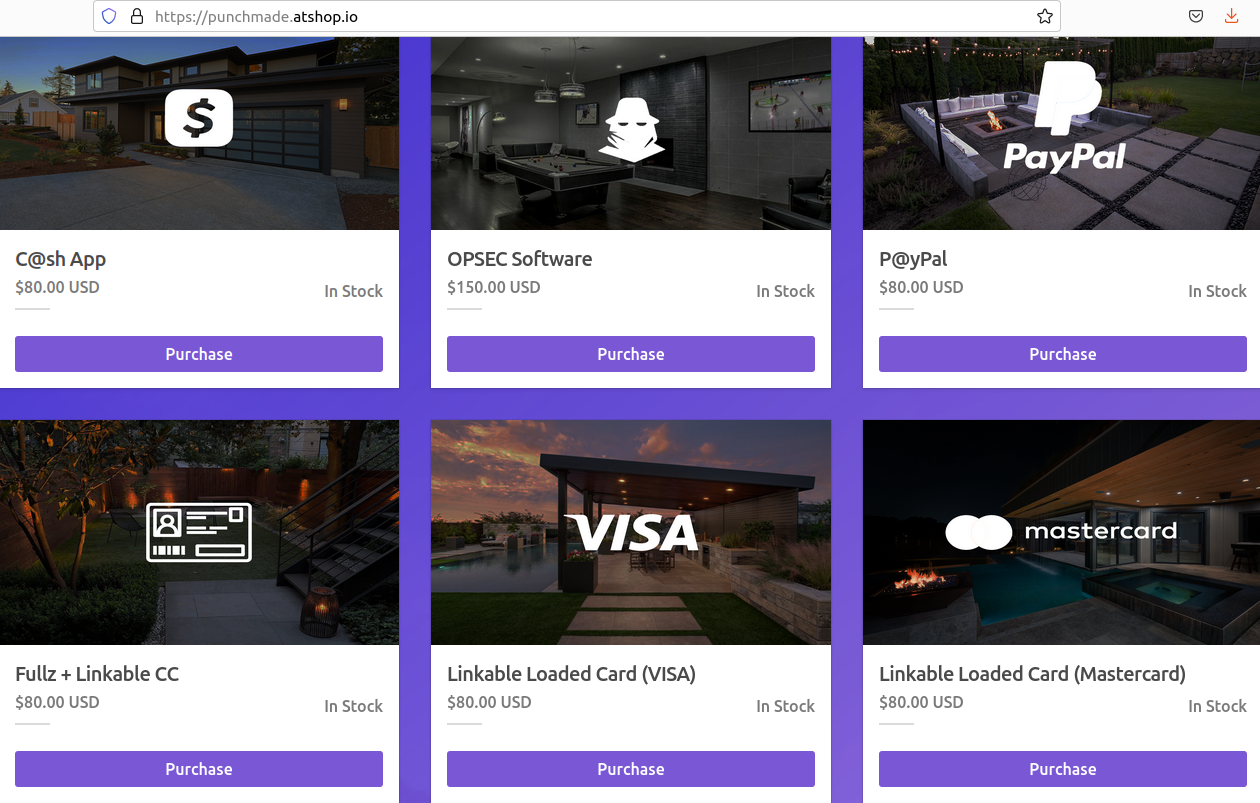
Punchmade Dev’s previous online shop (now defunct). His Telegram channel has more than 75,000 followers.
The January story traced Punchmade’s various online properties to a 22-year-old Devon Turner from Lexington, Ky. Reached via his profile on X/Twitter, Punchmade Dev said they were not affiliated with the lawsuit filed by Turner [Punchmade’s X account provided this denial even though it has still not responded to requests for comment from the first story about him in January]. Meanwhile, Mr. Turner has declined multiple requests to comment for this story.
On June 26, Turner filed a pro se lawsuit against PNC Bank, alleging “unlawful discriminatory and tortuous action” after he was denied a wire transfer in the amount of $75,000. PNC Bank did not respond to a request for comment.
Turner’s complaint states that a follow-up call to his bank revealed the account had been closed due to “suspicious activity,” and that he was no longer welcome to patronize PNC Bank.
“The Plaintiff is a very successful African-American business owner, who has generated millions of dollars with his businesses, has hired 30 plus people to work for his businesses,” Turner wrote.
As reported in January, among Turner’s businesses is a Lexington entity called OBN Group LLC (assumed name Punchmade LLC). Business incorporation documents from the Kentucky Secretary of State show he also ran a record label called DevTakeFlightBeats Inc.
Turner’s lawsuit alleges that bank staff made disparaging remarks about him, suggesting the account was canceled because it would be unusual for a person like him to have that kind of money.
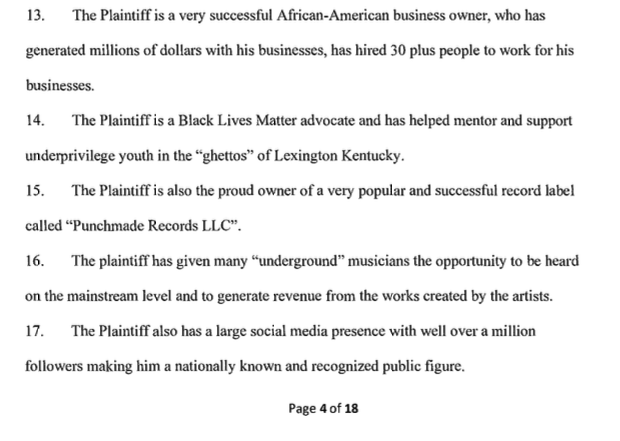
A snippet from Turner’s lawsuit vs. PNC.
Incredibly, Turner acknowledges that PNC told him his account was flagged for attention from law enforcement officials.
“The PNC Bank customer service representative also explained that there was a note on the account that law enforcement would be contacted at some point in time,” the lawsuit reads.
“The Plaintiff, who was not worried at all about law enforcement being involved because nothing illegal occurred, informed the PNC Bank representative that this was one big mistake and asked him what his options were,” the complaint states.

Devon Turner, a.k.a. “Punchmade Dev,” in an undated photo, wearing a diamond-covered Visa card. Image: tiktok.com/brainjuiceofficial
Turner’s lawsuit said PNC told him they would put a note on his account allowing him to withdraw the funds from any branch, but that when he visited a PNC branch and asked to withdraw the entire amount in his account — $500,000 — PNC refused, saying the money had been seized.
“Ultimately, PNC bank not only refused his request to release his funds but informed him that his funds would be seized indefinitely as [sic] PNC Bank,” Turner lawsuit recounts.
The Punchmade shops selling financial data that were profiled in the January story are long gone, but Punchmade’s Instagram account now promotes punchmade[.]cc, which behaves and looks the same as his older shop.
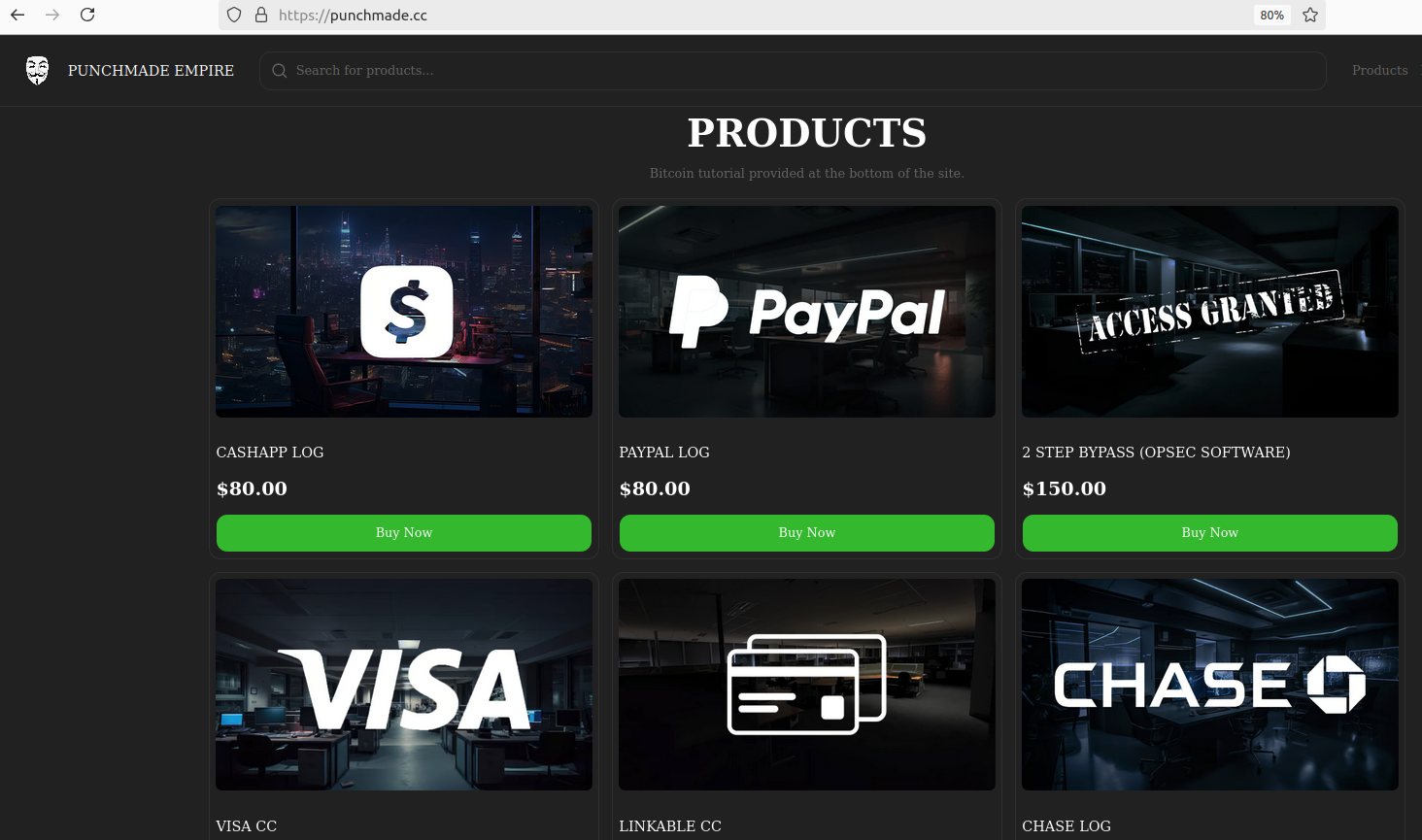
Punchmade’s current shop, which DomainTools says was registered to a Lexington, Ky. phone number used by accounts under the name of Devon Taylor at multiple online retailers.
The breach tracking service Constella Intelligence finds the email address associated with Turner’s enterprise OBN Group LLC — obndevpayments@gmail.com — was used by a Devon Turner from Lexington to purchase software online. That record includes the Lexington, Ky. mobile phone number 859-963-6243, which Constella also finds was used to register accounts for Devon Turner at the retailer Neiman Marcus, and at the home decor and fashion site poshmark.com.
A search on this phone number at DomainTools shows it is associated with two domain names since 2021. The first is the aforementioned punchmade[.]cc. The other is foreverpunchmade[.]com, which is registered to a Devon Turner in Lexington, Ky. A copy of this site at archive.org indicates it once sold Punchmade Dev-branded t-shirts and other merchandise.
Mr. Turner included his contact information at the bottom of his lawsuit. What phone number did he leave? Would you believe 859-963-6243?
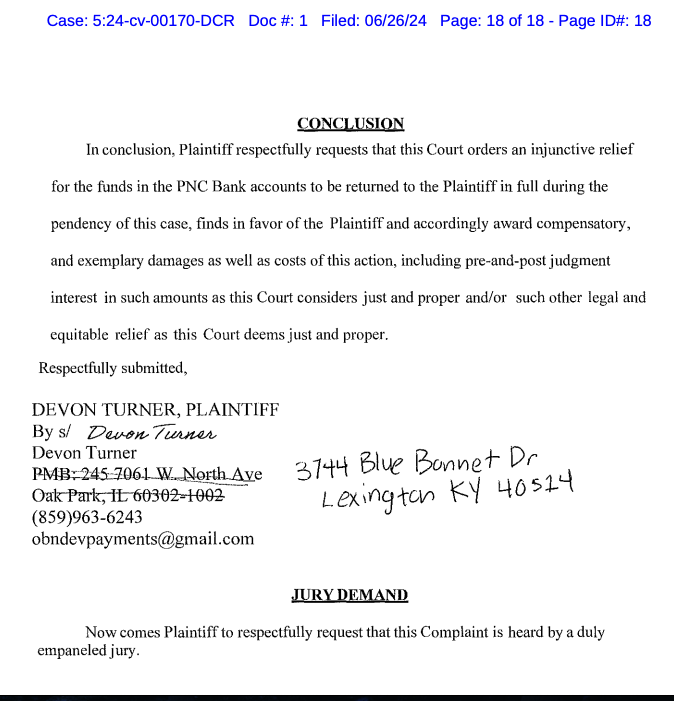
The closing section of Mr. Turner’s complaint includes a phone number that was used to register a popular online fraud shop named after Punchmade.
Is Punchmade Dev a big-time cybercriminal enabler, as his public personna would have us believe? Or is he some two-bit nitwit who has spent so much on custom medallions that he can’t afford a lawyer? It’s hard to tell.
But he definitively has a broad reach: His Instagram account has ~860k followers, and his Telegram channel has more than 75,000 subscribers, all no doubt seeking that sweet “C@sh App sauce,” which apparently has something to do with moving cryptocurrencies through Cash App in a way that financially rewards people able and willing to open up new accounts.
It’s incredibly ironic that Punchmade sells tutorials on how to have great “opsec,” a reference to “operational security,” which in the cybercriminal context means the ability to successfully separate one’s cybercriminal identity from one’s real-life identity: This guy can’t even register a domain name anonymously.
A copy of Turner’s complaint is available here (PDF).
For more on Punchmade, check out the TikTok video How Punchmade Dev Got Started Scamming.
from Krebs on Security https://ift.tt/c7Jx4M5
via IFTTT
[Streaming Again] This documentary explores Philippe Petit’s preparations for his historic walk across a high wire between New York’s Twin Towers.
from New On Netflix USA https://ift.tt/QfX1avG
via IFTTT
A hustler and the child he took in routinely con the wealthy — but a life-changing opportunity could end their inseparable bond.
from New On Netflix USA https://ift.tt/OgxRKrD
via IFTTT
After taking a winter teaching job in a remote Midwest town, a woman struggles to find her place amid the tapestry of colorful locals.
from New On Netflix USA https://ift.tt/jaYPcn3
via IFTTT
Emma and Matt Willis host a social experiment where British singles look for love and get engaged before meeting in person. But who will say “I do”?
from New On Netflix USA https://ift.tt/LBEW10j
via IFTTT
Advanced audio technology captures the sound of nature like you’ve never heard it before, in this riveting docuseries narrated by Sir David Attenborough.
from New On Netflix USA https://ift.tt/JmGK7ar
via IFTTT

En el terreno de los navegadores web, hace mucho que yo me pasé a Vivaldi. Motivos hay muchos, pero puedo resumirlos con una palabra: productividad. Firefox es un buen navegador, pero se queda cojo si queremos hacer algo más que navegar. Yo dí el salto hace ya ¿tres años?, pero podría no haberlo dado nunca de ser como Zen Browser. Actualmente está en fase de desarrollo, y es el fork de Firefox que deberían probar los usuarios exigentes.
Si alguien conoce la interfaz de Vivaldi, como es mi caso, se dará cuenta de que la de Zen Browser se parece un poco. Cierto es que el panel lateral está también en Opera, por ejemplo, pero no sé, la rueda de ajustes ahí abajo y otras cosas… quizá sólo me lo parece a mí. Lo que sí está claro es que es muy diferente a Firefox, al cual mejora en muchos aspectos. Se podría decir que Zen Browser es como Firefox debería ser si se plantearan ofrecer un navegador más productivo.
Lo primero que diferencia a Zen Browser de su ancestro navegador del panda rojo es que soporta pestañas apiladas tras la instalación de 0. Se nota que hay componentes que están en una fase muy temprana, pero apunta maneras. Aunque en su página web oficial promete que se pueden apilar como lo hace Vivaldi, no es así en la actualidad. Por mis pruebas, ahora se pueden apilar automáticamente muchas pestañas, pero no cambiar el tamaño de éstas ni tampoco he encontrado la opción para deshacer el apilado. Pero permite pilas de pestañas.

También cuenta con una barra lateral. Alojada en lo que sería el panel de la izquierda, es como se espera que sea: un punto en el que añadimos páginas y las vemos en un tamaño diferente. Por ejemplo, ahí podemos tener redes sociales, como X y WhatsApp, y servicios como Inoreader o algún traductor. Este tipo de accesos son muy útiles, y cuando se prueban no hay marcha atrás.
Zen Browser también se ha propuesto rellenar la carencia de los perfiles en Firefox. Sí, en el navegador de Mozilla existen, pero este fork facilita el uso de estos perfiles. De esta manera, podemos compartir nuestro navegador sin compartir nuestros datos, o podemos usar un perfil personal y otro para el trabajo o lo que nos vengan en gana.
Zen Browser está en desarrollo ahora mismo, y no se recomienda su uso para algo más que para pruebas. Ya disponible están también los espacios de trabajo, algo que uso yo en Vivaldi para separar una navegación general, una para los blogs y otra para el desarrollo. Pero también puede servir para otros menesteres, como crear un espacio de trabajo para un viaje que vamos a hacer y dejar allí todos los enlaces que nos resulten de interés.
Por defecto, las pestañas están en la barra de la izquierda, y aquí hay un fallo que sólo se puede perdonar por la fase en la que se encuentran: las pestañas son pequeñas, del tamaño del panel lateral y sólo el icono. Esto no es un problema, de hecho me gusta, pero sí lo es que no se pueden cerrar las pestañas… la «x» sí aparece si expandimos el panel, pero así se pierde algo de su encanto. Se pueden cerrar desde el menú contextual al hacer clic derecho.
También es importante el hecho de que de momento sólo esté en inglés. Si no dominamos la lengua de Shakespeare, tendremos un problema, ya que no permite descargar otras opciones.
En el futuro también añadirán la opción de agrupar pestañas, útil si hay un tema en concreto que queremos tener bien acotado y no necesitamos un espacio de trabajo nuevo.
Por todo lo demás, es Firefox en su interior, y también de código abierto. Incluso cuenta con la opción para recoger datos para la publicidad personalizada, pero desactivada en Zen Browser. En definitiva, es el navegador del panda rojo supervitaminado, o lo será cuando lancen una versión estable.
La página web oficial está en este enlace. Allí encontraremos una sección con descargas, y los usuarios de Linux podemos elegir una AppImage, la versión Flatpak o una portable, es decir, como los binarios de Firefox. Los usuarios de una distro con base Arch también lo tienen en AUR con el nombre zen-browser-bin.
A mí el concepto me gusta, y ya veremos si hago el camino de vuelta a «Firefox» si Manifest v3 termina perjudicando a los usuarios de Chromium.
from Linux Adictos https://ift.tt/1wXl9pv
via IFTTT

A no ser que el tema de la publicidad cambie las cosas, lo que no parece muy probable, Firefox es el navegador por defecto que encontramos en la mayoría de distribuciones Linux. Por lo general, está actualizado, pero también hay distribuciones que ofrecen una versión ESR o podríamos encontrar un caso extraño en el que no esté en los repositorios oficiales. O si queremos usar la versión Nightly para conocer las novedades antes de que lleguen a la versión estable, lo mejor es instalar el navegador a partir de sus binarios.
Mozilla ofrece varios empaquetados de Firefox para Linux. Está como paquete flatpak, como snap, lo que usa por defecto Ubuntu, una versión nativa en un repositorio oficial para distribuciones con base Debian, versiones nativas en repositorios oficiales de muchas distribuciones, y no sé si me dejo algo. También ofrece una opción «portable» que podemos usar directamente haciendo clic sobre su ejecutable o instalar los binarios, y esto último es lo que vamos a explicar aquí.
Yo no recomiendo instalar los binarios de Firefox a no ser que no tengamos otra opción. Si queremos usar diferentes perfiles, Firefox ofrece esa posibilidad. Pero hay mucho que puede ocurrir y es difícil imaginar todos los escenarios. Sí es más fácil pensar en que queremos usar una versión preliminar, y Mozilla ofrece también canales Beta, Dev y Nightly. Para instalar una de estas versiones a partir de sus binarios, o la estable si es lo que queremos, tendremos que hacer lo siguiente:
sudo mkdir /opt/firefox
sudo chown $USER:$USER /opt/firefox/
tar -xvf ruta_al_archivo/firefox-VERSION-.0a1.*.linux-x86_64.tar.bz2
Lo anterior, en donde hay que cambiar «VERSION» por el número de la versión, descomprimirá la carpeta en el directorio opt, y tendrá permisos de ejecución. Si la carpeta «firefox» queda vacía, descomprimimos el archivo y copiamos su contenido a mano en la misma ruta. Pero para finalizar la instalación, quedan un par de pasos más.
nano ~/.local/share/applications/firefox.desktop
[Desktop Entry]
Version=1.0
Name=Firefox Nightly
Comment=Navega por la web con la versión Nightly
GenericName=Navegador Web
Keywords=Internet;WWW;Browser;Web;Explorer
Exec=/opt/firefox/firefox %u
Icon=/home/pablinux/Imágenes/logos/firefox_nightly.png
Terminal=false
Type=Application
MimeType=text/html;text/xml;application/xhtml+xml;application/vnd.mozilla.xul+xml;text/mml;x-scheme-handler/http;x-scheme-handler/https;application/x-xpinstall;application/pdf;application/json;
StartupNotify=true
Categories=Network;WebBrowser;
Actions=new-window;new-private-window;profile-manager-window;
StartupWMClass=firefox

[Desktop Action new-window]
Name=Abrir nueva ventana
Exec=/opt/firefox/firefox -new-window

[Desktop Action new-private-window]
Name=Abrir nueva ventana privada
Exec=/opt/firefox/firefox -private-window
La información del archivo .desktop anterior es para su uso en español de España. Si alguien quiere usarlo en otro idioma, lo único que tiene que hacer es cambiar los textos de los «name=», «comment=», «GenericName=» y puede que el de las categorías, aunque esto último yo no lo tocaría; es probable que funcione mejor si está en inglés.
Es importante cambiar la línea «icon=» para que incluya la ruta al icono que queramos que se muestre. En mi caso, lo tengo en mi carpeta personal/Imágenes/logos/ con el nombre de firefox_nightly.png. El tamaño de la imagen no importa, o no mucho, pero el formato sí, depende del escritorio. Para evitar confusiones, lo recomendable es PNG.
El texto anterior tiene todo lo necesario, entre lo que podremos lanzar ventanas de incógnito. Si queremos que aparezca «Beta», «Dev», o «Nightly», tenemos que buscar esa línea y modificarla. Lo anterior es el archivo .desktop para la versión Nightly, y es exactamente lo que tengo yo.
Para deshacer los cambios, sólo tenemos que eliminar la carpeta dentro de opt y el archivo .desktop.
Esto es válido para también para otros programas. Sólo hay algo a tener en cuenta: Mozilla permite que su navegador se actualice automáticamente desde la misma aplicación de un modo similar a como pasa en Windows y macOS. En otros programas, actualizar puede requerir volver a realizar todos los pasos, excepto el de crear el archivo .desktop.
Esta es la mejor manera de tener varias versiones de Firefox en Linux, o una si el sistema operativo no lo pone fácil.
.barra {display: flex;justify-content: flex-end;height: 25px; background-color: #333;border-radius: 5px 5px 0 0;}.rojo, .naranja, .verde{width: 12px;height: 12px; position: relative;border-radius: 50%;top: 7px; margin: 0 3px;}.rojo{background-color: rgb(248, 82, 82); margin-right: 7px;}.naranja{background-color: rgb(252, 186, 63);}.verde{background-color: rgb(17, 187, 17);}.terminal{background-color: black !important; border-radius: 5px !important; margin-bottom:20px}pre{font-family:monospace !important; padding: 0 10px 10px; line-height: 1.5em; overflow: auto; background-color: black !important; color: #0EE80E !important}code {background-color: rgba(255, 255, 0, 0.18); color: #d63384; padding: 1px 3px; font-family: monospace; border-radius: 2px;}
from Linux Adictos https://ift.tt/WlTbk2O
via IFTTT

By Stuart A. Thompson
An outlandish idea that President Biden was dead or nearly dead was quickly refuted. Few of the accounts that had spread it online recanted.
Published: August 7, 2024 at 03:00AM
from NYT Technology https://ift.tt/9LMbsHY
via IFTTT
 Pacosite's Blog