Malicious hackers are targeting people in the cryptocurrency space in attacks that start with a link added to the target’s calendar at Calendly, a popular application for scheduling appointments and meetings. The attackers impersonate established cryptocurrency investors and ask to schedule a video conference call. But clicking the meeting link provided by the scammers prompts the user to run a script that quietly installs malware on macOS systems.
KrebsOnSecurity recently heard from a reader who works at a startup that is seeking investment for building a new blockchain platform for the Web. The reader spoke on condition that their name not be used in this story, so for the sake of simplicity we’ll call him Doug.
Being in the cryptocurrency scene, Doug is also active on the instant messenger platform Telegram. Earlier this month, Doug was approached by someone on Telegram whose profile name, image and description said they were Ian Lee, from Signum Capital, a well-established investment firm based in Singapore. The profile also linked to Mr. Lee’s Twitter/X account, which features the same profile image.
The investor expressed interest in financially supporting Doug’s startup, and asked if Doug could find time for a video call to discuss investment prospects. Sure, Doug said, here’s my Calendly profile, book a time and we’ll do it then.
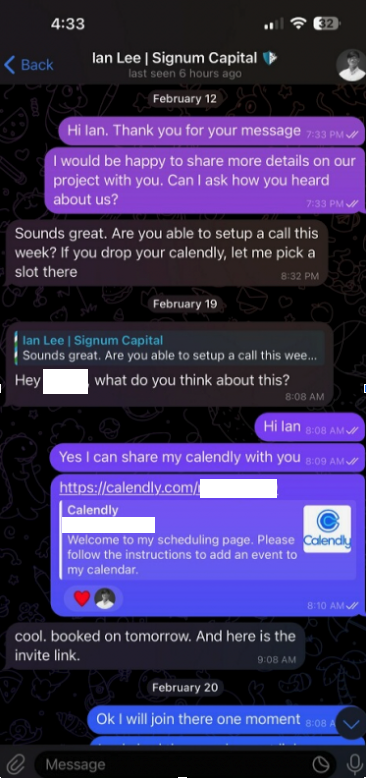
When the day and time of the scheduled meeting with Mr. Lee arrived, Doug clicked the meeting link in his calendar but nothing happened. Doug then messaged the Mr. Lee account on Telegram, who said there was some kind of technology issue with the video platform, and that their IT people suggested using a different meeting link.
Doug clicked the new link, but instead of opening up a videoconference app, a message appeared on his Mac saying the video service was experiencing technical difficulties.
“Some of our users are facing issues with our service,” the message read. “We are actively working on fixing these problems. Please refer to this script as a temporary solution.”
Doug said he ran the script, but nothing appeared to happen after that, and the videoconference application still wouldn’t start. Mr. Lee apologized for the inconvenience and said they would have to reschedule their meeting, but he never responded to any of Doug’s follow-up messages.
It didn’t dawn on Doug until days later that the missed meeting with Mr. Lee might have been a malware attack. Going back to his Telegram client to revisit the conversation, Doug discovered his potential investor had deleted the meeting link and other bits of conversation from their shared chat history.
In a post to its Twitter/X account last month, Signum Capital warned that a fake profile pretending to be their employee Mr. Lee was trying to scam people on Telegram.

The file that Doug ran is a simple Apple Script (file extension “.scpt”) that downloads and executes a malicious trojan made to run on macOS systems. Unfortunately for us, Doug freaked out after deciding he’d been tricked — backing up his important documents, changing his passwords, and then reinstalling macOS on his computer. While this a perfectly sane response, it means we don’t have the actual malware that was pushed to his Mac by the script.
But Doug does still have a copy of the malicious script that was downloaded from clicking the meeting link (the online host serving that link is now offline). A search in Google for a string of text from that script turns up a December 2023 blog post from cryptocurrency security firm SlowMist about phishing attacks on Telegram from North Korean state-sponsored hackers.
“When the project team clicks the link, they encounter a region access restriction,” SlowMist wrote. “At this point, the North Korean hackers coax the team into downloading and running a ‘location-modifying’ malicious script. Once the project team complies, their computer comes under the control of the hackers, leading to the theft of funds.”
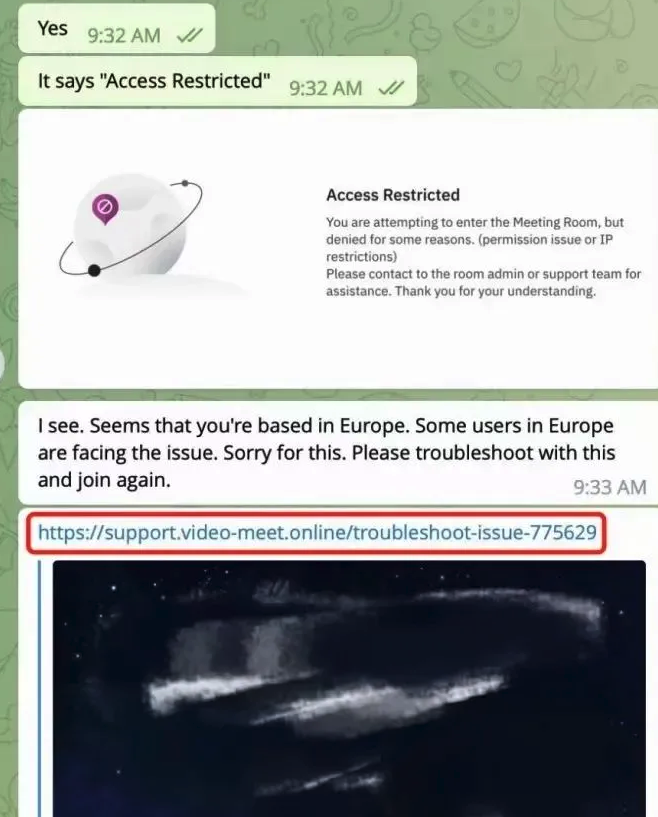
Image: SlowMist.
SlowMist says the North Korean phishing scams used the “Add Custom Link” feature of the Calendly meeting scheduling system on event pages to insert malicious links and initiate phishing attacks.
“Since Calendly integrates well with the daily work routines of most project teams, these malicious links do not easily raise suspicion,” the blog post explains. “Consequently, the project teams may inadvertently click on these malicious links, download, and execute malicious code.”
SlowMist said the malware downloaded by the malicious link in their case comes from a North Korean hacking group dubbed “BlueNoroff, which Kaspersky Labs says is a subgroup of the Lazarus hacking group.
“A financially motivated threat actor closely connected with Lazarus that targets banks, casinos, fin-tech companies, POST software and cryptocurrency businesses, and ATMs,” Kaspersky wrote of BlueNoroff in Dec. 2023.
The North Korean regime is known to use stolen cryptocurrencies to fund its military and other state projects. A recent report from Recorded Future finds the Lazarus Group has stolen approximately $3 billion in cryptocurrency over the past six years.
While there is still far more malware out there today targeting Microsoft Windows PCs, the prevalence of information-stealing trojans aimed at macOS users is growing at a steady clip. MacOS computers include X-Protect, Apple’s built-in antivirus technology. But experts say attackers are constantly changing the appearance and behavior of their malware to evade X-Protect.
“Recent updates to macOS’s XProtect signature database indicate that Apple are aware of the problem, but early 2024 has already seen a number of stealer families evade known signatures,” security firm SentinelOne wrote in January.
According to the threat hunting platform Hunt.io, the Internet address of the fake meeting website Doug was tricked into visiting (104.168.163,149) hosts or very recently hosted about 75 different domain names, many of which invoke words associated with videoconferencing or cryptocurrency. Those domains indicate this North Korean hacking group is hiding behind a number of phony crypto firms, like the six-month-old website for Cryptowave Capital (cryptowave[.]capital).

The increasing frequency of new Mac malware is a good reminder that Mac users should not depend on security software and tools to flag malicious files, which are frequently bundled with or disguised as legitimate software.
As KrebsOnSecurity has advised Windows users for years, a good rule of safety to live by is this: If you didn’t go looking for it, don’t install it. Following this mantra heads off a great deal of malware attacks, regardless of the platform used. When you do decide to install a piece of software, make sure you are downloading it from the original source, and then keep it updated with any new security fixes.
On that last front, I’ve found it’s a good idea not to wait until the last minute to configure my system before joining a scheduled videoconference call. Even if the call uses software that is already on my computer, it is often the case that software updates are required before the program can be used, and I’m one of those weird people who likes to review any changes to the software maker’s privacy policies or user agreements before choosing to install updates.
Most of all, verify new contacts from strangers before accepting anything from them. In this case, had Doug simply messaged Mr. Lee’s real account on Twitter/X or contacted Signum Capital directly, he would discovered that the real Mr. Lee never asked for a meeting.
If you’re approached in a similar scheme, the response from the would-be victim documented in the SlowMist blog post is probably the best.
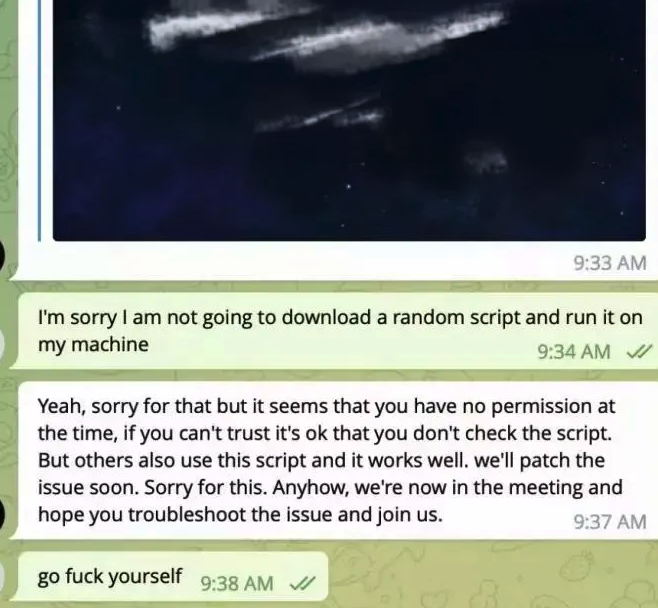
Image: SlowMist.
from Krebs on Security https://ift.tt/p2hgS50
via IFTTT




 Pacosite's Blog