Many organizations — including quite a few Fortune 500 firms — have exposed web links that allow anyone to initiate a Zoom video conference meeting as a valid employee. These company-specific Zoom links, which include a permanent user ID number and an embedded passcode, can work indefinitely and expose an organization’s employees, customers or partners to phishing and other social engineering attacks.

Image: @Pressmaster on Shutterstock.
At issue is the Zoom Personal Meeting ID (PMI), which is a permanent identification number linked to your Zoom account and serves as your personal meeting room available around the clock. The PMI portion forms part of each new meeting URL created by that account, such as:
zoom.us/j/5551112222
Zoom has an option to include an encrypted passcode within a meeting invite link, which simplifies the process for attendees by eliminating the need to manually enter the passcode. Following the previous example, such a link might look something like this:
zoom.us/j/5551112222/pwd=jdjsklskldklsdksdklsdkll
Using your PMI to set up new meetings is convenient, but of course convenience often comes at the expense of security. Because the PMI remains the same for all meetings, anyone with your PMI link can join any ongoing meeting unless you have locked the meeting or activated Zoom’s Waiting Room feature.
Including an encrypted passcode in the Zoom link definitely makes it easier for attendees to join, but it might open your meetings to unwanted intruders if not handled responsibly. Particularly if that Zoom link is somehow indexed by Google or some other search engine, which happens to be the case for thousands of organizations.
Armed with one of these links, an attacker can invite others using the identity of the authorized employee. And many companies using Zoom have made it easy to find recently created meeting links that include encrypted passcodes, because they have dedicated subdomains at Zoom.us.
For example, Citigroup has one, and it’s citi.zoom.us. Using the Wayback Machine at archive.org, KrebsOnSecurity was able to find multiple links at this address that opened working virtual meeting rooms at Citi.

One of the open Zoom meeting links for Citi.
Using the same method, KrebsOnSecurity also found working Zoom meeting links for Disney, Humana, JPMorgan Chase, LinkedIn, Nike, Oracle and Uber. And that was from just a few minutes of searching.
KrebsOnSecurity received a tip about the Zoom exposures from Charan Akiri, a researcher and security engineer at Reddit. In April 2023, this site featured research by Akiri showing that many public Salesforce websites were leaking private data, including banks and healthcare organizations (Akiri said Salesforce also had these open Zoom meeting links before he notified them).
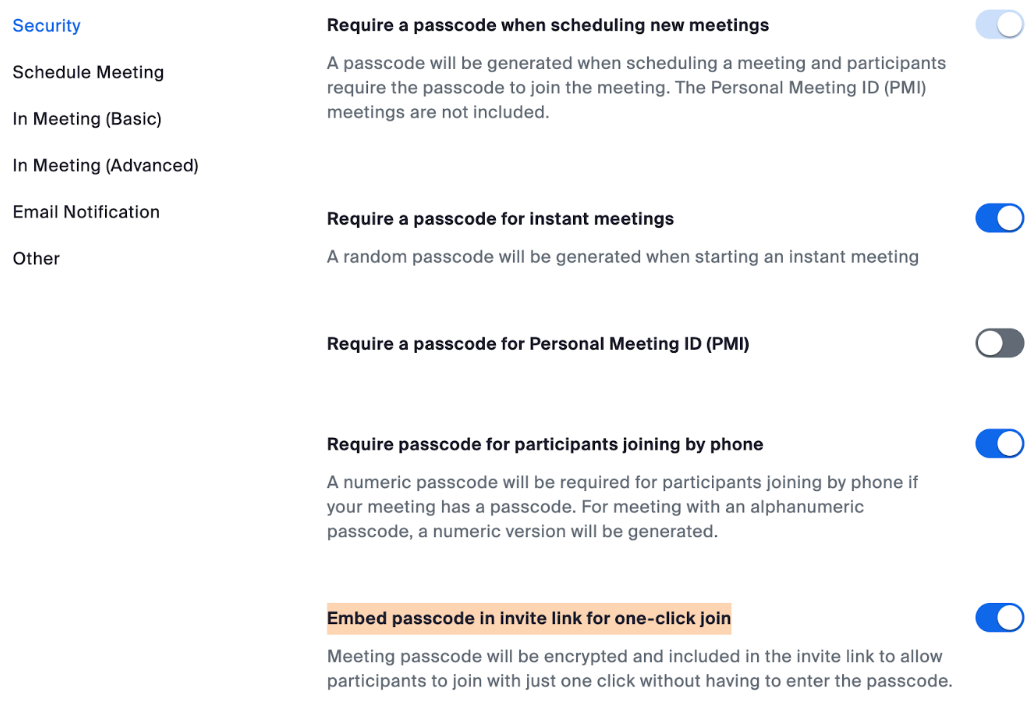
The Zoom links that exposed working meeting rooms all had enabled the highlighted option.
Charan said the misuse of PMI links, particularly those with passcodes embedded, can give unauthorized individuals access to meetings.
“These one-click links, which are not subject to expiration or password requirement, can be exploited by attackers for impersonation,” Charan said. “Attackers exploiting these vulnerabilities can impersonate companies, initiating meetings unknowingly to users. They can contact other employees or customers while posing as the company, gaining unauthorized access to confidential information, potentially for financial gain, recruitment, or fraudulent advertising campaigns.”
Akiri said he built a simple program to crawl the web for working Zoom meeting links from different organizations, and so far it has identified thousands of organizations with these perfectly functional zombie Zoom links.
According to Akiri, here are several tips for using Zoom links more safely:
Don’t Use Personal Meeting ID or Public Meetings: Your Personal Meeting ID (PMI) is the default meeting that launches when you start an ad hoc meeting. Your PMI doesn’t change unless you change it yourself, which makes it very useful if people need a way to reach you. But for public meetings, you should always schedule new meetings with randomly generated meeting IDs. That way, only invited attendees will know how to join your meeting. You can also turn off your PMI when starting an instant meeting in your profile settings.
Require a Passcode to Join: You can take meeting security even further by requiring a passcode to join your meetings. This feature can be applied to both your Personal Meeting ID, so only those with the passcode will be able to reach you, and to newly scheduled meetings. To learn all the ways to add a passcode for your meetings, see this support article.
Only Allow Registered or Domain Verified Users: Zoom can also give you peace of mind by letting you know exactly who will be attending your meeting. When scheduling a meeting, you can require attendees to register with their email, name, and custom questions. You can even customize your registration page with a banner and logo. By default, Zoom also restricts participants to those who are logged into Zoom, and you can even restrict it to Zoom users whose email address uses a certain domain.
from Krebs on Security https://ift.tt/on7wdlg
via IFTTT



 Pacosite's Blog