
By Mike Isaac and Cade Metz
The company said it would give outside programmers access to the latest version of its core artificial intelligence technology.
Published: July 18, 2023 at 09:50AM
from NYT Technology https://ift.tt/wV8jlkY
via IFTTT

By Mike Isaac and Cade Metz
The company said it would give outside programmers access to the latest version of its core artificial intelligence technology.
Published: July 18, 2023 at 09:50AM
from NYT Technology https://ift.tt/wV8jlkY
via IFTTT
[This is Part III in a series on research conducted for a recent Hulu documentary on the 2015 hack of marital infidelity website AshleyMadison.com.]
In 2019, a Canadian company called Defiant Tech Inc. pleaded guilty to running LeakedSource[.]com, a service that sold access to billions of passwords and other data exposed in countless data breaches. KrebsOnSecurity has learned that the owner of Defiant Tech, a 32-year-old Ontario man named Jordan Evan Bloom, was hired in late 2014 as a developer for the marital infidelity site AshleyMadison.com. Bloom resigned from AshleyMadison citing health reasons in June 2015 — less than one month before unidentified hackers stole data on 37 million users — and launched LeakedSource three months later.

Jordan Evan Bloom, posing in front of his Lamborghini.
On Jan. 15, 2018, the Royal Canadian Mounted Police (RCMP) charged then 27-year-old Bloom, of Thornhill, Ontario, with selling stolen personal identities online through the website LeakedSource[.]com.
LeakedSource was advertised on a number of popular cybercrime forums as a service that could help hackers break into valuable or high-profile accounts. LeakedSource also tried to pass itself off as a legal, legitimate business that was marketing to security firms and professionals.
The RCMP arrested Bloom in December 2017, and said he made approximately $250,000 selling hacked data, which included information on 37 million user accounts leaked in the 2015 Ashley Madison breach.
Subsequent press releases from the RCMP about the LeakedSource investigation omitted any mention of Bloom, and referred to the defendant only as Defiant Tech. In a legal settlement that is quintessentially Canadian, the matter was resolved in 2019 after Defiant Tech agreed to plead guilty. The RCMP did not respond to requests for comment.
The Impact Team, the hacker group that claimed responsibility for stealing and leaking the AshleyMadison user data, also leaked several years worth of email from then-CEO Noel Biderman. A review of those messages shows that Ashley Madison hired Jordan Evan Bloom as a PHP developer in December 2014 — even though the company understood that Bloom’s success as a programmer and businessman was tied to shady and legally murky enterprises.
Bloom’s recommendation came to Biderman via Trevor Sykes, then chief technology officer for Ashley Madison parent firm Avid Life Media (ALM). The following is an email from Sykes to Biderman dated Nov. 14, 2014:
“Greetings Noel,
“We’d like to offer Jordan Bloom the position of PHP developer reporting to Mike Morris for 75k CAD/Year. He did well on the test, but he also has a great understanding of the business side of things having run small businesses himself. This was an internal referral.”
When Biderman responded that he needed more information about the candidate, Sykes replied that Bloom was independently wealthy as a result of his forays into the shadowy world of “gold farming” — the semi-automated use of large numbers of player accounts to win some advantage that is usually related to cashing out game accounts or inventory. Gold farming is particularly prevalent in massively multiplayer online role-playing games (MMORPGs), such as RuneScape and World of Warcraft.
“In his previous experience he had been doing RMT (Real Money Trading),” Sykes wrote. “This is the practice of selling virtual goods in games for real world money. This is a grey market, which is usually against the terms and services of the game companies.” Here’s the rest of his message to Biderman:
“RMT sellers traditionally have a lot of problems with chargebacks, and payment processor compliance. During my interview with him, I spent some time focusing in on this. He had to demonstrate to the processor, Paypal, at the time he had a business and technical strategy to address his charge back rate.”
“He ran this company himself, and did all the coding, including the integration with the processors,” Sykes continued in his assessment of Bloom. “Eventually he was squeezed out by Chinese gold farmers, and their ability to market with much more investment than he could. In addition the cost of ‘farming’ the virtual goods was cheaper in China to do than in North America.”
The gold farming reference is fascinating because in 2017 KrebsOnSecurity published Who Ran LeakedSource?, which examined clues suggesting that one of the administrators of LeakedSource also was the admin of abusewith[.]us, a site unabashedly dedicated to helping people hack email and online gaming accounts.
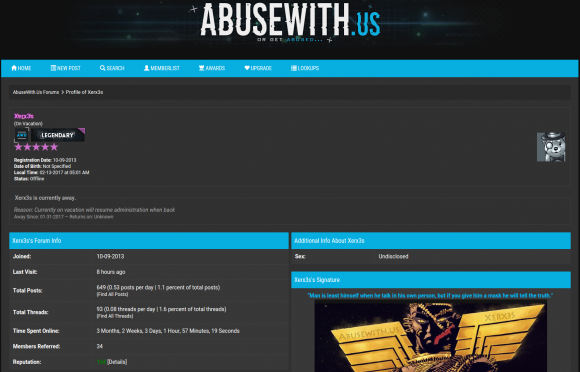
An administrator account Xerx3s on Abusewithus.
Abusewith[.]us began in September 2013 as a forum for learning and teaching how to hack accounts at Runescape, an MMORPG set in a medieval fantasy realm where players battle for kingdoms and riches.
The currency with which Runescape players buy and sell weapons, potions and other in-game items are virtual gold coins, and many of Abusewith[dot]us’s early members traded in a handful of commodities: Phishing kits and exploits that could be used to steal Runescape usernames and passwords from fellow players; virtual gold plundered from hacked accounts; and databases from hacked forums and websites related to Runescape and other online games.
That 2017 report here interviewed a Michigan man who acknowledged being administrator of Abusewith[.]us, but denied being the operator of LeakedSource. Still, the story noted that LeakedSource likely had more than one operator, and breached records show Bloom was a prolific member of Abusewith[.]us.
In an email to all employees on Dec. 1, 2014, Ashley Madison’s director of HR said Bloom graduated from York University in Toronto with a degree in theoretical physics, and that he has been an active programmer since high school.
“He’s a proprietor of a high traffic multiplayer game and developer/publisher of utilities such as PicTrace,” the HR director enthused. “He will be a great addition to the team.”
PicTrace appears to have been a service that allowed users to glean information about anyone who viewed an image hosted on the platform, such as their Internet address, browser type and version number. A copy of pictrace[.]com from Archive.org in 2012 redirects to the domain qksnap.com, which DomainTools.com says was registered to a Jordan Bloom from Thornhill, ON that same year.
The street address listed in the registration records for qksnap.com — 204 Beverley Glen Blvd — also shows up in the registration records for leakadvisor[.]com, a domain registered in 2017 just months after Canadian authorities seized the servers running LeakedSource.
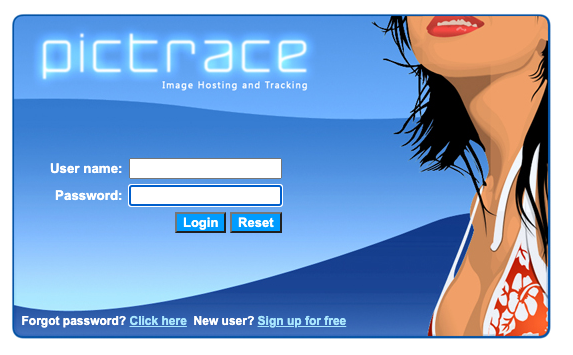
Pictrace, one of Jordan Bloom’s early IT successes.
A review of passive DNS records from DomainTools indicates that in 2013 pictrace[.]com shared a server with just a handful of other domains, including Near-Reality[.]com — a popular RuneScape Private Server (RSPS) game based on the RuneScape MMORPG.
Copies of near-reality[.]com from 2013 via Archive.org show the top of the community’s homepage was retrofitted with a message saying Near Reality was no longer available due to a copyright dispute. Although the site doesn’t specify the other party to the copyright dispute, it appears Near-Reality got sued by Jagex, the owner of RuneScape.
The message goes on to say the website will no longer “encourage, facilitate, enable or condone (i) any infringement of copyright in RuneScape or any other Jagex product; nor (ii) any breach of the terms and conditions of RuneScape or any other Jagex product.”

A scene from the MMORPG RuneScape.
Near Reality also has a Facebook page that was last updated in 2019, when its owner posted a link to a news story about Defiant Tech’s guilty plea in the LeakedSource investigation. That Facebook page indicates Bloom also went by the nickname “Agentjags.”
“Just a quick PSA,” reads a post to the Near Reality Facebook page dated Jan. 21, 2018, which linked to a story about the charges against Bloom and a photo of Bloom standing in front of his lime-green Lamborghini. “Agentjags has got involved in some shady shit that may have compromised your personal details. I advise anyone who is using an old NR [Near Reality] password for anything remotely important should change it ASAP.”
By the beginning of 2016, Bloom was nowhere to be found, and was suspected of having fled his country for the Caribbean, according to the people commenting on the Near Reality Facebook page:
“Jordan aka Agentjags has gone missing,” wrote a presumed co-owner of the Facebook page. “He is supposedly hiding in St. Lucia, doing what he loved, scuba-diving. Any information to his whereabouts will be appreciated.”
KrebsOnSecurity ran the unusual nickname “AgentJags” through a search at Constella Intelligence, a commercial service that tracks breached data sets. That search returned just a few dozen results — and virtually all were accounts at various RuneScape-themed sites, including a half-dozen accounts at Abusewith[.]us.
Constella found other “AgentJags” accounts tied to the email address ownagegaming1@gmail.com. The marketing firm Apollo.io experienced a data breach several years back, and according to Apollo the email address ownagegaming1@gmail.com belongs to Jordan Bloom in Ontario.
Constella also revealed that the password frequently used by ownagegaming1@gmail.com across many sites was some variation on “niggapls,” which my 2017 report found was also the password used by the administrator of LeakedSource.
Curiously, Constella discovered that the email eric.malek@rogers.com comes up when one searches for “AgentJags.” This is curious because emails leaked from Ashley Madison’s then-CEO Biderman show that Eric Malek from Toronto was the Ashley Madison employee who initially recommended Bloom for the PHP developer job.
According to DomainTools.com, Eric.Malek@rogers.com was used to register the domain devjobs.ca, which previously advertised “the most exciting developer jobs in Canada, delivered to you weekly.” Constella says eric.malek@rogers.com also had an account at Abusewith[.]us — under the nickname “Jags.”
Biderman’s email records show Eric Malek was also a PHP developer for Ashley Madison, and that he was hired into this position just a few months before Bloom — on Sept. 2, 2014.
The CEO’s leaked emails show Eric Malek resigned from his developer position at Ashley Madison on June 19, 2015 — just four days before Bloom would announce his departure. Both men left the company less than a month before the Impact Team announced they’d hacked Ashley Madison, and both said they were leaving for health-related reasons.
“Please note that Eric Malek has resigned from this position with Avid and his last day will be June 19th,” read a June 5, 2015 email from ALM’s HR director. “He is resigning to deal with some personal issues which include health issues. Because he is not sure how much time it will take to resolve, he is not requesting a leave of absence (his time off will be indefinite). Overall, he likes the company and plans to reach out to Trevor or I when the issues are resolved to see what is available at that time.”
A follow-up email from Biderman demanded, “want to know where he’s truly going….,” and it’s unclear why there was friction with Malek’s departure. But ALM General Counsel Avi Weisman replied indicating that Malek probably would not sign an “Exit Acknowledgment Form” prior to leaving, and that the company had unanswered questions for Malek.
“Aneka should dig during exit interview,” Weisman wrote. “Let’s see if he balks at signing the Acknowledgment.”
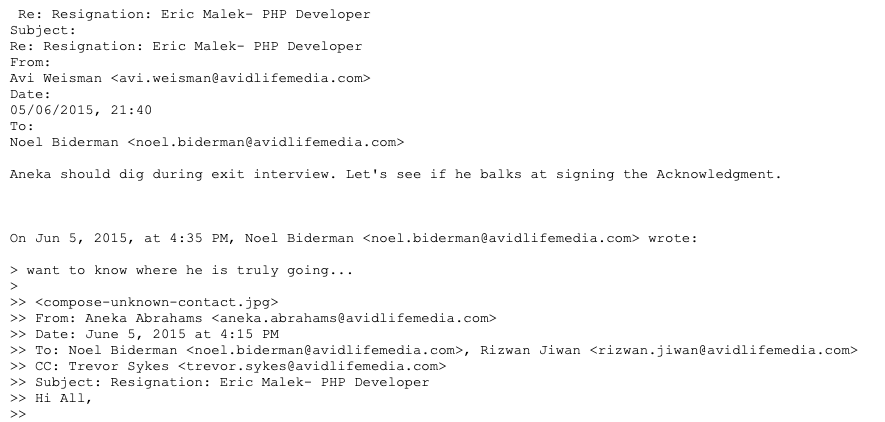
An email dated June 5, 2015, from ALM General Counsel to Biderman, regarding an exit interview with Malek.
Bloom’s departure notice from Ashley Madison’s HR person, dated June 23, 2015, read:
“Please note that Jordan Bloom has resigned from his position as PHP Developer with Avid. He is leaving for personal reasons. He has a neck issue that will require surgery in the upcoming months and because of his medical appointment schedule and the pain he is experiencing he can no longer commit to a full-time schedule. He may pick up contract work until he is back to 100%.”
A follow-up note to Biderman about this announcement read:
“Note that he has disclosed that he is independently wealthy so he can get by without FT work until he is on the mend. He has signed the Exit Acknowledgement Form already without issue. He also says he would consider reapplying to Avid in the future if we have opportunities available at that time.”
Perhaps Mr. Bloom hurt his neck from craning it around blind spots in his Lamborghini. Maybe it was from a bad scuba outing. Whatever the pain in Bloom’s neck was, it didn’t stop him from launching himself fully into LeakedSource[.]com, which was registered roughly one month after the Impact Team leaked data on 37 million Ashley Madison accounts.
Mr. Malek did not respond to multiple requests for comment. A now-deleted LinkedIn profile for Malek from December 2018 listed him as a “technical recruiter” from Toronto who also attended Mr. Bloom’s alma mater — York University. That resume did not mention Mr. Malek’s brief stint as a PHP developer at Ashley Madison.
“Developer, entrepreneur, and now technical recruiter of the most uncommon variety!” Mr. Malek’s LinkedIn profile enthused. “Are you a developer, or other technical specialist, interested in working with a recruiter who can properly understand your concerns and aspirations, technical, environmental and financial? Don’t settle for a ‘hack’; this is your career, let’s do it right! Connect with me on LinkedIn. Note: If you are not a resident of Canada/Toronto, I cannot help you.”
Mr. Bloom told KrebsOnSecurity he had no role in harming or hacking Ashley Madison. Bloom validated his identity by responding at one of the email addresses mentioned above, and agreed to field questions so long as KrebsOnSecurity agreed to publish our email conversation in full (PDF).
Bloom said Mr. Malek did recommend him for the Ashley Madison job, but that Mr. Malek also received a $5,000 referral bonus for doing so. Given Mr. Malek’s stated role as a technical recruiter, it seems likely he also recommended several other employees to Ashley Madison.
Bloom was asked whether anyone at the RCMP, Ashley Madison or any authority anywhere ever questioned him in connection with the July 2015 hack of Ashley Madison. He replied that he was called once by someone claiming to be from the Toronto Police Service asking if he knew anything about the Ashley Madison hack.
“The AM situation was not something they pursued according to the RCMP disclosure,” Bloom wrote. “Learning about the RCMP’s most advanced cyber investigative techniques and capabilities was very interesting though. I was eventually told information by a third party which included knowledge that law enforcement effectively knew who the hacker was, but didn’t have enough evidence to proceed with a case. That is the extent of my involvement with any authorities.”
As to his company’s guilty plea for operating LeakedSource, Bloom maintains that the judge at his preliminary inquiry found that even if everything the Canadian government alleged was true it would not constitute a violation of any law in Canada with respect the charges the RCMP leveled against him, which included unauthorized use of a computer and “mischief to data.”
“In Canada at the lower court level we are allowed to possess stolen information and manipulate our copies of them as we please,” Bloom said. “The judge however decided that a trial was required to determine whether any activities of mine were reckless, as the other qualifier of intentionally criminal didn’t apply. I will note here that nothing I was accused of doing would have been illegal if done in the United States of America according to their District Attorney. +1 for free speech in America vs freedom of expression in Canada.”
“Shortly after their having most of their case thrown out, the Government proposed an offer during a closed door meeting where they would drop all charges against me, provide full and complete personal immunity, and in exchange the Corporation which has since been dissolved would plead guilty,” Bloom continued. “The Corporation would also pay a modest fine.”
Bloom said he left Ashley Madison because he was bored, but he acknowledged starting LeakedSource partly in response to the Ashley Madison hack.
“I intended to leverage my gaming connections to get into security work including for other private servers such as Minecraft communities and others,” Bloom said. “After months of asking management for more interesting tasks, I became bored. Some days I had virtually nothing to do except spin in my chair so I would browse the source code for security holes to fix because I found it enjoyable.”
“I believe the decision to start LS [LeakedSource] was partly inspired by the AM hack itself, and the large number of people from a former friend group messaging me asking if XYZ person was in the leak after I revealed to them that I downloaded a copy and had the ability to browse it,” Bloom continued. “LS was never my idea – I was just a builder, and the only Canadian. In other countries it was never thought to be illegal on closer examination of their laws.”
Bloom said he still considers himself independently wealthy, and that still has the lime green Lambo. But he said he’s currently unemployed and can’t seem to land a job in what he views as his most promising career path: Information security.
“As I’m sure you’re aware, having negative media attention associated with alleged (key word) criminal activity can have a detrimental effect on employment, banking and relationships,” Bloom wrote. “I have no current interest in being a business owner, nor do I have any useful business ideas to be honest. I was and am interested in interesting Information Security/programming work but it’s too large of a risk for any business to hire someone who was formerly accused of a crime.”
If you liked this story, please consider reading the first two pieces in this series:
SEO Expert Hired and Fired by Ashley Madison Turned on Company, Promising Revenge
Top Suspect in 2015 Ashley Madison Hack Committed Suicide in 2014
from Krebs on Security https://ift.tt/bdQEYH5
via IFTTT
Global Gateway: EU builds new partnership for improved Latin American and Caribbean health technologies with Pan American Health Organisation
Cristina Mitchell
18 Jul 2023
from PAHO/WHO | Pan American Health Organization https://ift.tt/8siG3ZU
via IFTTT
Forget waiting all day for repairs. You supply the can-do attitude, and we’ll supply the tool picks.
from Gear Latest https://ift.tt/r4DuyG3
via IFTTT

Aquí en LXA tenemos algunos artículos sobre Timeshift, una herramienta que sirve para hacer copias de seguridad de nuestro sistema operativo basado en Linux. En uno de ellos se explica qué es, y en otro cómo instalarlo en Linux. Ambos son artículos que podríamos etiquetar como de archivo, estando más actualizado el que nos habla del software y algo más obsoleto el de su instalación. Lo que no tenemos es un artículo que explique cómo usar el programa.
Como ya dijo mi compañero Isaac en su día, lo cierto es que Timeshift es un programa muy sencillo que básicamente es ir siempre hacia adelante, pero es comprensible hasta cierto punto ese temor que tienen algunos usuarios de zambullirse en cualquier charco que no conozcan. Por ese motivo, y porque acaban de publicar cómo actualizar a una nueva versión de Linux Mint y usar Timeshift es uno de los pasos recomendados, me he decidido a escribir este artículo.
(adsbygoogle = window.adsbygoogle || []).push({});
Podría seguir el artículo hablando sobre cómo instalar Timeshift, pero me pasaría como a Joaquín y es probable que, pasados unos meses/años, ese apartado sólo sirva para confundir porque las cosas son diferentes. Yo sí puedo decir que en la actualidad está en los repositorios oficiales de Ubuntu o Manjaro, que ahora es parte del software de Linux Mint (es una XApp) y es el proyecto que lidera Clem Lefebvre quien se encarga de su mantenimiento. Si una distribución no ofrece el software en sus repositorios, la página de GitHub es esta, en la que se menciona que es una XApp. Los sistemas basados en Arch lo tienen en AUR.
Cómo hemos explicado, el uso de Timeshift es más bien ir hacia adelante una vez ya está instalado.

(adsbygoogle = window.adsbygoogle || []).push({});
Siempre que lo abramos nos pedirá la contraseña, y tras introducirla podremos configurar cómo queremos que se hagan las copias.
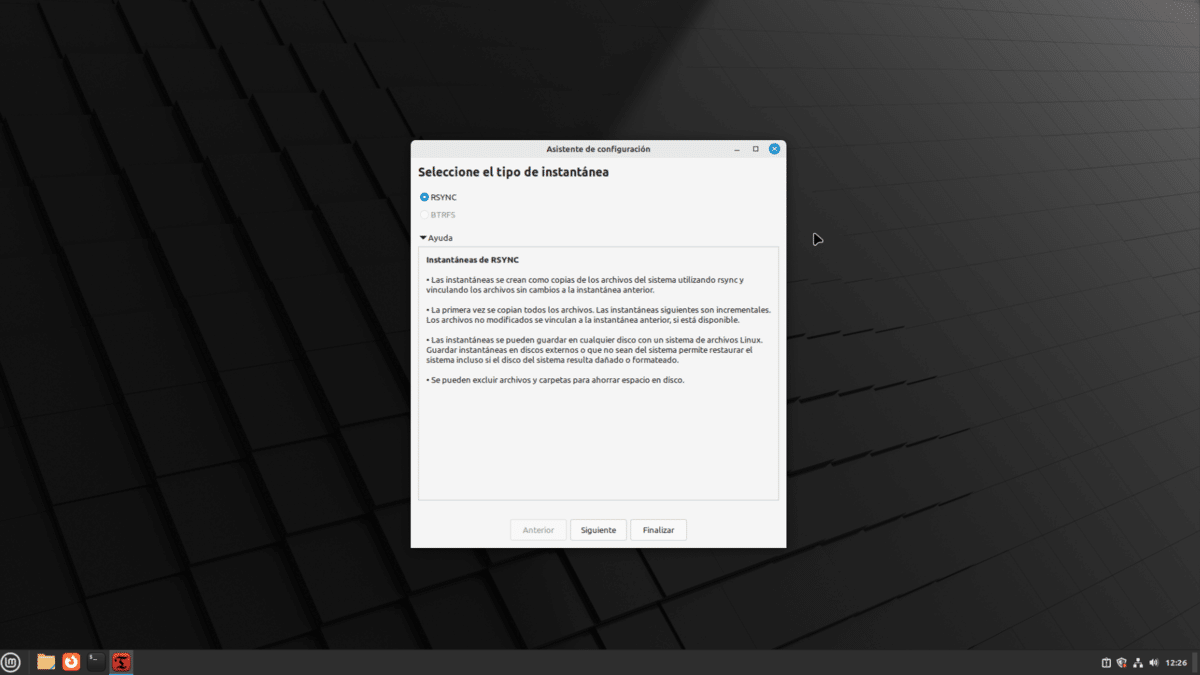
Lo primero que veremos será el tipo de instantánea que queremos hacer. Haciendo clic en «Ayuda» veremos cómo es cada una. Tenemos que elegir lo que mejor se ajuste a nuestras necesidades. Leyendo como funciona cada una, parece que la opción BTRFS es más potente, pero tiene que usarse en una unidad formateada con ese formato.
(adsbygoogle = window.adsbygoogle || []).push({});
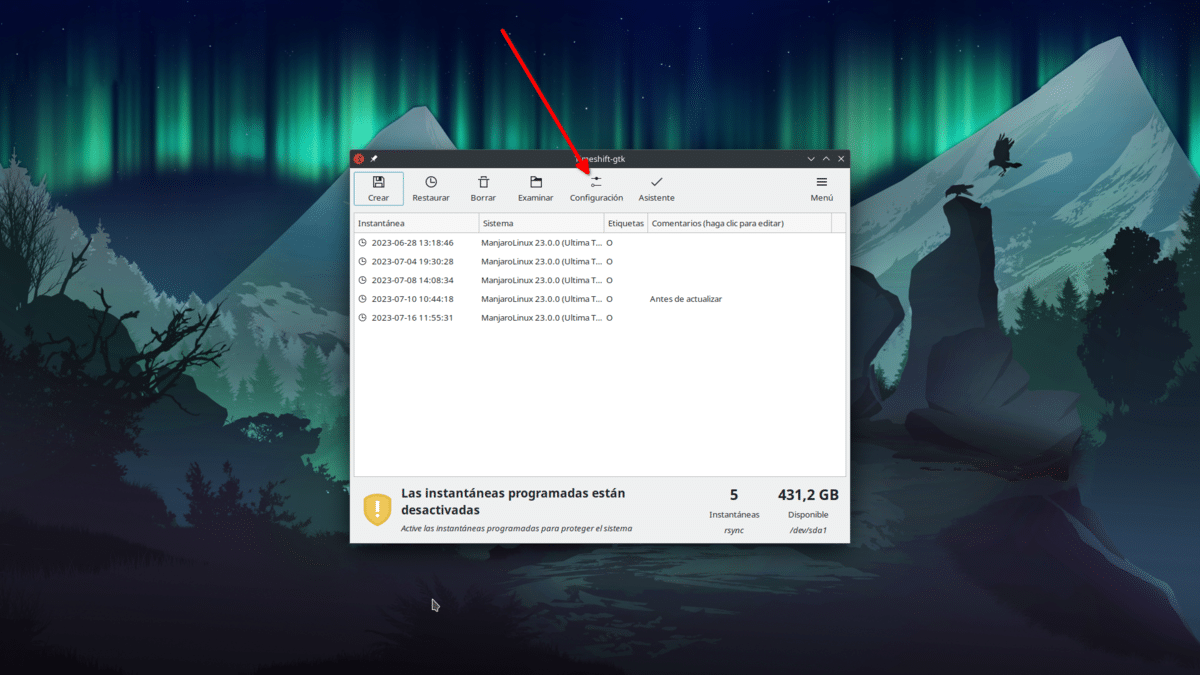
Una vez dentro se verá algo como lo anterior, pero sin ninguna instantánea. El fondo de pantalla no os cambiará, tranquilos. A mí me ha cambiado porque he empezado con Linux Mint (para iniciar de cero) y luego he seguido en mi Manjaro. Para realizar la configuración haremos clic en su botón. Veremos algo como lo siguiente:
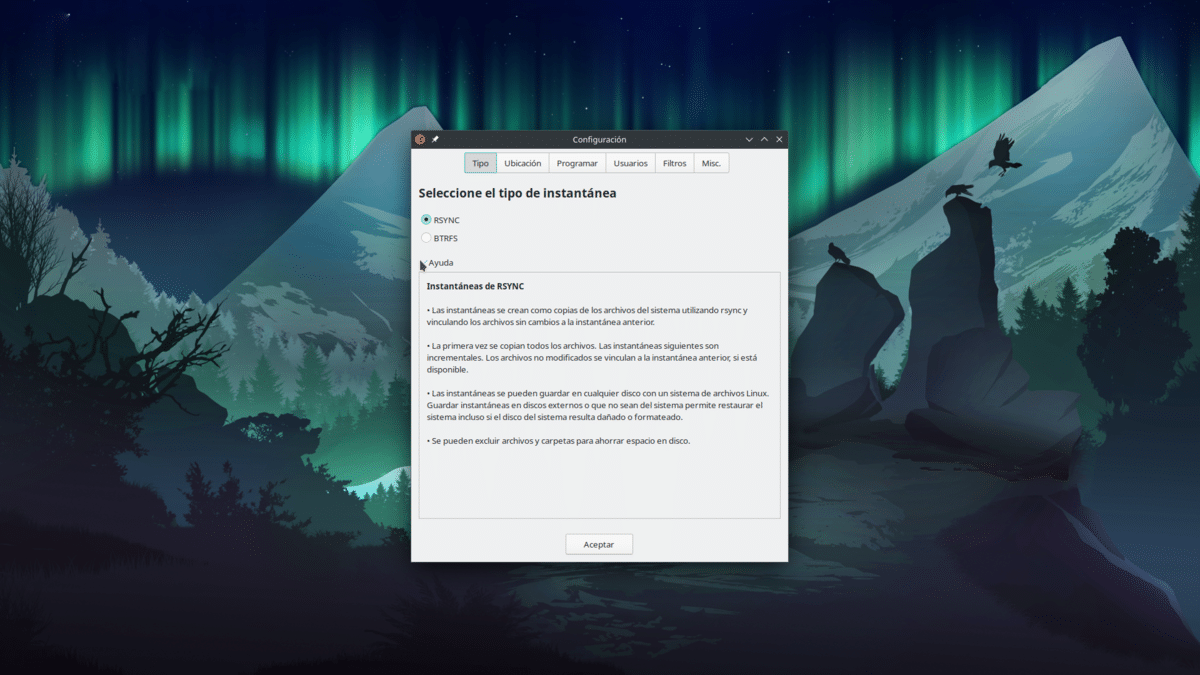
La primera pestaña es la del tipo de instantánea y es igual que la anterior, con la diferencia de que en esta ventana de configuración también podemos acceder al resto de parámetros.
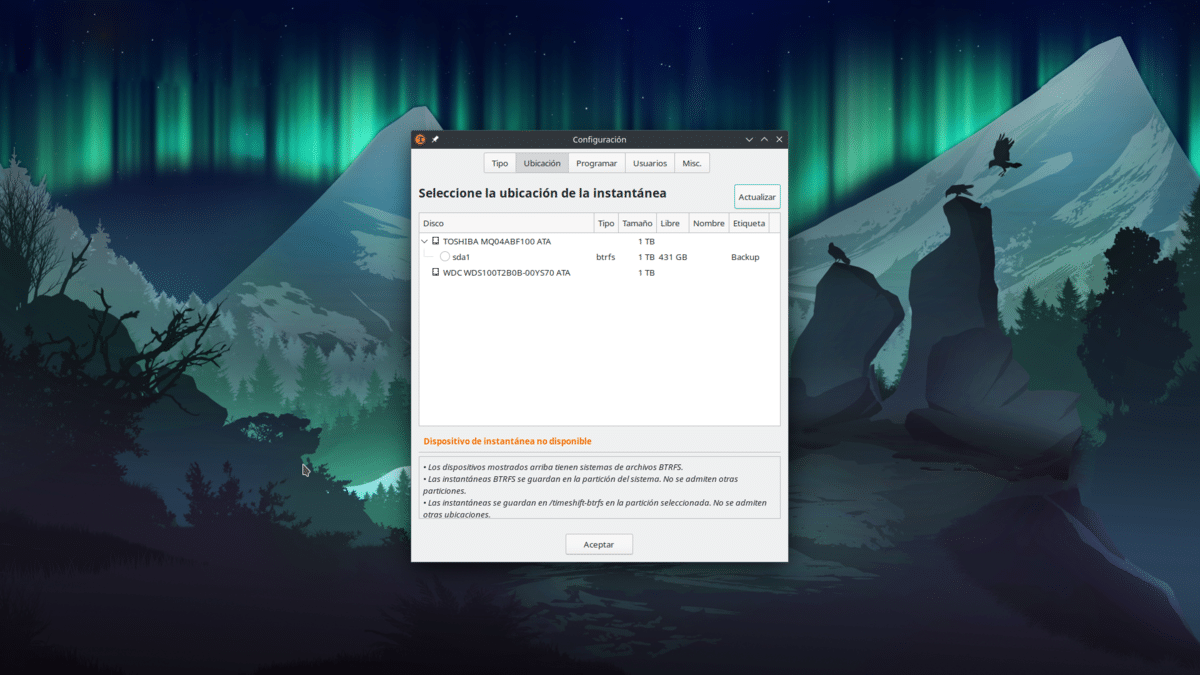
La siguiente pestaña es la de la ubicación, es decir, dónde se harán las copias de seguridad. Seleccionamos la unidad en donde queremos las copias.
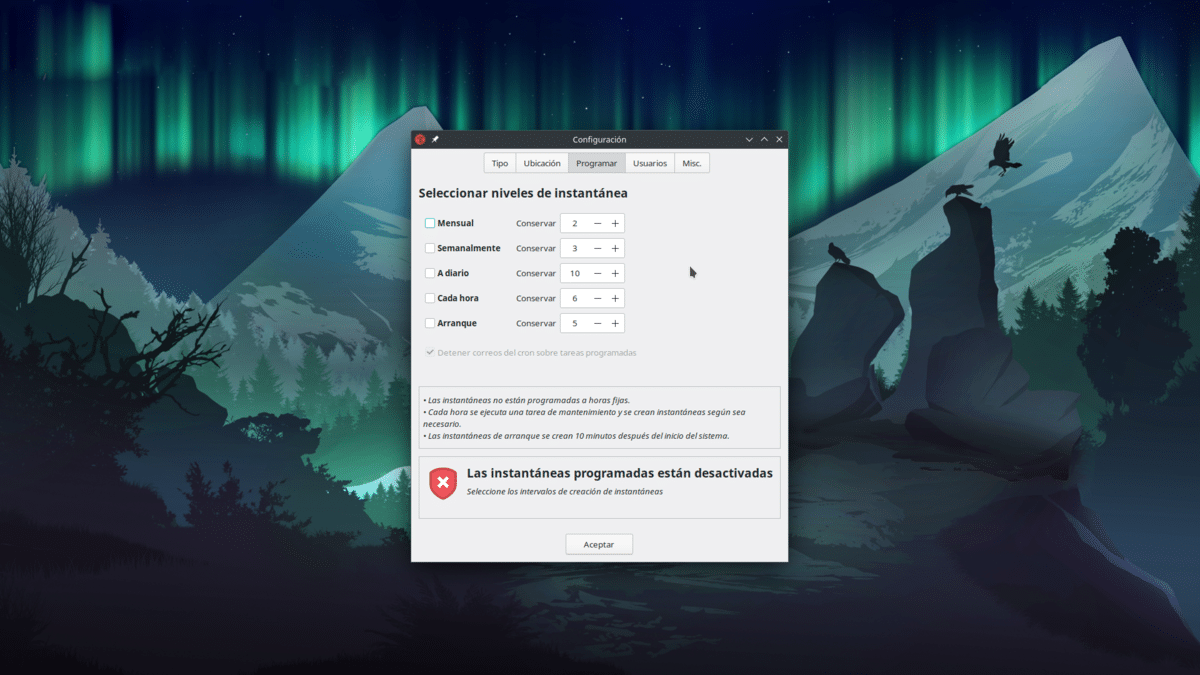
Desde la pestaña «Programar» programaremos las copias automáticas. Podemos elegir entre mensual, semanal, diaria, a cada hora o al iniciar el sistema operativo, y no son excluyentes. También podemos indicar el número que debe guardar de cada tipo de copia. Si ponemos que almacene 5 y se llega a ese tope, irá eliminando las más antiguas.

Desde Usuarios podremos indicar si se incluye en las copias el subvolumen @home.
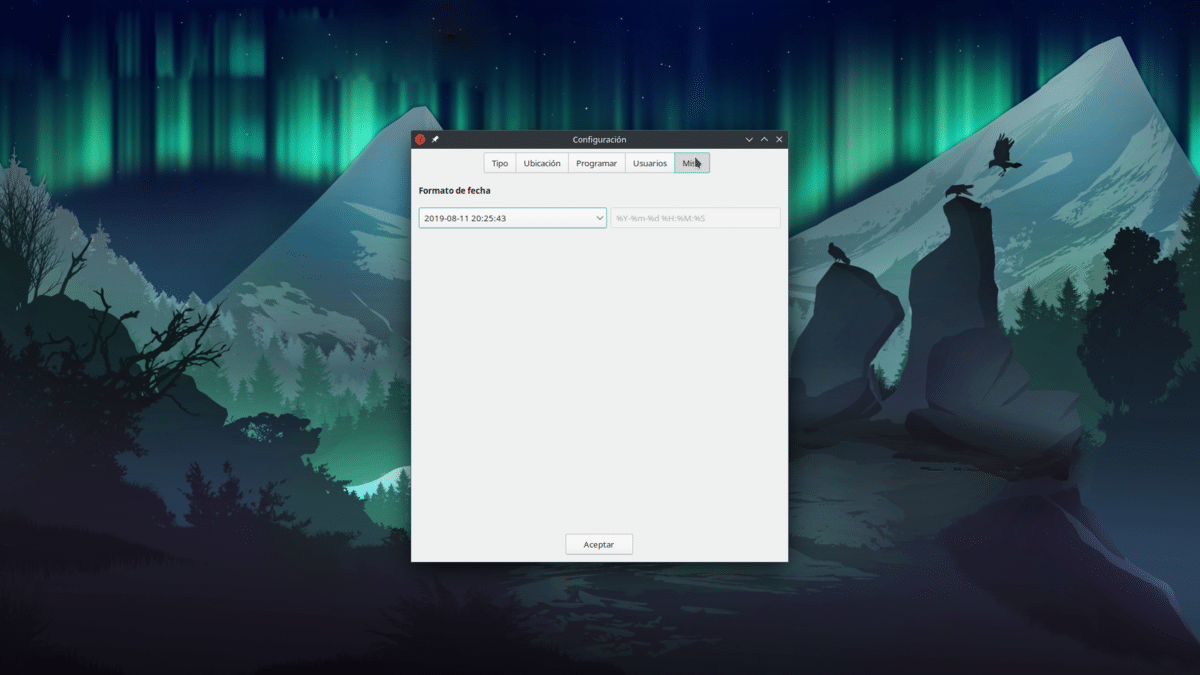
Y por último, en Misc., en el momento de escribir este artículo podemos indicar cómo se muestra la fecha y la hora. Al hacer clic en Aceptar ya estará todo preparado. Si hemos indicado que haga copias automáticas, las hará como le hayamos indicado.
En la ventana principal tenemos los botones de:
Aunque todo es bastante sencillo, sí me gustaría explicar algo: las copias de seguridad se hacen iniciando un proceso, y en ocasiones no podremos, por ejemplo, apagar el equipo hasta que finalice o el mismo Timeshift haga lo necesario para parar la copia de seguridad. Puede que nunca lo notemos, pero es una posibilidad. Por otra parte, si no se hacen muchos cambios, las nuevas copias se hacen a partir de las anteriores, y examinar los cambios y añadirlos a una nueva copia puede ser cuestión de segundos.
Se use el software que se use, merece la pena tener siempre una copia de seguridad de nuestros archivos más importantes, y Timeshift es una de las opciones más sencillas y eficaces.
from Linux Adictos https://ift.tt/7IEv8fo
via IFTTT

Linux Mint 21.2 «Victoria» se puede descargar desde el pasado domingo. Para ser fieles a la verdad, se puede desde pocos días antes, pero el día 16 es cuando se hizo pública su disponibilidad. Cuando Clem Lefebvre o alguien de su equipo dice que hay disponible una nueva versión de Linux Mint, lo que está pasando es que ya se pueden descargar las nueva ISOs, pero aún no se puede actualizar. Ese momento llega días después.
Cuando he empezado a escribir este artículo aún no hacía ni una hora desde que la cuenta oficial de Linux Mint en Twitter había publicado el artículo con las instrucciones necesarias para actualizar a Linux Mint 21.2 «Victoria» desde versiones anteriores. El enlace es este, pero nosotros vamos a publicar la guía a nuestra manera y con capturas y texto en español; WordPress hará lo suyo y, como siempre, traducirá el artículo a otros muchos idiomas.
La siguiente guía no es más que un reflejo de la original. Hay pasos que se pueden omitir, pero todo lo explicado aquí es lo recomendado.
(adsbygoogle = window.adsbygoogle || []).push({});


(adsbygoogle = window.adsbygoogle || []).push({});


(adsbygoogle = window.adsbygoogle || []).push({});


La primera frase de la guía indica que «ahora es posible actualizar Linux Mint 21 y 21.1 a 21.2«, por lo tanto, sólo están soportadas las versiones que empiecen por el número 21. Los usuarios que están en Linux Mint 20 o anteriores deben realizar el proceso tantas veces como sea necesario. Por ejemplo, los de Linux Mint 20 que quieran subir a 21.2 deben subir primero a la versión 21 que muestre el gestor de actualizaciones y luego a 21.2.
Lo recomendable sería subir a saltos lo más pequeños posibles, o dicho de otro modo actualizar cada seis meses. En el caso de que alguien prefiera quedarse más tiempo en una versión anterior, posible porque son todas LTS, lo único que hay que hacer es actualizar sólo los nuevos paquetes, olvidándose de la opción de Editar/Actualizar a Linux Mint X.
Para nuevas instalaciones, en nuestro artículo sobre la disponibilidad de Linux Mint 21.2 «Victoria» tenemos los enlaces para descargar las ISO, que recordamos que hay opciones Cinnamon, MATE y Xfce.
from Linux Adictos https://ift.tt/ulEzONx
via IFTTT
Even my 6′ 3″ dad loved this versatile, comfortable city stroller.
from Gear Latest https://ift.tt/ZJjp1GI
via IFTTT
Childhood immunization begins recovery after COVID-19 backslide
Cristina Mitchell
18 Jul 2023
from PAHO/WHO | Pan American Health Organization https://ift.tt/MwW6UdE
via IFTTT

By Kashmir Hill
An advanced version of ChatGPT can analyze images and is already helping the blind. But its ability to put a name to a face is one reason the public doesn’t have access to it.
Published: July 18, 2023 at 03:00AM
from NYT Technology https://ift.tt/2kXEA7Z
via IFTTT
 Pacosite's Blog