VMware Flaw a Vector in SolarWinds Breach?

U.S. government cybersecurity agencies warned this week that the attackers behind the widespread hacking spree stemming from the compromise at network software firm SolarWinds used weaknesses in other, non-SolarWinds products to attack high-value targets. According to sources, among those was a flaw in software virtualization platform VMware, which the U.S. National Security Agency (NSA) warned on Dec. 7 was being used by Russian hackers to impersonate authorized users on victim networks.

On Dec. 7, 2020, the NSA said “Russian state-sponsored malicious cyber actors are exploiting a vulnerability in VMware Access and VMware Identity Manager products, allowing the actors access to protected data and abusing federated authentication.”
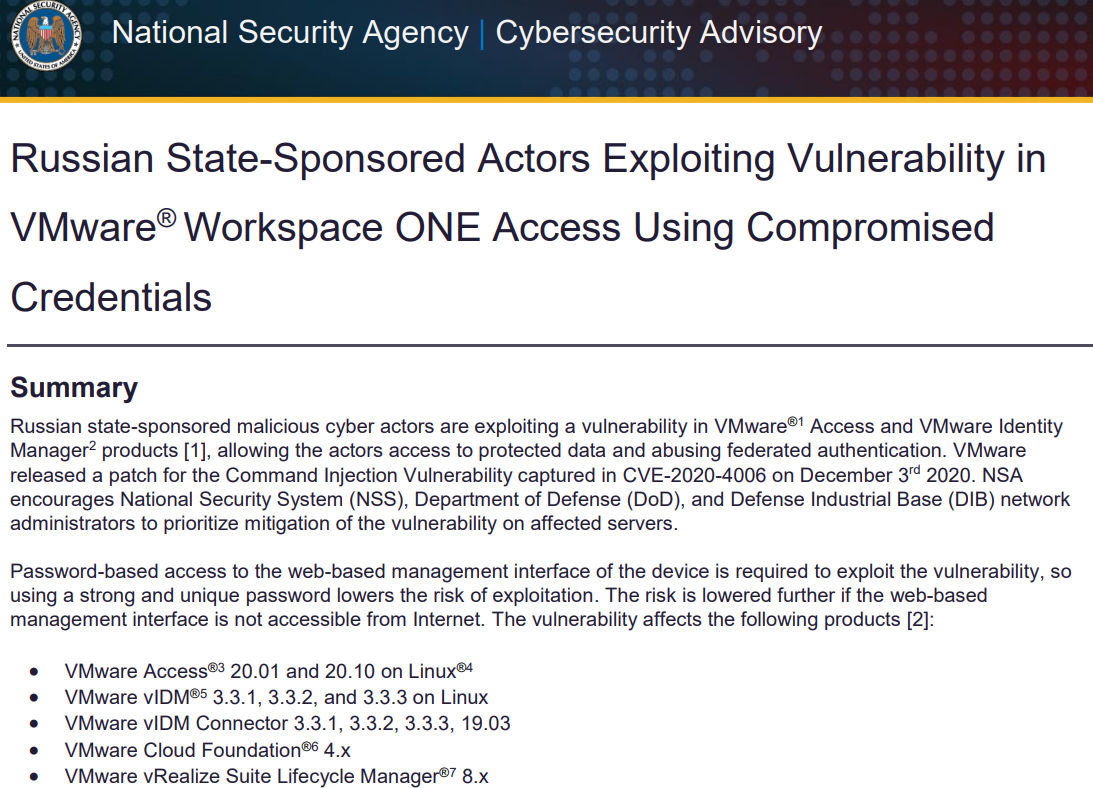
VMware released a software update to plug the security hole (CVE-2020-4006) on Dec. 3, and said it learned about the flaw from the NSA.

The NSA advisory (PDF) came less than 24 hours before cyber incident response firm FireEye said it discovered attackers had broken into its networks and stolen more than 300 proprietary software tools the company developed to help customers secure their networks.

On Dec. 13, FireEye disclosed that the incident was the result of the SolarWinds compromise, which involved malicious code being surreptitiously inserted into updates shipped by SolarWinds for users of its Orion network management software as far back as March 2020.

In its advisory on the VMware vulnerability, the NSA urged patching it “as soon as possible,” specifically encouraging the National Security System, Department of Defense, and defense contractors to make doing so a high priority.

The NSA said that in order to exploit this particular flaw, hackers would already need to have access to a vulnerable VMware device’s management interface — i.e., they would need to be on the target’s internal network (provided the vulnerable VMware interface was not accessible from the Internet). However, the SolarWinds compromise would have provided that internal access nicely.

In response to questions from KrebsOnSecurity, VMware said it has “received no notification or indication that the CVE 2002-4006 was used in conjunction with the SolarWinds supply chain compromise.”

VMware added that while some of its own networks used the vulnerable SolarWinds Orion software, an investigation has so far revealed no evidence of exploitation.

“While we have identified limited instances of the vulnerable SolarWinds Orion software in our environment, our own internal investigation has not revealed any indication of exploitation,” the company said in a statement. “This has also been confirmed by SolarWinds own investigations to date.”

On Dec. 17, DHS’s Cyber Security and Infrastructure Security Agency (CSIA) released a sobering alert on the SolarWinds attack, noting that CISA had evidence of additional access vectors other than the SolarWinds Orion platform.

CSIA’s advisory specifically noted that “one of the principal ways the adversary is accomplishing this objective is by compromising the Security Assertion Markup Language (SAML) signing certificate using their escalated Active Directory privileges. Once this is accomplished, the adversary creates unauthorized but valid tokens and presents them to services that trust SAML tokens from the environment. These tokens can then be used to access resources in hosted environments, such as email, for data exfiltration via authorized application programming interfaces (APIs).”

Indeed, the NSA’s Dec. 7 advisory said the hacking activity it saw involving the VMware vulnerability “led to the installation of a web shell and follow-on malicious activity where credentials in the form of SAML authentication assertions were generated and sent to Microsoft Active Directory Federation Services (ADFS), which in turn granted the actors access to protected data.”

Also on Dec. 17, the NSA released a far more detailed advisory explaining how it has seen the VMware vulnerability being used to forge SAML tokens, this time specifically referencing the SolarWinds compromise.

CSIA’s analysis suggested the crooks behind the SolarWinds intrusion were heavily focused on impersonating trusted personnel on targeted networks, and that they’d devised clever ways to bypass multi-factor authentication (MFA) systems protecting networks they targeted.

The bulletin references research released earlier this week by security firm Volexity, which described encountering the same attackers using a novel technique to bypass MFA protections provided by Duo for Microsoft Outlook Web App (OWA) users.

Duo’s parent Cisco Systems Inc. responded that the attack described by Volexity didn’t target any specific vulnerability in its products. As Ars Technica explained, the bypass involving Duo’s protections could have just as easily involved any of Duo’s competitors.

“MFA threat modeling generally doesn’t include a complete system compromise of an OWA server,” Ars’ Dan Goodin wrote. “The level of access the hacker achieved was enough to neuter just about any defense.”

Several media outlets, including The New York Times and The Washington Post, have cited anonymous government sources saying the group behind the SolarWinds hacks was known as APT29 or “Cozy Bear,” an advanced threat group believed to be part of the Russian Federal Security Service (FSB).

SolarWinds has said almost 18,000 customers may have received the backdoored Orion software updates. So far, only a handful of customers targeted by the suspected Russian hackers behind the SolarWinds compromise have been made public — including the U.S. Commerce, Energy and Treasury departments, and the DHS.

No doubt we will hear about new victims in the public and private sector in the coming days and weeks. In the meantime, thousands of organizations are facing incredibly costly, disruptive and time-intensive work in determining whether they were compromised and if so what to do about it.

The CSIA advisory notes the attackers behind the SolarWinds compromises targeted key personnel at victim firms — including cyber incident response staff, and IT email accounts. The warning suggests organizations that suspect they were victims should assume their email communications and internal network traffic are compromised, and rely upon or build out-of-band systems for discussing internally how they will proceed to clean up the mess.

“If the adversary has compromised administrative level credentials in an environment—or if organizations identify SAML abuse in the environment, simply mitigating individual issues, systems, servers, or specific user accounts will likely not lead to the adversary’s removal from the network,” CSIA warned. “In such cases, organizations should consider the entire identity trust store as compromised. In the event of a total identity compromise, a full reconstitution of identity and trust services is required to successfully remediate. In this reconstitution, it bears repeating that this threat actor is among the most capable, and in many cases, a full rebuild of the environment is the safest action.”

from Krebs on Security https://ift.tt/3mvmqYb
via IFTTT

El Samsung Galaxy S20 FE empieza a actualizarse a Android 11 y One UI 3.0

El Samsung Galaxy S20 FE empieza a actualizarse a Android 11 y One UI 3.0

El despliegue de One UI 3.0 o lo que es lo mismo, la capa de personalización de Samsung y Android 11 sigue su camino. No sabemos si será de baldosas amarilla, pero por ahora ya ha empezado a llegar a los Samsung Galaxy S20 y al Galaxy Note 20 Ultra. Dos modelos a los que ahora se suma el Samsung Galaxy S20 FE, que ha comenzado a actualizar antes de lo previsto.

Hace unos días conocimos cuál era el calendario de actualizaciones de Samsung para Europa en lo que respecta a Android 11 y su ultima capa de personalización. Un listado encabezado por la familia Galaxy S20 en el que el Galaxy S20 FE quedaba fuera y en lugar de diciembre, quedaba relegado al mes de febrero. Por eso llama la atención este cambio en las fechas. Continue reading

Más cosas sobre Python. Los componentes del lenguaje

Más cosas sobre Python
En el artículo anterior habíamos comentado las razones de por qué aprender el lenguaje de programación Python y como tener la última versión. Llegó el momento de aprender los componentes del lenguaje con algunos ejemplos.

Más cosas sobre Python. Las herramientas para empezar

Pip

Python tiene muchos módulos que ahorran tiempo de escritura de código porque traen preprogramadas funciones que necesitamos. Aunque algunos de ellos vienen preinstalados otros debemos agregarlos a medida que los necesitamos.

Hay dos formas fáciles de agregarlos; desde los repositorios de tu distribución (como si fueran un programas normal) o utilizando un gestor de paquetes llamado PIP. El segundo método nos asegura tener las versiones más actuales.

Importante
Recuerda que el comando para lanzar programas es python3 nombre_del_programa y no python nombre_del_programa.

Comprobemos si tenemos instalado PIP
pip3 -V

Deberías recibir un mensaje parecido a este
pip 20.2.3 from /usr/local/lib/python3.9/site-packages/pip (python 3.9)
En caso de que no tengas instalado Pip puedes hacerlo desde el gestor de paquetes de tu distribución. Necesitas el paquete
python3-pip

Ingresando y mostrando datos

Vamos a escribir nuestro primer programa. Es probable que si copias y pegas los programas, no funcionen. Te recomiendo que los tipees. Asegúrate de respetar los espacios o no funcionarán.

print("¡Hola!")
nombre=input("¿Cómo te llamas? ")
print("¡Bienvenido/a!", nombre, ".Gracias por leer Linux Adictos")

En la primera línea del programa imprimimos el mensaje de saludo. En la segunda definimos una variable llamada «mombre» y le asignamos como valor la respuesta a la pregunta ¿Cómo te llamas?. Nota que Input cumple dos funciones, la de mostrar un mensaje y asignarle a la variable el valor de la respuesta.

En la tercera línea vuelve el comando print imprimiendo dos tipos de contenidos. El saludo predefinido (Qué siempre va entre comillas) y el valor de la variable (Las variables van siempre sin comillas. El contenido variable y no variable se separa con una coma (,).

Intentemos una modificación

print("¡Hola!")
nombre=input("¿Cómo te llamas? " )
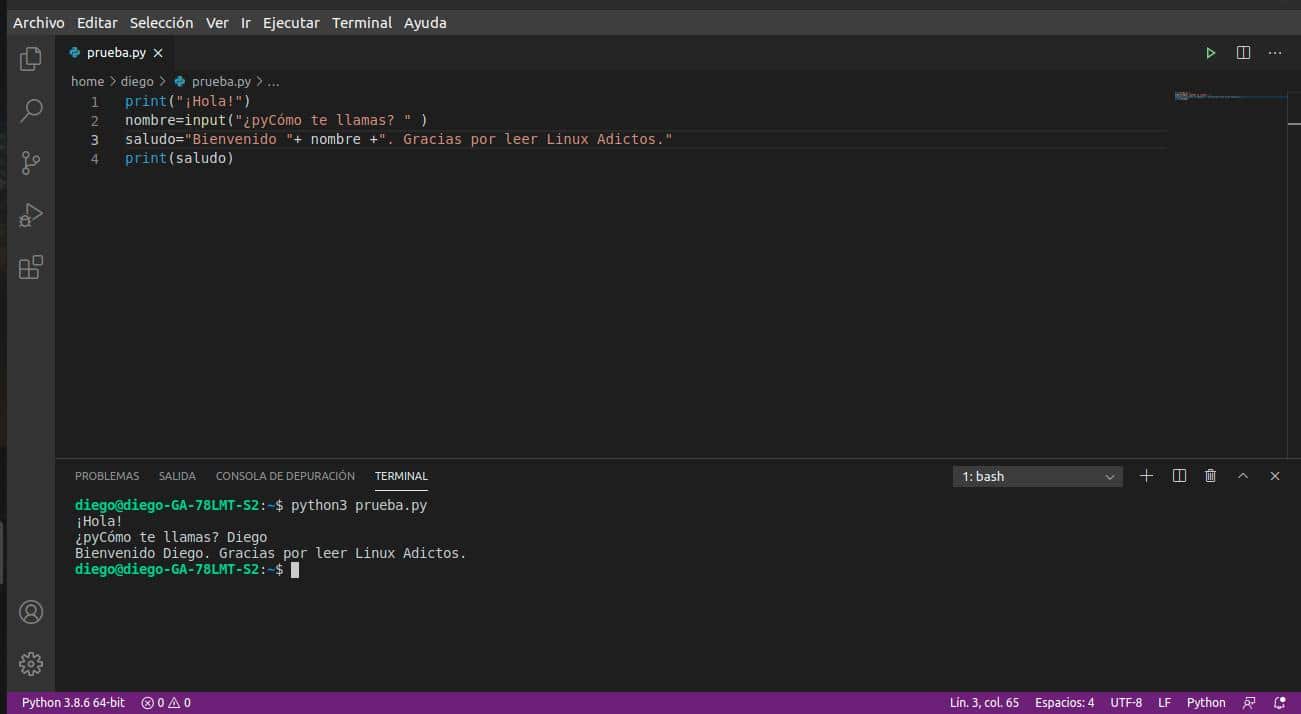
saludo="Bienvenido "+ nombre +". Gracias por leer Linux Adictos"
print(saludo)

En la tercera línea asignamos a la variable «saludo» una combinación de texto predefinido (entre comillas) y el valor de la variable (sin comillas)

Módulos

Tener que escribir una serie de instrucciones en código cada vez que se necesita es una pérdida de tiempo y espacio. Sobre todo si se trata de un programa extenso. Es por eso que lo mejor es utilizar un entorno integrado de desarrollo y escribir un programa largo (script en la jerga) para que luego lo ejecute el intérprete.

A medida que el programa se alarga, lo aconsejable es dividirlo en varios archivos para facilitar su mantenimiento y la reutilización. Para eso se utilizan los módulos.

Los módulos son archivos que contienen definiciones y declaraciones en Python. El nombre del archivo es el nombre del módulo terminado en .py. Por ejemplo, nosotros crearemos un módulo llamado Bienvenida.py. Dentro de un módulo, el nombre del módulo (como cadena) está disponible como el valor de la variable global __nombre__.

Ten en cuenta lo que dije más arriba de los espacios. Nota que la segunda, tercera y cuarta líneas del programa comienzan justo debajo del espacio entre la palabra def y la palabra Bienvenida. Esto es requerido por Python y lo explicaremos en los siguientes artículos.

En la primera línea definimos una función llamada Bienvenida. Las tres líneas siguientes son las instrucciones que tienen que ejecutarse cada vez que se llama a la función.

En la línea 5 definimos el contenido de la variable publicación que la última instrucción de la función necesita para imprimir el mensaje de bienvenida.

Con la última línea del programa, ejecutamos la función.

Probemos otra cosa. Crea dos archivos. Uno llamado Bienvenida.py y el otro prueba. py.

En Bienvenida.py escribe estas líneas:
def Bienvenida():
   publicacion="Linux adictos"
   nombre=input("¿Cómo te llamas ")
   saludo="Bienvenido "+nombre+" Gracias por leer "+publicacion
   print(saludo)

En prueba.py escribe:
from Bienvenida import Bienvenida
Bienvenida()
Lo que estamos haciendo es separar la función y la llamada a la función en dos archivos separados.


from Linux Adictos https://ift.tt/37x6mAW
via IFTTT

basename y dirname: dos comandos que deberías conocer

terminal shell comandos Linux

A veces, algunos tutoriales van dirigidos a explicar comandos algo más exóticos y extraños, en cambio, existen algunos que incluyen las distribuciones de serie y no son tan populares como cd, ls, cat, etc., pero que son igualmente prácticos. En este tutorial te mostraré lo que se puede realizar con dos de esos comandos: basename y dirname.

Quizás a priori te parezcan absurdos y que no tienen ninguna utilidad, pero tienen aplicaciones bastante prácticas en algunos casos como, por ejemplo, en los scripts donde se necesita extraer alguna parte de una ruta, como el nombre del fichero o el directorio para que otro comando opere sobre esto…

Para qué sirven

Estos comandos son muy básicos, y sus funciones son:

  • basename: sirve para extraer el nombre del fichero de una ruta.
  • dirname: sirve para extraer el nombre del directorio de una ruta.

Ejemplos de uso

Aquí puedes ver algunos ejemplos de cómo usarlos:

  • Por ejemplo, para usar basename con /etc/passwd, y que te devuelva en su salida el nombre del fichero, en este caso passwd:

basename /etc/passwd

  • También puedes especificar una extensión para que te de el nombre del fichero sin la extensión. Por ejemplo, imagina que quieras extraer el nombre de una imagen /home/media/prueba.jpg sin la extensión jpg (devolvería prueba):

basename -s .jpg /home/media/prueba.jpg

  • Incluso puedes procesar varias rutas a la vez por separado, para ello tienes que usar la opción -a:

basename -a /etc/passwd /var/log/boot.log

  • Para hacer lo contrario, y que te de el nombre del directorio, sin el nombre del fichero, entonces tienes que usar dirname. Por ejemplo, si quieres usarlo en la ruta /var/spool/mail/prueba.txt y que te devuelva /var/spool/mail, entonces usa:

dirname /var/spool/mail/prueba.txt

En cuanto a una utilidad en un script, aquí tienes otro ejemplo. Imagina que tienes un script simple, y que en él hay una ruta que es variable. Pero quieres que muestre el directorio que contiene un fichero, independientemente del fichero, en ese caso podrías tener algo como:


pathname="/home/usuario/data/fichero"

result=$(dirname "$pathname")

echo $result

Evidentemente, en este script el «pathname» sería siempre ese mismo estático declarado por la constante del principio, pero pueden darse casos en los que no lo sea, y es ahí donde se vuelve práctico. Por ejemplo:


/*script para convertir una imagen gif en png*/

#!/bin/sh
for file in *.gif;do
    #Salir si no hay ficheros
    if [! -f $file];then
        exit
    fi
    b='basename $file .gif'
    echo NOW $b.gif is $b.png
    giftopnm $b.gif | pnmtopng >$b.png
done

from Linux Adictos https://ift.tt/37tMhLJ
via IFTTT