Thousands of people graduate from colleges and universities each year with cybersecurity or computer science degrees only to find employers are less than thrilled about their hands-on, foundational skills. Here’s a look at a recent survey that identified some of the bigger skills gaps, and some thoughts about how those seeking a career in these fields can better stand out from the crowd.

Virtually every week KrebsOnSecurity receives at least one email from someone seeking advice on how to break into cybersecurity as a career. In most cases, the aspirants ask which certifications they should seek, or what specialization in computer security might hold the brightest future.
Rarely am I asked which practical skills they should seek to make themselves more appealing candidates for a future job. And while I always preface any response with the caveat that I don’t hold any computer-related certifications or degrees myself, I do speak with C-level executives in cybersecurity and recruiters on a regular basis and frequently ask them for their impressions of today’s cybersecurity job candidates.
A common theme in these C-level executive responses is that a great many candidates simply lack hands-on experience with the more practical concerns of operating, maintaining and defending the information systems which drive their businesses.
Granted, most people who have just graduated with a degree lack practical experience. But happily, a somewhat unique aspect of cybersecurity is that one can gain a fair degree of mastery of hands-on skills and foundational knowledge through self-directed study and old fashioned trial-and-error.
One key piece of advice I nearly always include in my response to readers involves learning the core components of how computers and other devices communicate with one another. I say this because a mastery of networking is a fundamental skill that so many other areas of learning build upon. Trying to get a job in security without a deep understanding of how data packets work is a bit like trying to become a chemical engineer without first mastering the periodic table of elements.
But please don’t take my word for it. The SANS Institute, a Bethesda, Md. based security research and training firm, recently conducted a survey of more than 500 cybersecurity practitioners at 284 different companies in an effort to suss out which skills they find most useful in job candidates, and which are most frequently lacking.
The survey asked respondents to rank various skills from “critical” to “not needed.” Fully 85 percent ranked networking as a critical or “very important” skill, followed by a mastery of the Linux operating system (77 percent), Windows (73 percent), common exploitation techniques (73 percent), computer architectures and virtualization (67 percent) and data and cryptography (58 percent). Perhaps surprisingly, only 39 percent ranked programming as a critical or very important skill (I’ll come back to this in a moment).
How did the cybersecurity practitioners surveyed grade their pool of potential job candidates on these critical and very important skills? The results may be eye-opening:
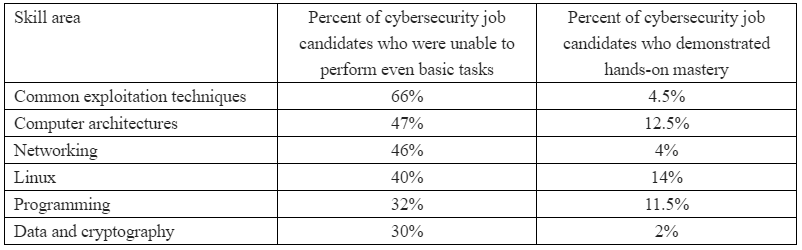
“Employers report that student cybersecurity preparation is largely inadequate and are frustrated that they have to spend months searching before they find qualified entry-level employees if any can be found,” said Alan Paller, director of research at the SANS Institute. “We hypothesized that the beginning of a pathway toward resolving those challenges and helping close the cybersecurity skills gap would be to isolate the capabilities that employers expected but did not find in cybersecurity graduates.”
The truth is, some of the smartest, most insightful and talented computer security professionals I know today don’t have any computer-related certifications under their belts. In fact, many of them never even went to college or completed a university-level degree program.
Rather, they got into security because they were passionately and intensely curious about the subject, and that curiosity led them to learn as much as they could — mainly by reading, doing, and making mistakes (lots of them).
I mention this not to dissuade readers from pursuing degrees or certifications in the field (which may be a basic requirement for many corporate HR departments) but to emphasize that these should not be viewed as some kind of golden ticket to a rewarding, stable and relatively high-paying career.
More to the point, without a mastery of one or more of the above-mentioned skills, you simply will not be a terribly appealing or outstanding job candidate when the time comes.
BUT..HOW?
So what should you focus on, and what’s the best way to get started? First, understand that while there are a near infinite number of ways to acquire knowledge and virtually no limit to the depths you can explore, getting your hands dirty is the fastest way to learning.
No, I’m not talking about breaking into someone’s network, or hacking some poor website. Please don’t do that without permission. If you must target third-party services and sites, stick to those that offer recognition and/or incentives for doing so through bug bounty programs, and then make sure you respect the boundaries of those programs.
Besides, almost anything you want to learn by doing can be replicated locally. Hoping to master common vulnerability and exploitation techniques? There are innumerable free resources available; purpose-built exploitation toolkits like Metasploit, WebGoat, and custom Linux distributions like Kali Linux that are well supported by tutorials and videos online. Then there are a number of free reconnaissance and vulnerability discovery tools like Nmap, Nessus, OpenVAS and Nikto. This is by no means a complete list.
Set up your own hacking labs. You can do this with a spare computer or server, or with older hardware that is plentiful and cheap on places like eBay or Craigslist. Free virtualization tools like VirtualBox can make it simple to get friendly with different operating systems without the need of additional hardware.
Or look into paying someone else to set up a virtual server that you can poke at. Amazon’s EC2 services are a good low-cost option here. If it’s web application testing you wish to learn, you can install any number of web services on computers within your own local network, such as older versions of WordPress, Joomla or shopping cart systems like Magento.
Want to learn networking? Start by getting a decent book on TCP/IP and really learning the network stack and how each layer interacts with the other.
And while you’re absorbing this information, learn to use some tools that can help put your newfound knowledge into practical application. For example, familiarize yourself with Wireshark and Tcpdump, handy tools relied upon by network administrators to troubleshoot network and security problems and to understand how network applications work (or don’t). Begin by inspecting your own network traffic, web browsing and everyday computer usage. Try to understand what applications on your computer are doing by looking at what data they are sending and receiving, how, and where.
ON PROGRAMMING
While being able to program in languages like Go, Java, Perl, Python, C or Ruby may or may not be at the top of the list of skills demanded by employers, having one or more languages in your skillset is not only going to make you a more attractive hire, it will also make it easier to grow your knowledge and venture into deeper levels of mastery.
It is also likely that depending on which specialization of security you end up pursuing, at some point you will find your ability to expand that knowledge is somewhat limited without understanding how to code.
For those intimidated by the idea of learning a programming language, start by getting familiar with basic command line tools on Linux. Just learning to write basic scripts that automate specific manual tasks can be a wonderful stepping stone. What’s more, a mastery of creating shell scripts will pay handsome dividends for the duration of your career in almost any technical role involving computers (regardless of whether you learn a specific coding language).
GET HELP
Make no mistake: Much like learning a musical instrument or a new language, gaining cybersecurity skills takes most people a good deal of time and effort. But don’t get discouraged if a given topic of study seems overwhelming at first; just take your time and keep going.
That’s why it helps to have support groups. Seriously. In the cybersecurity industry, the human side of networking takes the form of conferences and local meetups. I cannot stress enough how important it is for both your sanity and career to get involved with like-minded people on a semi-regular basis.
Many of these gatherings are free, including Security BSides events, DEFCON groups, and OWASP chapters. And because the tech industry continues to be disproportionately populated by men, there are also a number cybersecurity meetups and membership groups geared toward women, such as the Women’s Society of Cyberjutsu and others listed here.
Unless you live in the middle of nowhere, chances are there’s a number of security conferences and security meetups in your general area. But even if you do reside in the boonies, the good news is many of these meetups are going virtual to avoid the ongoing pestilence that is the COVID-19 epidemic.
In summary, don’t count on a degree or certification to prepare you for the kinds of skills employers are going to understandably expect you to possess. That may not be fair or as it should be, but it’s likely on you to develop and nurture the skills that will serve your future employer(s) and employability in this field.
I’m certain that readers here have their own ideas about how newbies, students and those contemplating a career shift into cybersecurity can best focus their time and efforts. Please feel free to sound off in the comments. I may even update this post to include some of the better recommendations.
from Krebs on Security https://ift.tt/32R7cXi
via IFTTT






 Pacosite's Blog