Maybe you were once advised to “look for the padlock” as a means of telling legitimate e-commerce sites from phishing or malware traps. Unfortunately, this has never been more useless advice. New research indicates that half of all phishing scams are now hosted on Web sites whose Internet address includes the padlock and begins with “https://”.
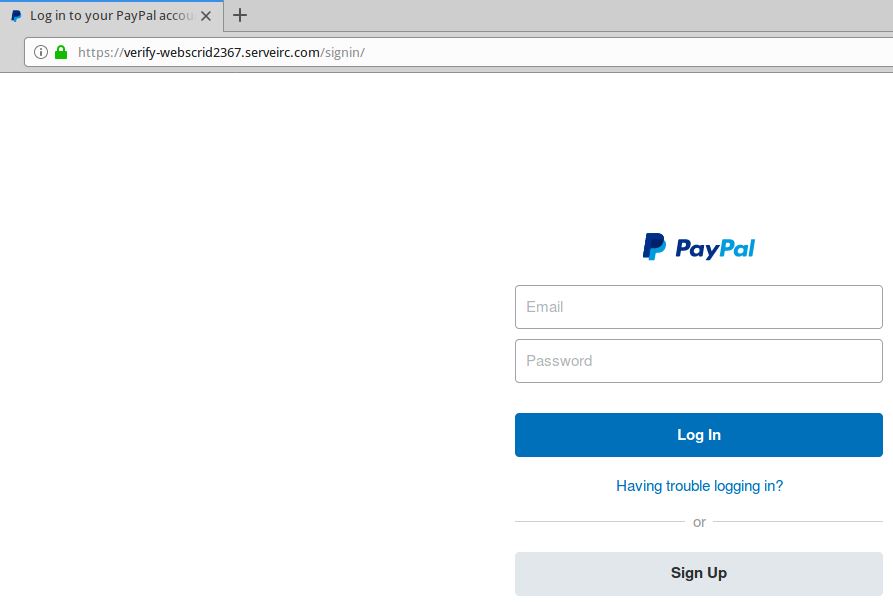
A live Paypal phishing site that uses https:// (has the green padlock).
Recent data from anti-phishing company PhishLabs shows that 49 percent of all phishing sites in the third quarter of 2018 bore the padlock security icon next to the phishing site domain name as displayed in a browser address bar. That’s up from 25 percent just one year ago, and from 35 percent in the second quarter of 2018.
This alarming shift is notable because a majority of Internet users have taken the age-old “look for the lock” advice to heart, and still associate the lock icon with legitimate sites. A PhishLabs survey conducted last year found more than 80% of respondents believed the green lock indicated a website was either legitimate and/or safe.
In reality, the https:// part of the address (also called “Secure Sockets Layer” or SSL) merely signifies the data being transmitted back and forth between your browser and the site is encrypted and can’t be read by third parties. The presence of the padlock does not mean the site is legitimate, nor is it any proof the site has been security-hardened against intrusion from hackers.
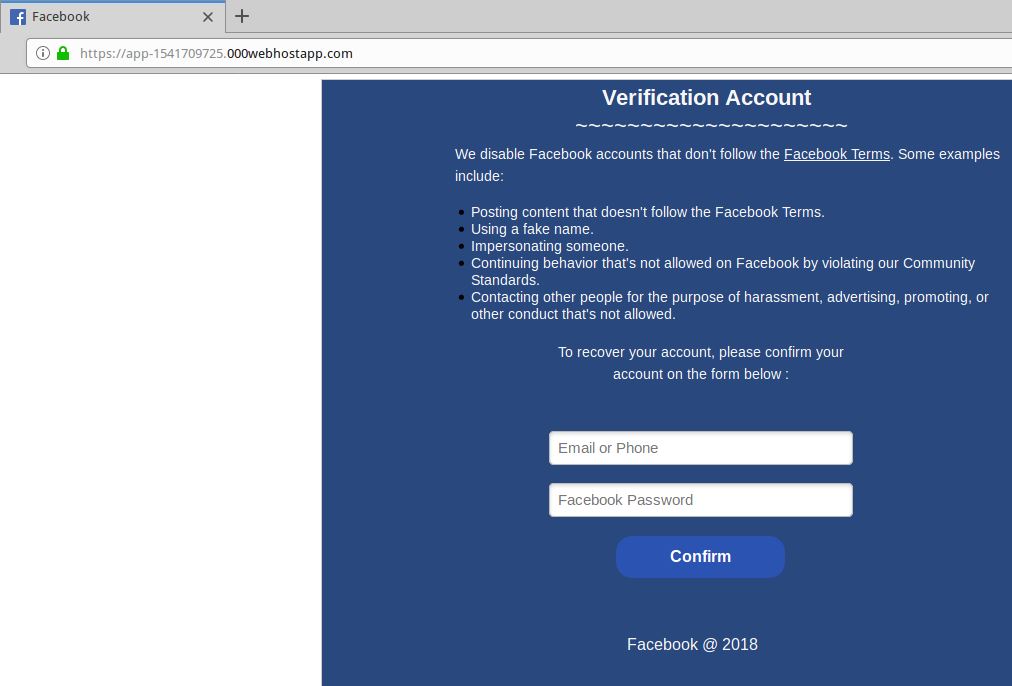
A live Facebook phish that uses SSL (has the green padlock).
Most of the battle to combat cybercrime involves defenders responding to offensive moves made by attackers. But the rapidly increasing adoption of SSL by phishers is a good example in which fraudsters are taking their cue from legitimate sites.
“PhishLabs believes that this can be attributed to both the continued use of SSL certificates by phishers who register their own domain names and create certificates for them, as well as a general increase in SSL due to the Google Chrome browser now displaying ‘Not secure’ for web sites that do not use SSL,” said John LaCour, chief technology officer for the company. “The bottom line is that the presence or lack of SSL doesn’t tell you anything about a site’s legitimacy.”
The major Web browser makers work with a number of security organizations to index and block new phishing sites, often serving bright red warning pages that flag the page of a phishing scam and seek to discourage people from visiting the sites. But not all phishing scams get flagged so quickly.
I spent a few minutes browsing phishtank.com for phishing sites that use SSL, and found this cleverly crafted page that attempts to phish credentials from users of Bibox, a cryptocurrency exchange. Click the image below and see if you can spot what’s going on with this Web address:
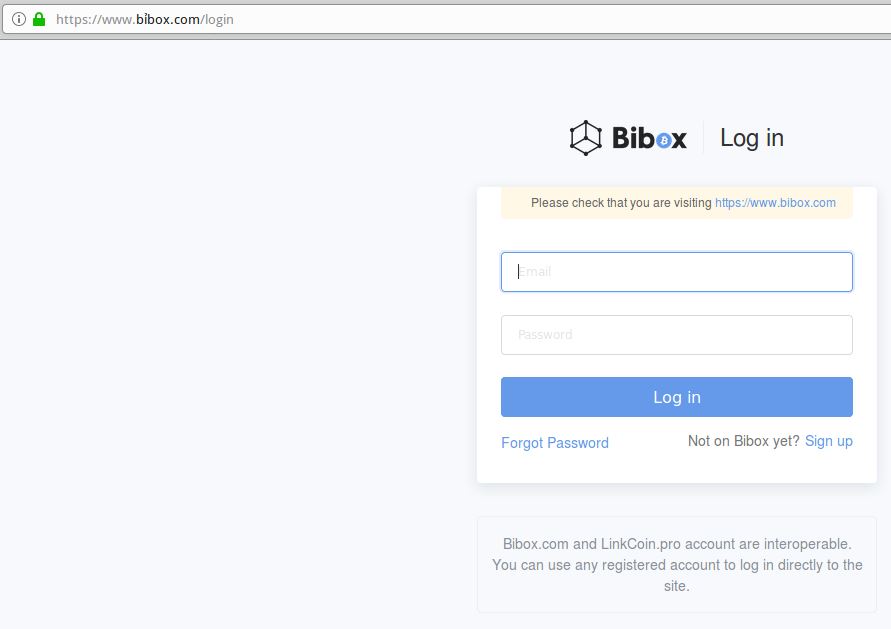
This live phish targets users of cryptocurrency exchange Bibox. Look carefully at the URL in the address bar, and you’ll notice a squiggly mark over the “i” in Bibox. This is an internationalized domain name, and the real address is https://www.xn--bbox-vw5a%5B.%5Dcom/login
Load the live phishing page at https://www.xn--bbox-vw5a%5B.%5Dcom/login (that link has been hobbled on purpose) in Google Chrome and you’ll get a red “Deceptive Site Ahead” warning. Load the address above — known as “punycode” — in Mozilla Firefox and the page renders just fine, at least as of this writing.
This phishing site takes advantage of internationalized domain names (IDNs) to introduce visual confusion. In this case, the “i” in Bibox.com is rendered as the Vietnamese character “ỉ,” which is extremely difficult to distinguish in a URL address bar.
As KrebsOnSecurity noted in March, while Chrome, Safari and recent versions of Microsoft’s Internet Explorer and Edge browsers all render IDNs in their clunky punycode state, Firefox will happily convert the code to the look-alike domain as displayed in the address bar.
If you’re a Firefox (or Tor) user and would like Firefox to always render IDNs as their punycode equivalent when displayed in the browser address bar, type “about:config” without the quotes into a Firefox address bar.
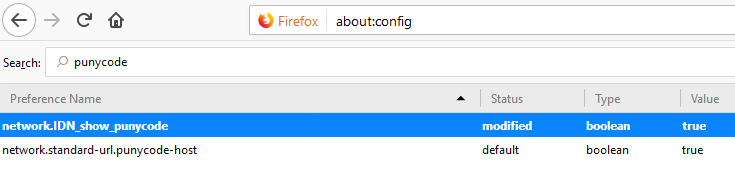
Then in the “search:” box type “punycode,” and you should see one or two options there. The one you want is called “network.IDN_show_punycode.” By default, it is set to “false”; double-clicking that entry should change that setting to “true.”
from Krebs on Security https://ift.tt/2P3Z5vV
via IFTTT

 Apple now has its last chance to fend off a lawsuit accusing it of price fixing on the App Store. The US Supreme Court is hearing arguments from Apple on November 26th as the company rejects claims that it uses its absolute control of iOS app downlo…
 Pacosite's Blog